
24/7 Customer Support

Free returns

Same-day & Next-day Delivery

Quality Guaranteed

Unlock Your Welcome Offers: FREE Delivery | Up to 80% OFF | Free 30-day JoyPlus trial
Download the APP
A wireless mechanical gaming keyboard can improve desk space, gaming comfort and everyday typing, but product listings often make similar models look interchangeable. The important differences are usually hidden in the layout, wireless mode, battery design and internal construction.
For UK buyers, three common purchasing traps deserve attention:
A tri-mode wireless mechanical keyboard normally supports Bluetooth, 2.4GHz wireless and USB-C wired operation. This combination is practical for a UK home office where one keyboard may be shared between a gaming PC, work laptop and tablet.
Battery capacity is listed in mAh, but capacity alone does not guarantee a particular number of hours. RGB brightness, wireless mode and usage patterns all affect endurance. Models in this guide include batteries rated at 4,000mAh or 8,000mAh, so check the charging method and manufacturer guidance before purchase.
A QWERTY US layout keyboard uses an ANSI-style arrangement, which may differ from the ISO layout commonly found on UK keyboards. The most noticeable differences are the shape of the Enter key and the position of certain symbols. Confirm the layout in the product photographs and specification table before ordering.
A 75% layout is a useful compromise for many gamers and programmers. It retains the function row, arrow keys and navigation controls in a smaller footprint. If you regularly use spreadsheets, accounting software or number entry, a full-size mechanical keyboard with a dedicated number pad may be more practical. A 96% layout can also retain most full-size functions while reducing gaps between key groups.
A hot-swappable mechanical keyboard lets you replace compatible switches without soldering. This is valuable if you want to change from a lighter linear feel to a tactile or more resistant option later. Always check whether the PCB supports 3-pin, 5-pin or both switch types, and disconnect the keyboard before replacing switches.
A gasket mount keyboard uses cushioning around parts of the plate or internal assembly. It is designed to provide a more flexible key feel and can help reduce harsh resonance, although the result varies by plate, foam and switch combination. Internal padding may also alter the sound profile, but terms such as “creamy” or “thocky” remain subjective rather than technical performance measures.
For durability, PBT keycap keyboards use keycaps made from polybutylene terephthalate, a material commonly selected for resistance to shine from prolonged use. Aluminium cases can add rigidity and weight, but they may also make a keyboard less convenient to move between rooms.

Why This Fits Their Persona: A compact option for first-time mechanical keyboard buyers who want gaming and work functionality without occupying a full desk width.
It specifies tri-mode connectivity, a 75% layout, full-key hot-swap sockets and a 4,000mAh battery rather than relying on RGB lighting as its main selling point.
Five-layer internal padding, pre-lubricated mechanical switches, RGB lighting and double-shot PBT keycaps.

Why This Fits Their Persona: Suitable for enthusiasts building a refined desk setup with room to change switches, remap keys and use multiple connection methods.
The listing identifies an aluminium case, leaf spring mount, VIA compatibility and hot-swappable support, giving more information than a generic “custom” label.
8,000mAh battery, USB-C wired mode, per-key RGB and support for 3-pin and 5-pin switches.
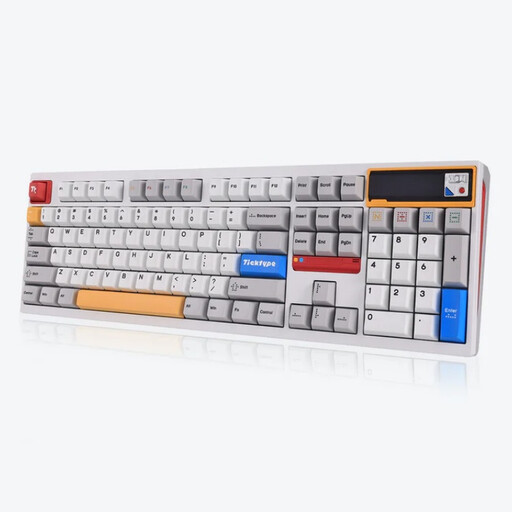
Why This Fits Their Persona: A full-size choice for users who rely on a number pad for spreadsheets, programming workflows, content production or frequent data entry.
The 108-key full-size layout makes the retained number pad clear, while the hot-swap design avoids locking the user into one switch type.
Full aluminium construction, 8,000mAh battery, leaf spring mount, customisable pixel screen and RGB backlighting.
We have compiled a complete, real-time list of products that fully satisfy these strict selection criteria and UK safety regulations.
A 2.4GHz connection is generally the more practical choice for gaming because it uses a dedicated receiver. Bluetooth is convenient for laptops, tablets and low-cable setups. A tri-mode model gives you both options, plus USB-C wired use.
Lifespan depends on switch quality, keycap material, battery care and usage. Hot-swappable sockets can extend practical ownership because worn or unsuitable switches may be replaced. Keep the keyboard away from spills, dust and excessive force, and follow the supplied battery guidance.
Electricity use is usually limited to periodic USB charging. The ongoing cost is therefore generally low, but battery condition can decline over time. Using wired mode while charging and reducing RGB brightness may help reduce charging frequency.