
24/7 Customer Support

Free returns

Same-day & Next-day Delivery

Quality Guaranteed

Unlock Your Welcome Offers: FREE Delivery | Up to 80% OFF | Free 30-day JoyPlus trial
Download the APP
Navigating the world of mechanical keyboards can feel like a minefield of technical jargon and ambitious marketing claims. For anyone in the UK looking to upgrade their setup, the promise of a perfect wireless mechanical gaming keyboard is tempting, but the reality can often be a costly disappointment. As a Joybuy Product Recommendation Officer, my role is to help you see past the hype and focus on the features that genuinely matter. Let's break down the common pitfalls and identify the key specifications that lead to a satisfying purchase.
Many keyboards look the part but fail to deliver where it counts. Here are three frequent issues that can lead to buyer's remorse:
To avoid these traps, focus on the underlying technology. These three parameters are non-negotiable for a modern, versatile wireless mechanical keyboard.
For maximum flexibility, look for a tri-mode keyboard. This feature provides three distinct connection options, each with its own advantage:
The way a keyboard is constructed internally has a huge impact on its sound and feel. A gasket mount keyboard is a significant step up from older designs. In this structure, the plate holding the switches is suspended between soft gaskets, isolating it from the case. This does two things: it absorbs the impact of each keystroke, creating a softer, more cushioned typing feel and it eliminates the hollow resonance found in cheaper boards, resulting in a deeper, more pleasant and often creamy sounding keyboard.
Full-size keyboards are becoming less common as users seek to reclaim desk space. A compact gaming keyboard offers a more efficient footprint. The 75% mechanical keyboard layout has emerged as a popular choice because it retains the essential function row and arrow keys while being significantly smaller than a traditional board.
When paired with a hot swappable keyboard PCB, this layout becomes incredibly powerful. Hot-swap sockets allow you to pull out and replace the mechanical switches with any compatible alternative, all without any soldering. This means you can experiment with different switch types (linear, tactile, clicky) to find the perfect feel for your typing style or gaming needs.
Based on these core principles, here are a few models that align with different user needs and successfully avoid the common pitfalls.
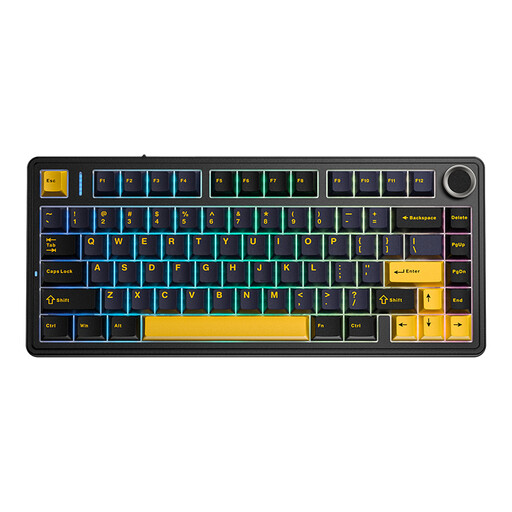
Why This Fits Their Persona: This keyboard is ideal for UK gamers who want high-end features without the premium price. It delivers on the core requirements for both competitive gaming and daily typing in a space-saving 75% layout.
It directly counters the "hollow feel" trap with its five-layer sound-dampening and gasket mount structure. It also offers true customisation with hot-swappable sockets and provides reliable tri-mode connectivity.
Offers a gasket-mounted, hot-swappable and tri-mode experience at a very accessible price point. The 4000mAh battery provides solid wireless endurance.
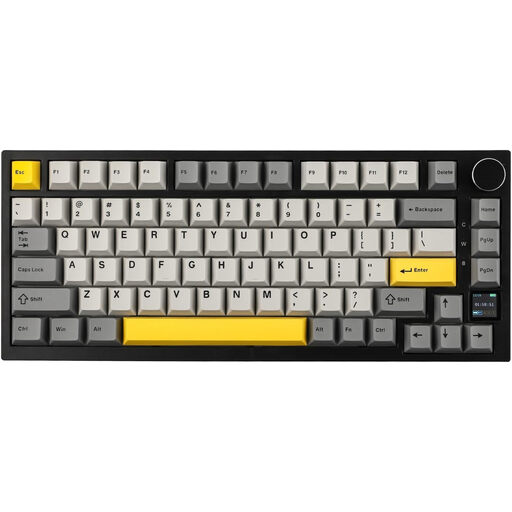
Why This Fits Their Persona: For the user who loves to personalise their tech and needs a versatile tool for both Mac and Windows. The built-in screen and control knob offer a level of interaction that goes beyond the standard keyboard.
It sidesteps the "limited customisation" trap by offering a TFT screen for GIFs and status info, a programmable **keyboard with knob** and full hot-swap support. Its gasket structure ensures a premium typing feel.
The interactive TFT screen is a standout feature for at-a-glance info. It is also a fully Mac compatible keyboard with easy switching between OS layouts shown on the screen.

Why This Fits Their Persona: For the user who wants a statement piece that is also a high-performance tool. The full CNC aluminium build and unique motorised lift for ergonomic adjustment set it apart as a truly premium device.
It completely avoids the "premium feel" deception by using genuinely high-end materials (CNC aluminium) and innovative engineering. Its gasket mount and HIFI switches deliver a top-tier sound and feel.
The motorised lift mechanism is a unique feature for on-the-fly ergonomic adjustments. The full metal body provides exceptional stability and a substantial, high-quality presence on the desk.

Why This Fits Their Persona: Perfect for those in the UK who need a number pad for work (e.g., data entry, finance) but still want a compact, high-performance keyboard for gaming. The 96% layout is the ideal compromise.
It provides a feature-rich experience (gasket, hot-swap, tri-mode) in a less common but highly practical layout, proving you don't have to choose between a compact size and a number pad.
The 96% (99-key) layout retains the number pad while saving significant desk space. Its massive 8000mAh battery is a major benefit for heavy wireless users, reducing charging frequency.
We have compiled a complete, real-time list of products that fully satisfy these strict selection criteria and UK safety regulations.
Battery life varies significantly based on the battery's capacity (measured in mAh) and your usage, particularly the RGB lighting. A keyboard with a large battery (e.g., 4000mAh to 8000mAh) can last for several weeks of typical use with the backlighting off, or several days of heavy use with the lighting on. Most models can be used in wired mode while charging, so you'll never be caught out.
Yes, for many people it's an ideal balance. The compact form factor provides more space for mouse movement, which is a significant advantage in many games. At the same time, it retains the dedicated arrow keys and function row, which are crucial for productivity tasks and much more convenient than the layered functions on smaller 60% or 65% keyboards.
Most RGB keyboards offer several pre-set lighting effects that can be cycled through using key combinations, so software is not strictly necessary for basic customisation. However, to unlock advanced features like creating your own colour patterns, synchronising lights with games or programming macros, you will typically need to install the manufacturer's optional software.