
24/7 Customer Support

Free returns

Same-day & Next-day Delivery

Quality Guaranteed

Unlock Your Welcome Offers: FREE Delivery | Up to 80% OFF | Free 30-day JoyPlus trial
Download the APP
By Joybuy Product Recommendation Officer
A wireless mechanical gaming keyboard can clear desk clutter, make switching between devices easier and provide a more customisable typing experience. However, the feature list alone does not tell you whether a keyboard will suit your desk, games or daily workload.
Several buying traps appear repeatedly in this category:
A compact gaming keyboard is useful when you need more room for a mouse, travel frequently or have a small footprint. A 75% layout keeps the arrow keys and function row while removing the separate number pad. An 87-key tenkeyless board offers a similar space-saving approach.
A full-size wireless mechanical keyboard is more suitable for spreadsheets, finance work and frequent number entry. Models with 104 or 108 keys also reduce the need for function-layer shortcuts. Before ordering, check the product dimensions and whether the board uses a QWERTY US layout. US ANSI boards have a different Enter, Shift and symbol arrangement from a typical UK ISO keyboard, which can take time to adjust to.
A tri-mode wireless keyboard normally combines:
If you regularly move between a gaming PC and a laptop, tri-mode connectivity offers practical flexibility. A Bluetooth mechanical keyboard may be sufficient for office work, but buyers should check whether it also includes a receiver or wired mode if gaming responsiveness is important.
Mechanical switches influence actuation feel, sound and fatigue. Linear switches move smoothly without a tactile bump, while tactile switches provide physical feedback during a press. Descriptions such as “quiet”, “creamy” or “thocky” are subjective, so use them as sound-profile guidance rather than a guarantee for every desk or room.
A hot-swappable mechanical keyboard allows compatible switches to be replaced without soldering. Check whether the sockets support 3-pin, 5-pin or both types, and turn the keyboard off before changing switches. A gasket-mounted keyboard uses cushioning around the plate or assembly, which may create a more flexible key feel.
For durability, PBT keycap keyboards use a material that is generally more resistant to surface shine than ABS. Double-shot or dye-sublimated legends may also help characters remain readable, but the exact construction should be confirmed in the listing.

Why This Fits Their Persona: Its 68-key footprint suits students, those with a small footprint and users who want a straightforward keyboard for Windows, Mac, Android or iPadOS.
The listing clearly states that this is a dual-mode Bluetooth 5.1 and USB-C keyboard, rather than implying that every wireless mode has the same purpose.
68-key compact layout, MX Jellyfish linear switches, white backlight with seven modes and a 2,000mAh battery.

Why This Fits Their Persona: Programmers, enthusiasts and content creators may value a customisable 75% platform with an aluminium case and flexible leaf spring mount.
The connectivity, US ANSI layout, hot-swap support and VIA compatibility are specified, making the customisation options easier to assess before purchase.
Bluetooth, 2.4GHz and USB-C modes; 8,000mAh battery; per-key RGB; hot-swap support for 3-pin and 5-pin switches.
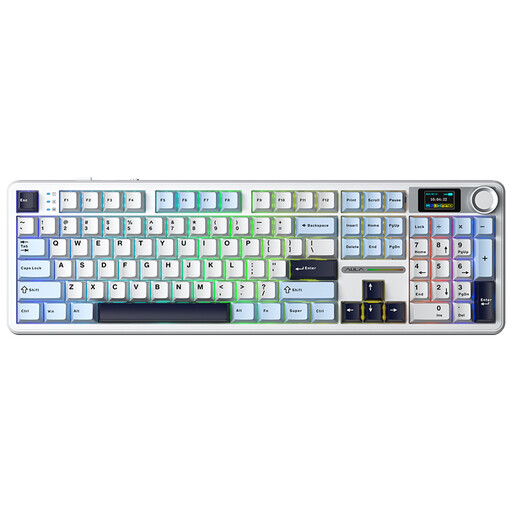
Why This Fits Their Persona: Full-time remote workers, number-entry users and gamers who prefer dedicated keys can choose a full-size layout with added control features.
The 108-key format avoids the missing number-pad problem, while tri-mode Bluetooth, 2.4GHz and USB-C connectivity gives you a wired fallback.
Gasket-mounted construction, hot-swappable pre-lubed linear switches, RGB lighting, smart LCD screen and multimedia knob.

Why This Fits Their Persona: It suits PC gamers and home-office users who want a compact board with a number of enthusiast-oriented features already included.
It identifies all three connection methods, the 75% layout and QWERTY US arrangement, so buyers can compare the practical details rather than relying on RGB marketing.
4,000mAh battery, full-key hot-swap sockets, five-layer internal padding, pre-lubricated switches, RGB and PBT keycaps.
We have compiled a complete, real-time list of products that fully satisfy these strict selection criteria and UK safety regulations.
A 2.4GHz connection is generally the more relevant wireless option for gaming because it uses a dedicated receiver. For the most predictable connection, use wired USB-C mode. Bluetooth is useful for general typing and devices such as tablets, but buyers should check the product’s stated connection modes and compatibility.
Lifespan depends on switch design, keycap material, battery care, dust exposure and how heavily the board is used. Hot-swappable sockets can extend practical service life by allowing compatible switches to be replaced. PBT keycaps may help reduce visible surface wear, although no component is immune to damage.
RGB uses additional battery power compared with the lighting being switched off. Brightness, animation and connection mode all affect charging frequency. If battery duration matters more than lighting, lower the brightness or disable RGB when working wirelessly.