
24/7 Customer Support

Free returns

Same-day & Next-day Delivery

Quality Guaranteed

Unlock Your Welcome Offers: FREE Delivery | Up to 80% OFF | Free 30-day JoyPlus trial
Download the APP
A wireless mechanical gaming keyboard can improve desk organisation, support faster key response and make switching between gaming and work more convenient. However, product pages often place equal emphasis on features that matter very differently in real use.
Before buying, UK shoppers should look beyond RGB lighting and headline battery figures. Layout, connection stability, switch technology, software support and replacement parts have a greater effect on daily satisfaction.
An 8000mAh battery sounds substantial, but actual runtime depends on RGB brightness, polling rate, display use and wireless mode. A quoted figure may refer to backlighting being switched off.
Check whether the description separates usage with lighting enabled and disabled. Also confirm the charging method. For example, the Ticktype EVO75 safety information recommends using the supplied USB-C cable and avoiding incompatible high-voltage smartphone fast chargers.
A compact board may free space for mouse movement, but a 60% model normally removes the dedicated function row and arrow keys. A 75% mechanical keyboard usually retains the F-row and arrow cluster while removing the number pad. A 96% or full-size board is more suitable for spreadsheets, programming shortcuts and frequent numeric entry.
Also check the regional layout. A US ANSI keyboard may differ from the UK ISO arrangement, particularly around the Enter key, left Shift key and additional UK symbols. German QWERTZ models are not interchangeable with standard UK or US QWERTY boards.
“Mechanical” describes the switch mechanism, not necessarily the ease of modification. If you want to change switches without soldering, look for full-key hot-swap sockets and confirm whether they accept 3-pin, 5-pin or both types.
A gasket mount, foam layers or PBT keycaps can alter the feel and sound, but these features do not replace a clear specification for switch compatibility, stabilisers and software support.
A tri-mode mechanical keyboard generally offers:
For competitive PC gaming, 2.4GHz is often more convenient than Bluetooth because it is designed around a dedicated receiver. Wired mode remains useful when charging or when you want to minimise wireless variables. Bluetooth is practical for office work and mobile devices, but check supported operating systems and device switching before purchase.
Linear switches provide a smooth press without a tactile bump, while tactile switches offer a noticeable point of feedback. Clicky switches add an audible click and may be unsuitable for shared offices or late-night use.
A magnetic switch keyboard detects key movement using Hall Effect technology rather than a conventional metal contact. Some models allow adjustable actuation and rapid trigger, which resets a key based on movement rather than a fixed release point. These controls can appeal to competitive players, but they add setup complexity and are not necessary for general typing, study or office work.
A gasket mount keyboard places cushioning material between the plate or internal assembly and the case. This can produce a softer, more flexible key feel, but advertised acoustic results vary according to switches, keycaps and desk surface.
Look for practical details such as:
RGB lighting is primarily a visual feature. A genuine RGB mechanical keyboard should state whether lighting is per-key, how it is controlled and whether software is required.

Why This Fits Their Persona: A wired 75% board suits students, first-time enthusiasts and PC users who do not need battery management or wireless pairing. It keeps the arrow keys and F-row in a compact footprint.
Its wired USB-C connection avoids uncertain wireless battery claims, while hot-swap support allows switch changes without soldering.
75% layout, CNC volume knob, gasket structure, PBT keycaps and RGB lighting.

Why This Fits Their Persona: This option is aimed at users who want an aluminium case, wireless flexibility and a platform for ongoing customisation across gaming and work setups.
The stated 75% US ANSI layout, tri-mode connectivity and support for 3-pin and 5-pin switches make key compatibility easier to assess before ordering.
Full aluminium case, leaf spring mount, VIA compatibility, 8000mAh battery and per-key RGB.

Why This Fits Their Persona: Players focused on adjustable key activation may prefer a compact wired board with Hall Effect magnetic switches and configurable rapid trigger features.
The product specifies adjustable actuation to 0.01mm, rapid trigger and 8K polling. These are concrete settings to compare rather than vague speed wording.
Magnetic hot-swappable switches, compact 68-key format, adjustable actuation and RGB backlighting.
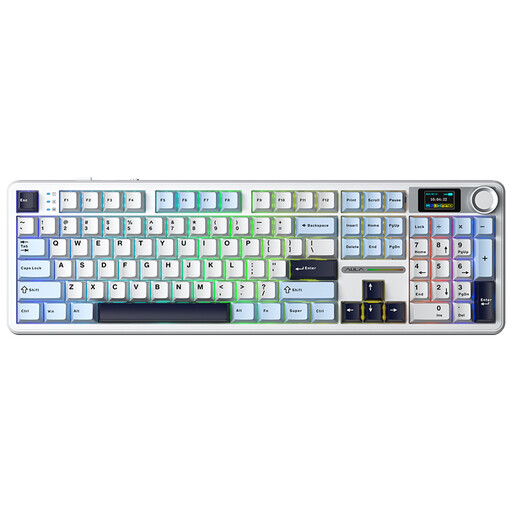
Why This Fits Their Persona: A full-size mechanical keyboard is a sensible match for office professionals, programmers and gamers who regularly use the number pad and function keys.
Its full-size format avoids the inconvenience of missing number keys, while tri-mode operation lets one keyboard serve a desktop, laptop and mobile workflow.
Gasket-mounted design, Bluetooth, 2.4GHz and USB-C modes, hot-swap support, smart LCD screen and control knob.
We have compiled a complete, real-time list of products that fully satisfy these strict selection criteria and UK safety regulations.
Yes, provided the switch noise, layout and connection options suit your environment. Linear or tactile switches are often quieter than clicky types, but the complete sound also depends on keycaps, case construction and desk resonance. Bluetooth is useful for laptops, while USB-C provides a straightforward wired option.
Lifespan depends on switch construction, usage, dust, liquid exposure and the quality of the PCB and hot-swap sockets. A hot-swappable model can be easier to maintain because individual switches may be replaced without soldering. Treat the stated switch-life figure as a component specification, not a guarantee of overall keyboard lifespan.
Rapid trigger may be relevant to players who specifically want adjustable actuation behaviour in compatible games. For programming, study, office work and everyday gaming, conventional linear or tactile mechanical switches may provide sufficient responsiveness at a lower level of complexity. Check software compatibility and whether the feature is available in wired mode before buying.