
24/7 Customer Support

Free returns

Same-day & Next-day Delivery

Quality Guaranteed

Unlock Your Welcome Offers: FREE Delivery | Up to 80% OFF | Free 30-day JoyPlus trial
Download the APP
A wireless mechanical keyboard can make a desk feel cleaner and typing more enjoyable, but the specification list often hides important differences. Gamers may focus on RGB lighting, while remote workers and students may prioritise battery life, layout and noise. The right choice depends on how the keyboard connects, how much space it uses and whether it can be adapted over time.
As the Joybuy Product Recommendation Officer, I focus on separating useful features from marketing language. These are the main pitfalls to avoid before ordering.
“Wireless” can refer to Bluetooth, a 2.4GHz receiver or both. Bluetooth is convenient for laptops, tablets and multi-device setups, but a dedicated 2.4GHz wireless keyboard connection is generally more suitable when you want a direct desktop or gaming connection. Wired USB-C remains useful for charging, troubleshooting and situations where wireless interference is undesirable.
A tri-mode keyboard combines wired, Bluetooth and 2.4GHz modes, giving you more flexibility. However, check whether the receiver is included, how many devices can be paired and how switching between devices works.
RGB lighting changes the appearance of a keyboard, but it does not automatically improve typing. Look for the keycap material and construction. Double-shot PBT keycaps are designed to resist the polished, worn appearance that can develop on frequently used keys. Also check the layout: a QWERTY US layout has a different Enter key, symbol arrangement and punctuation positioning from a UK ISO layout.
If you regularly type British pound signs, use UK-specific shortcuts or rely on a familiar UK keyboard, confirm compatibility before buying a QWERTY US layout model.
Acoustic descriptions are subjective and depend on switches, keycaps, desk surface and typing force. A keyboard with internal padding may reduce hollow resonance, but it will not make mechanical switches silent. In shared flats, offices or bedrooms, consider the switch type as well as the internal structure.
A gasket-mounted keyboard may provide a softer, more flexible feel than a rigid plate-mounted design. It can be comfortable for long sessions, but users who prefer a firm, crisp response may favour a less flexible construction.
For work and gaming, compare the available modes rather than relying on a single “low latency” phrase. A sensible setup may be:
Battery capacity is measured in mAh and indicates the stored electrical capacity, not a guaranteed number of days. RGB brightness, animation effects, connection mode and usage patterns all affect runtime. Models with 4,000mAh or 8,000mAh batteries offer a substantial capacity on paper, but actual usage time still varies.
A compact 75% mechanical keyboard usually retains the function row, arrow keys and a navigation cluster while removing the separate number pad. It suits users who need a small footprint, laptop stands and those who move between workspaces.
A 96% mechanical keyboard keeps a number pad in a more compact arrangement than a full-size board. It is practical for spreadsheets, finance work and data entry, but the compressed key spacing may take some adjustment.
Before buying, measure your available desk width and consider mouse space. A smaller keyboard can improve mouse positioning, but removing the number pad may slow down numeric input.
A hot-swappable keyboard allows compatible mechanical switches to be replaced without soldering. Check whether the sockets support 3-pin, 5-pin or both types, and confirm whether replacement switches are readily available.
Pre-lubricated switches can offer a smoother feel from the outset, although sound and resistance remain matters of personal preference. Linear switches provide a consistent press, while tactile and clicky switches introduce more noticeable feedback or sound.
Internal layers such as Poron foam, IXPE switch pads, PET sheets and silicone dampening can affect resonance. These materials are useful indicators of construction, but they should be considered alongside stabiliser quality, keycap material and the overall layout.

Why This Fits Their Persona: Its 75% layout offers a smaller footprint while retaining commonly used navigation keys, making it suitable for students, home workers and first-time mechanical keyboard buyers.
It provides wired, Bluetooth and 2.4GHz modes, plus full-key hot-swap sockets, rather than limiting the buyer to one connection or fixed switch type.
4000mAh battery, five-layer internal padding, RGB backlighting and double-shot PBT keycaps.

Why This Fits Their Persona: The 96% layout suits users who need a number pad for spreadsheets or coding but still want a more compact footprint than a traditional full-size keyboard.
Its listed five-layer sound-dampening structure addresses hollow resonance, while hot-swap support avoids locking the owner into the supplied switches.
8000mAh battery, support for 3-pin and 5-pin switches, multi-device connectivity and full N-key rollover.
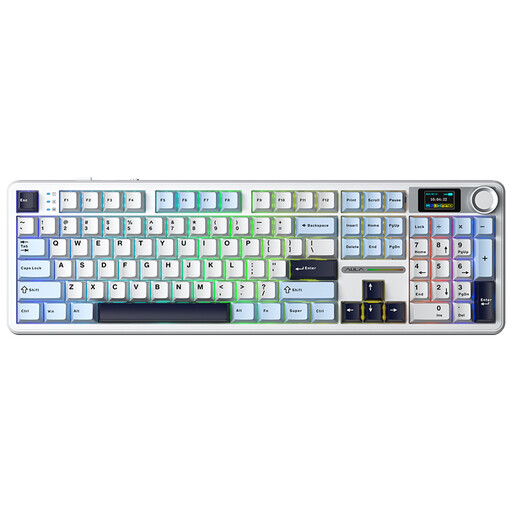
Why This Fits Their Persona: A fuller gaming and desktop setup can benefit from the F108 Pro’s gasket-mounted design, tri-mode connection, smart LCD screen and control knob.
The hot-swappable, pre-lubed switch configuration supports future changes, while wired and wireless modes provide a fallback if the battery needs charging.
Gasket-mounted construction, smart LCD screen, rotary knob and Reaper linear switches.
Both can be useful, but they serve different setups. Bluetooth is convenient for laptops and tablets, while 2.4GHz is commonly selected for a direct desktop connection. A tri-mode model gives you both options, along with wired USB-C.
Lifespan depends on switch durability, keycap wear, battery care and handling. Hot-swappable sockets can extend practical ownership because compatible switches may be replaced without soldering. PBT keycaps can also help maintain the surface finish of frequently used keys.
Yes. Brighter lighting and animated effects generally consume more power than lighting that is dimmed or switched off. If battery runtime matters more than appearance, use lower brightness or a static lighting profile and keep wired mode available for charging.