
24/7 Customer Support

Free returns

Same-day & Next-day Delivery

Quality Guaranteed

Unlock Your Welcome Offers: FREE Delivery | Up to 80% OFF | Free 30-day JoyPlus trial
Download the APP
Navigating the world of mechanical keyboards can feel like a minefield of technical jargon and ambitious marketing claims. For those in the UK seeking to upgrade their setup, cutting through the clutter to find a reliable wireless mechanical keyboard is a common challenge. Many find themselves with a keyboard that looks the part but fails to deliver on performance, comfort or longevity. As the Joybuy Product Recommendation Officer, my role is to help you identify the key features that matter and sidestep the common purchasing pitfalls.
Before you invest, be aware of these frequent traps:
To ensure you get a keyboard that feels as good as it looks, focus on these three non-negotiable parameters.
The way the internal components are mounted is crucial for typing feel and acoustics. While many standard keyboards use a rigid tray mount, a gasket mount keyboard is fast becoming the standard for a premium experience. In this design, the plate and PCB (the circuit board holding the switches) are isolated from the case by soft, porous gaskets.
The keycaps are your primary point of contact, and their material composition matters immensely. Most budget keyboards use ABS (Acrylonitrile Butadiene Styrene) plastic, which is cheap to produce but lacks durability.
From sprawling full-size boards to minimalist compact models, the layout determines your keyboard's functionality and desk presence.
Here are a few options that align with specific user needs, chosen because they successfully address the common pitfalls with solid, verifiable features.
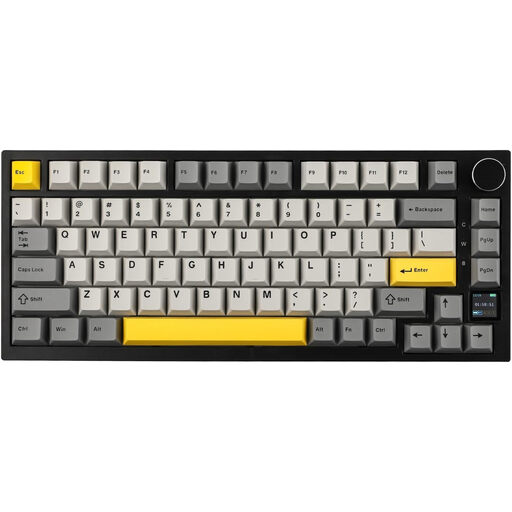
Why This Fits Their Persona: For the user who wants to build a custom mechanical keyboard without starting from scratch. This board provides a high-end foundation with features that appeal to hobbyists, including a customisable TFT screen and a sophisticated internal structure.
It features a true hot-swappable PCB that supports both 3-pin and 5-pin switches, avoiding the limitation trap. The gasket mount and multi-layer foam deliver a premium sound and feel straight out of the box.
The interactive keyboard with screen allows for on-the-fly status checks and GIF customisation. Its tri-mode connectivity and Mac/Win compatibility make it exceptionally versatile.
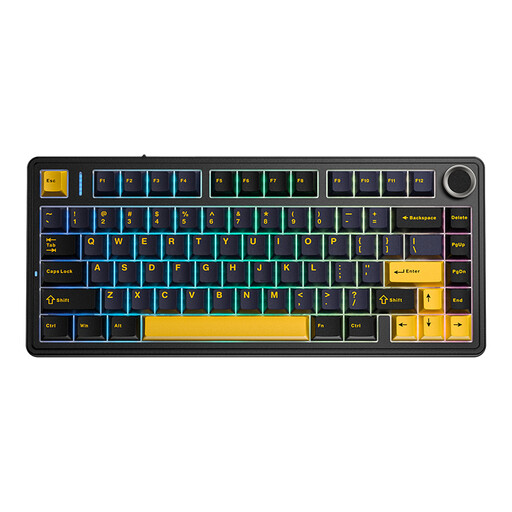
Why This Fits Their Persona: This user needs a responsive, reliable gaming keyboard for their setup in the UK. Low-latency wireless is non-negotiable, and comfort during long gaming sessions is a priority. The 75% layout frees up crucial desk space for mouse movement.
It offers a stable, low-latency 2.4GHz connection essential for gaming, avoiding the wireless dropout trap. The gasket structure and five-layer padding prevent the harsh feel and hollow sound of lesser boards.
Features full-key hot-swap sockets and durable double-shot PBT keycaps. The 4000mAh battery provides long endurance for wireless gaming sessions, and the vibrant RGB keyboard lighting adds aesthetic flair.

Why This Fits Their Persona: This professional splits their time between focused work and leisure. They need a keyboard that is versatile, comfortable for all-day typing and has a clean aesthetic suitable for a modern home office. Multi-device connectivity is a must.
Its tri-mode keyboard functionality allows seamless switching between a work laptop and a personal PC. The 5-layer padding and gasket mount create a refined, quiet typing sound that will not disturb others in a shared space.
The TFT display and knob provide practical utility, showing connection mode and battery life at a glance, plus easy volume control. The compact 75% mechanical keyboard layout maintains a tidy workspace.
We have compiled a complete, real-time list of products that fully satisfy these strict selection criteria and UK safety regulations.
Battery life varies significantly based on the battery's capacity (measured in mAh), usage and whether the RGB backlighting is on. A keyboard with a large battery (e.g., 4000mAh or more) can last for several weeks of typical use with the backlighting off. With full RGB keyboard effects enabled, you might need to charge it every few days. Most modern models use a convenient USB-C port for charging.
For many users, yes. A gasket mount keyboard provides a noticeably softer and more cushioned typing experience compared to a standard tray-mount board. This can reduce finger fatigue and create a more pleasant, less harsh sound. However, typing feel is subjective, and some may prefer the firmer feedback of other mounting styles.
A keyboard with screen is a "nice-to-have" feature rather than a necessity. It adds a layer of convenience by displaying useful information like the time, battery level, connection mode or even custom animations. This can be helpful for quickly checking status without opening software, but the core performance of the keyboard is not dependent on it.