
24/7 Customer Support

Free returns

Same-day & Next-day Delivery

Quality Guaranteed

Unlock Your Welcome Offers: FREE Delivery | Up to 80% OFF | Free 30-day JoyPlus trial
Download the APP
A wireless mechanical keyboard can improve a gaming setup, home office or creative workstation, but product pages often highlight appearance while leaving important details unclear. A colourful RGB mechanical keyboard may still have limited customisation, while a keyboard advertised as “wireless” may only support Bluetooth rather than a lower-latency 2.4GHz connection.
Before choosing a model, check the layout, connection options, battery information, switch compatibility and construction. These details have a greater effect on everyday use than decorative lighting or marketing phrases such as “creamy sound”.
A 75% mechanical keyboard saves desk space, but it normally removes the number pad and compresses navigation keys. That can suit gaming and general typing, yet it may slow down spreadsheet work or frequent data entry.
A full-size mechanical keyboard retains the number pad, while a 96% layout keeps most full-size functions in a more compact arrangement. Also check whether the keyboard uses a QWERTY US layout keyboard. US layouts commonly place the Enter, Shift and symbol keys differently from UK ISO keyboards and may not include a dedicated £ key.
Bluetooth is convenient for laptops, tablets and multi-device setups, but a 2.4GHz wireless keyboard with a USB receiver is generally the more suitable option for responsive desktop gaming. Wired USB-C remains useful for charging, firmware updates and situations where radio interference is undesirable.
A genuine tri-mode wireless keyboard should clearly list Bluetooth, 2.4GHz and wired USB-C connectivity. Check whether the receiver is included and whether the keyboard can switch between devices without repeatedly pairing.
A hot-swappable keyboard makes switch replacement easier, but it does not mean every switch is compatible. Confirm whether the PCB supports 3-pin, 5-pin or both types, and disconnect the keyboard before replacing switches. Bent pins can damage hot-swap sockets or the PCB.
Battery capacity is normally stated in mAh, but real runtime also depends on RGB brightness, wireless mode and display features. A larger battery adds weight and may increase charging time. Use the supplied or a certified USB-C cable, and avoid unsuitable high-voltage fast chargers.
Choose the layout around your routine:
Measure your desk depth as well as width. A keyboard with a tall case, display or knob may require more space than its layout percentage suggests.
A gasket mount keyboard uses flexible mounting material to create a softer, more cushioned key feel. A leaf spring mount can also provide a flexible response, but the exact feel depends on the plate, foam, PCB and switch.
Linear switches move smoothly without a tactile bump, which many gamers and fast typists prefer. Tactile switches provide a noticeable bump, while clicky switches produce an additional click sound. Factory-lubricated switches can feel smoother initially, but switch preference remains personal.
Look for PBT keycaps if you want resistance to the shiny wear that can develop on frequently used ABS keycaps. Double-shot or side-printed legends can also affect how markings remain visible over time.
For a flexible setup, look for:
A custom mechanical keyboard may offer more control over switches, keycaps and layouts, but confirm the software support before purchase. A mechanical keyboard with display can show status information or graphics, although it may add power consumption and software complexity.

Why This Fits Their Persona: A practical entry point for UK users wanting a compact gaming mechanical keyboard with flexible connections and customisation potential.
It lists wired, Bluetooth and 2.4GHz modes, plus a 75% US layout, making the key compromises visible before purchase.
Full-key hot-swapping, five-layer internal padding, PBT keycaps, RGB lighting and a 4000mAh battery.

Why This Fits Their Persona: Suited to enthusiasts who value a metal case, flexible mounting and software-based key customisation for a dedicated desk setup.
The specification lists Bluetooth, 2.4GHz and USB-C, as well as 3-pin and 5-pin hot-swap support, rather than leaving compatibility unclear.
Full aluminium construction, leaf spring mount, VIA compatibility, per-key RGB and an 8000mAh battery.
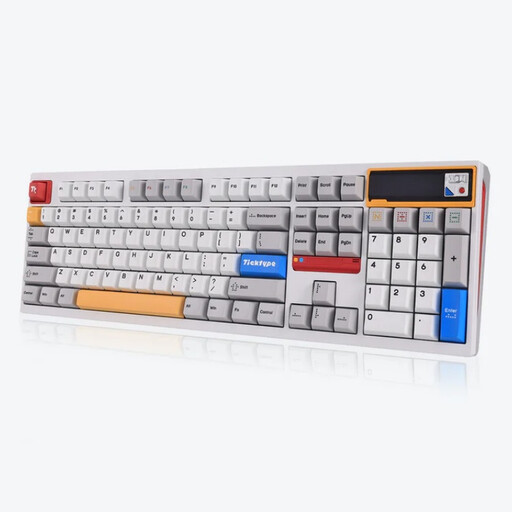
Why This Fits Their Persona: A full-size choice for remote workers, administrators and creators who rely on a number pad while still wanting wireless flexibility.
Its 108-key full-size format avoids the productivity trade-off of smaller layouts, while the stated 8000mAh battery addresses extended desk use.
Aluminium case, hot-swappable layout, leaf spring mount, customisable pixel screen, RGB and tri-mode connectivity.

Why This Fits Their Persona: Designed for users who want a distinctive workstation keyboard with a 96% layout, screen and motorised lift feature.
The product specifies its 96% US QWERTY layout and all three connection modes, so buyers can assess space and compatibility in advance.
CNC aluminium body, gasket mount, pre-lubricated linear switches, customisable IPS screen and motorised lift.
We have compiled a complete, real-time list of products that fully satisfy these strict selection criteria and UK safety regulations.
Yes, provided it offers a dedicated 2.4GHz wireless mode with a receiver and has a wired USB-C fallback. Bluetooth is useful for general computing, but gamers should check connection switching, receiver placement and software support rather than relying only on the word “wireless”.
Lifespan depends on switch design, keycap material, battery care, PCB quality and daily use. Hot-swappable models can be easier to maintain because worn switches can be replaced without changing the whole keyboard. Keep the keyboard dry, avoid forcing switches into sockets and follow the manufacturer’s charging guidance.
Yes. Per-key RGB generally consumes more power than an unlit keyboard, particularly at high brightness. If you prioritise longer wireless sessions, reduce lighting brightness or switch it off when it is not needed. A wired USB-C connection also avoids battery drain during long work or gaming sessions.