
24/7 Customer Support

Free returns

Same-day & Next-day Delivery

Quality Guaranteed

Unlock Your Welcome Offers: FREE Delivery | Up to 80% OFF | Free 30-day JoyPlus trial
Download the APP
Navigating the world of the wireless mechanical keyboard can feel like a minefield of technical jargon and flashy marketing. For many in the UK, the search for the perfect keyboard for a home office or gaming setup ends in disappointment, with a device that fails to live up to its promises. As a Joybuy Product Recommendation Officer, my role is to help you sidestep these common issues and identify the features that truly matter.
Before you add any keyboard to your basket, let's look at the frequent pitfalls that catch buyers out and how you can avoid them.
To ensure your new keyboard is a long-term asset rather than a short-term frustration, focus on these three fundamental specifications.
A modern wireless keyboard should offer flexibility for every scenario. A tri-mode keyboard provides three connection options, each with a distinct advantage:
The internal mounting style of a keyboard has a huge impact on the typing experience. While many budget models use a simple "tray mount" where the circuit board is screwed directly to the case, a gasket mount keyboard offers a more refined feel.
In a gasket design, the plate holding the switches is suspended between soft, porous gaskets. This isolates it from the case, absorbing the impact of each keystroke. The result is a softer, less rigid typing feel and a cleaner, more muted sound profile, reducing the harsh "clack" common in cheaper boards.
A hot-swappable mechanical keyboard is the key to true customisation. It features sockets on the printed circuit board (PCB) that allow you to pull out and replace the mechanical switches without any soldering. This means you can:
This single feature transforms a keyboard from a static device into an evolving platform that can adapt to your preferences over time.
Based on these core principles, here are a few options from our catalogue, matched to different user needs.
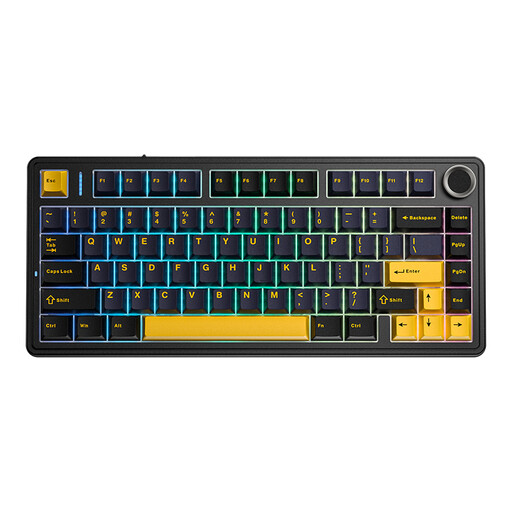
Why This Fits Their Persona: This keyboard provides an accessible entry into the enthusiast world without a high price. Its compact 75% mechanical keyboard layout is perfect for desks requiring a small footprint, while still retaining essential function keys for productivity.
It includes a 4000mAh battery, avoiding the poor battery life trap, and is fully hot-swappable, preventing the customisation dead-end. It offers features typically found in more expensive models.
Features a gasket mount structure for a superior typing feel and sound. Includes tri-mode connectivity for versatile use across gaming and work.
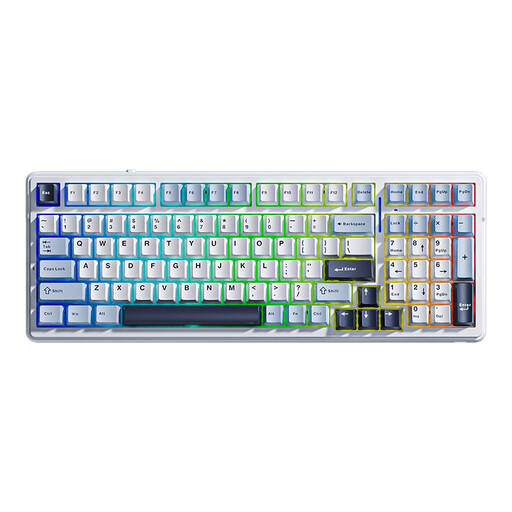
Why This Fits Their Persona: For professionals juggling multiple devices, the F99 is a workhorse. Its 96% layout retains a full number pad for data entry while saving desk space. The tri-mode connectivity allows for quick switching between a desktop PC, a work laptop and a tablet.
It directly counters the battery life trap with a massive 8000mAh battery, providing weeks of use on a single charge. This makes its wireless functionality genuinely reliable for a demanding work schedule.
Features a five-layer sound-dampening structure for a quiet office environment. The hot-swappable PCB allows for future repairs or upgrades, ensuring long-term value.
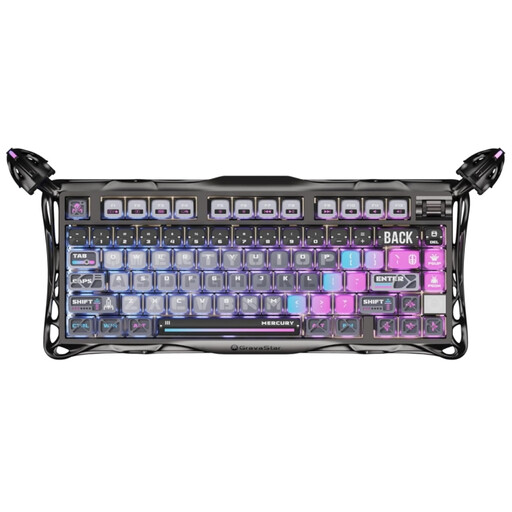
Why This Fits Their Persona: This keyboard is for those who value premium build quality, unique aesthetics and top-tier performance. The full aluminium alloy body provides a substantial, high-end feel, while the cyberpunk design makes it a centrepiece for any gaming setup.
It avoids the "gaming" branding trap by backing it up with substance: a low-latency 2.4GHz connection, a premium gasket mount structure and high-quality, factory-lubricated linear switches for a smooth gaming experience.
Features a large 8000mAh battery for extended wireless sessions. It is fully hot-swappable and comes with extra switches to encourage experimentation straight out of the box.
We have compiled a complete, real-time list of products that fully satisfy these strict selection criteria and UK safety regulations.
Battery life varies significantly based on capacity (measured in mAh) and usage. A keyboard with a 4000mAh battery can typically last for several days to a week of heavy use with RGB lighting on, or several weeks with the lighting off. Models with larger batteries, such as 8000mAh, can last for weeks or even months on a single charge, depending on your connection mode and backlight settings. Always check the mAh rating before buying.
Yes, it is highly recommended. For a beginner, a hot-swappable board removes the fear of commitment. You can start with the included switches and, as you learn more about your preferences, you can easily and affordably try new types without needing to buy a whole new keyboard. It also makes maintenance much simpler, as a single failed switch can be replaced in seconds.
2.4GHz provides a dedicated, low-latency wireless connection via a USB dongle. It is the standard for responsive wireless gaming as it minimises input delay. Bluetooth is a more universal standard that connects to a wide range of devices without a dongle but generally has slightly higher latency, making it better suited for typing, coding and general productivity tasks. A tri-mode keyboard gives you the advantages of both.