
24/7 Customer Support

Free returns

Same-day & Next-day Delivery

Quality Guaranteed

Unlock Your Welcome Offers: FREE Delivery | Up to 80% OFF | Free 30-day JoyPlus trial
Download the APP
A wireless mechanical gaming keyboard can make a desk more flexible, but the product pages often focus on colourful lighting and large battery figures while leaving important details unclear. For UK buyers, the main risks are usually layout mismatches, wireless compromises and customisation features that are less practical than they first appear.
Before choosing a keyboard, check how it will fit your games, work apps and connected devices. A compact board may free up mouse space, while a larger layout may be more suitable for spreadsheets or frequent number entry. The right choice depends on the way you use it, not simply the number of advertised features.
A 60% keyboard removes dedicated arrow keys and function rows, which may be inconvenient for programming, office shortcuts or productivity software. A 75% mechanical keyboard generally retains the arrow keys and a function row in a smaller footprint, although the spacing and navigation cluster can vary.
A 96% model keeps more keys, often including a number pad, but may feel wider and less spacious for mouse-heavy games. Always check the product layout and key count rather than relying on phrases such as “compact gaming keyboard”.
A tri-mode wireless keyboard normally offers wired USB, Bluetooth and 2.4GHz wireless connections. These modes serve different purposes:
Check whether the receiver is included, whether your computer has a suitable USB port and whether the keyboard supports your operating systems. A QWERTY US layout keyboard may also place symbols differently from a UK ISO keyboard, so confirm the layout before purchasing.
An RGB gaming keyboard can provide per-key lighting and custom effects, but lighting does not indicate switch quality, connection speed or durability. Similarly, terms such as “creamy sound” and “thocky” describe a subjective acoustic character rather than a guaranteed noise level.
Internal foam, stabiliser design and the switch type all influence sound. In a shared home, open-plan office or bedroom, a linear or silent switch may be more practical than a clicky switch, regardless of the lighting system.
For many UK desks, a 75% layout provides a useful balance between gaming space and everyday functionality. Look for dedicated arrow keys, accessible function-row shortcuts and a familiar navigation arrangement.
PBT keycaps are commonly selected because the material is generally more resistant to surface shine than ABS plastic. Double-shot or dye-sublimated legends can help preserve printed characters, but the exact construction should be confirmed in the listing. If you regularly switch between a UK laptop and a US-layout board, pay particular attention to the position of the “£”, quotation mark and “@” symbols.
A hot-swappable mechanical keyboard allows compatible switches to be replaced without soldering. This is useful if you want to alter the typing feel later or replace a faulty switch. Check whether the sockets support 3-pin, 5-pin or both types, and use a switch puller carefully.
Hot-swap sockets are not indestructible. Turn the keyboard off or disconnect it before making changes, align the switch pins correctly and never force a bent switch into the socket.
A gasket mount keyboard uses flexible material between parts of the plate and case. This can create a softer key feel, but the result varies with the plate, foam, switches and overall construction. A five-layer padding system may reduce internal resonance, but it will not make every switch silent.
Battery capacity is listed in mAh, but actual running time depends on RGB brightness, wireless mode and usage. Consider whether the keyboard can be used while wired and whether the charging cable and receiver are supplied. For rechargeable models, follow the manufacturer’s charging and battery safety instructions, keep the device away from liquids and do not attempt to open the battery compartment.

Why This Fits Their Persona: A practical starting point for UK users wanting a compact board for gaming, study and everyday typing without losing arrow keys or the function row.
It clearly specifies 75% layout, wired, Bluetooth and 2.4GHz modes, plus a QWERTY US layout, helping buyers check compatibility before ordering.
Full-key hot-swap sockets, PBT keycaps, a control knob and a stated 4000mAh rechargeable battery.
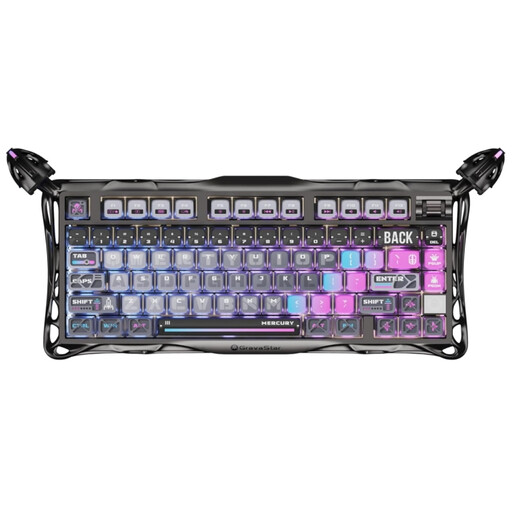
Why This Fits Their Persona: Suits enthusiasts who want a distinctive desk setup, customisable lighting and a flexible board for Windows or Mac use.
The listing identifies its gasket-mounted design, five-layer foam dampening, hot-swap support and tri-mode connectivity instead of relying only on appearance-led claims.
Aluminium alloy construction, an 8000mAh battery, dual RGB systems and four additional switches in the box.

Why This Fits Their Persona: Designed for users who type, create content or game for long sessions and want a highly customisable 75% platform.
It specifies a full-aluminium case, leaf spring mount, VIA compatibility and hot-swap support for users who want measurable customisation options.
Tri-mode connectivity, 3-pin and 5-pin switch support, per-key RGB and an 8000mAh rechargeable battery.
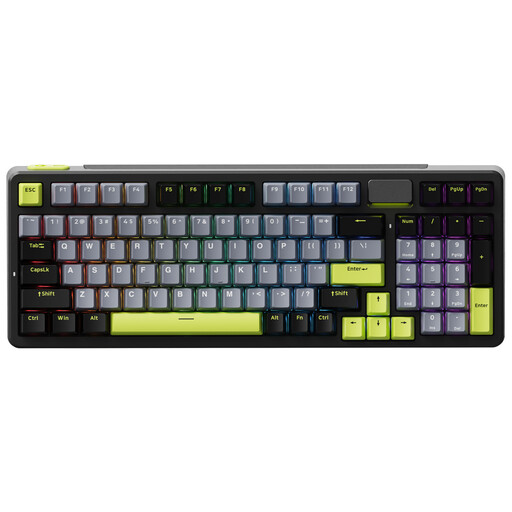
Why This Fits Their Persona: The 96% QWERTY US layout is suited to users who need more keys for documents, coding or data work while still wanting wireless flexibility.
The stated layout, mount type and three connection modes make it easier to assess desk space and device compatibility before buying.
Gasket mount, RGB backlighting, rechargeable battery and hot-swappable mechanical switches.
We have compiled a complete, real-time list of products that fully satisfy these strict selection criteria and UK safety regulations.
It can be, particularly when using the supplied 2.4GHz receiver or a wired USB connection. Bluetooth is more useful for general work and mobile devices. Check the product specification for connection details rather than assuming every wireless mode has the same response characteristics.
Lifespan depends on switch construction, keycap wear, battery condition and handling. A hot-swappable model can be easier to maintain because individual switches may be replaced. Keep the keyboard dry, clean it with suitable materials and follow the manufacturer’s battery guidance. Rechargeable batteries are consumable components and may hold less charge over time.