Pitch writers with few free sockets
If you write beside a laptop and want less permanent cabling, Bluetooth or receiver-based wireless connection is worth checking. A rechargeable keyboard still needs a charging plan.


Choose a wireless mechanical keyboard that can connect to your laptop, then check whether its layout keeps the keys you use to draft and revise a magazine pitch. A smaller board leaves more room beside the laptop but may move or remove editing keys; in a shared workspace, the exact switch option matters too. Wireless operation reduces desk cabling, not the need to plan charging.
If you write beside a laptop and want less permanent cabling, Bluetooth or receiver-based wireless connection is worth checking. A rechargeable keyboard still needs a charging plan.
Switch choice matters when you draft or revise in a newsroom, library or shared home workspace. Logitech offers distinct Tactile Quiet, Clicky and Linear variants; check the selected variant rather than assuming a keyboard will be quiet.
A smaller board can sit more comfortably beside a laptop, provided you can still reach the navigation, function and number-pad keys your editing work requires. Keychron and Razer illustrate how those keys differ across compact layouts.
Start with a connection your laptop can use and a workable charging routine. Then compare key placement and switch options against the way and place you write.
| Concern | What to check | Who this matters to |
|---|---|---|
| Wireless use and charging | Check laptop Bluetooth support or a free port for a receiver, plus the keyboard’s charging connection and stated runtime conditions. | I want to clear the keyboard cable from my pitch-writing desk without getting caught out when it needs charging. Around 36% of consumers put wireless use and charging first. |
| Sound and key feel | Check the exact switch variant; a switch name alone does not establish how a keyboard will sound in your workspace. | When colleagues are nearby, I need a key feel I can work with without choosing a conspicuously clicky option. For around 29% of consumers, sound and feel are the primary concern. |
| Space and editing keys | Compare the physical layout with the navigation, function and number-pad keys you use; confirm the selected regional layout. | My laptop shares a small desk with research material, but I still need quick access to the keys I use for revisions. Desk space and editing-key access come first for around 21% of consumers. |
| Shortcuts and device switching | Distinguish device switching from key remapping, and check any configuration software or wired-setup requirements. | If I repeatedly move between devices or use custom shortcuts, I would rather check that workflow before choosing a keyboard. Around 14% of consumers make it their main concern. |
A wireless connection removes the need for a permanent keyboard cable, but a rechargeable model still needs power. Stated runtime can depend on settings such as lighting and on how the keyboard is used.
Check the selected model’s charging connector, included cable and runtime conditions, then decide where it could charge without occupying a scarce mains socket.
Razer says its BlackWidow V3 Mini HyperSpeed 65% layout omits a dedicated function row, home cluster and number pad. Those omissions may affect shortcuts used while editing a pitch.
List the keys you regularly use for navigation, comments and formatting, then inspect the exact layout. Consider a 75% or tenkeyless layout if dedicated keys matter more than the smallest footprint.
Clicky, tactile and linear options differ in feel and audible feedback. Logitech distinguishes these variants within its MX Mechanical range, so the model name alone is not enough to judge the selected keyboard.
Check the actual switch option and, where possible, assess whether its sound suits the people working nearby. A quiet-oriented switch name is not a measured noise result.
Electrical products and batteries need appropriate disposal; damaged batteries can present a fire risk.
GOV.UK says waste electrical products can be taken to a local household waste recycling centre. Follow its battery guidance and local instructions, particularly if a battery is built in rather than safely removable.
Keychron offers UK-ISO options in compact wireless mechanical layouts, including the 75% V1 Max and 80% tenkeyless K8 Max.
The MX Mechanical range is relevant if you want a low-profile mechanical keyboard and switch between devices.
The BlackWidow V3 Mini HyperSpeed is a 65% wireless option for someone willing to use a more compact key arrangement.
These wireless mechanical keyboards offer different trade-offs for a laptop-based pitch-writing desk: several use compact layouts, while a full-size option retains more keys. Check the selected layout, switch and charging arrangements against your own workspace.
 No image available
Consider its 75% layout if desk space is tight but you do not want to move straight to a 65% board.
Check the exact UK key geometry, switch option and battery-runtime conditions for the settings you intend to use.
 No image available
Consider this option if keeping more keys close at hand matters more than choosing a 75% layout.
Its name specifies a UK layout; check the exact key geometry and installed switch option. Review battery-runtime conditions for your intended lighting settings.
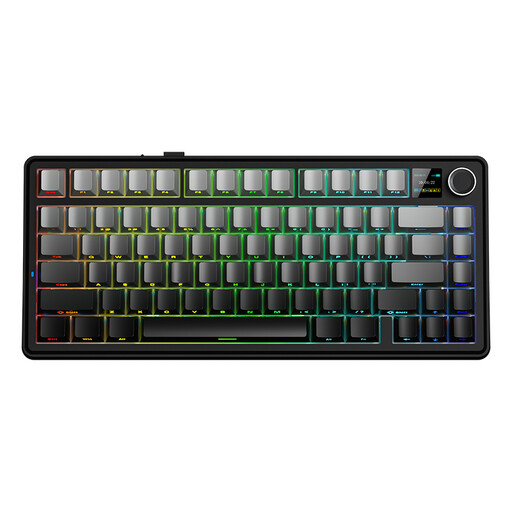 No image available
Its 75% format may suit a crowded desk if you are comfortable editing on a US QWERTY layout.
The named variant has side-engraved keycaps and tri-mode connectivity. Check its charging routine and whether the selected switches suit a shared workspace.
 No image available
Consider this compact, tri-mode keyboard if a US QWERTY key arrangement works for your pitch-writing shortcuts.
Its named switch variant is Gateron White. Check charging conditions and actual sound suitability rather than relying on the switch name.
 No image available
Its full-size 108-key layout is worth considering if retaining keys matters more than leaving room beside your laptop.
The named variant has tri-mode connectivity and an 8000 mAh battery. Capacity does not tell you how long it will run; check charging conditions, US key placement and whether the Silent Tactile option sounds suitable nearby.
Use Bluetooth if your laptop supports it and you want to keep a USB port free; a receiver offers another wireless route if you prefer it or cannot use Bluetooth. Logitech’s setup guidance distinguishes direct Bluetooth connection from receiver connection. Either way, plan how a rechargeable keyboard will be charged.
It can, provided its missing or relocated keys do not interrupt your editing shortcuts. Razer says its BlackWidow V3 Mini HyperSpeed 65% layout omits the function row and home cluster; inspect the keys you use for navigation, browser work and formatting before choosing a compact format.
Use an appropriate electrical-recycling route rather than ordinary household waste. GOV.UK says waste electrical products can go to a local household waste recycling centre; follow its guidance for removable batteries and local instructions if the battery is built in.