
24/7 Customer Support

Free returns

Same-day & Next-day Delivery

Quality Guaranteed

Unlock Your Welcome Offers: FREE Delivery | Up to 80% OFF | Free 30-day JoyPlus trial
Download the APP
Tired of the tangle of cables cluttering your desk, but unwilling to sacrifice the satisfying feel and precision of a mechanical keyboard? You're not alone. The desire for a clean, minimalist setup often clashes with the need for a high-performance typing and gaming tool. Fortunately, the world of the wireless mechanical keyboard has evolved, offering the freedom of a cable-free connection without compromising on responsiveness or feel.
This guide is designed to help you navigate the options. We'll break down the key features to consider and present a few standout models that cater to different needs and budgets, from dedicated gamers to professionals seeking a premium typing experience.
Choosing the right keyboard involves more than just cutting the cord. Here are a few key considerations to help you find the perfect match for your setup.
The physical layout of your keyboard has a significant impact on ergonomics and desk space.
Wireless keyboards connect in several ways, and understanding the differences is crucial.
The heart of any mechanical keyboard is its switches. They determine the sound and feel of each keystroke. Common types include:
For those who love to tinker, a hot swappable keyboard UK model is a fantastic choice. This feature allows you to change the mechanical switches easily without any soldering, letting you create a truly customisable mechanical keyboard with the exact feel you want.
After reviewing the market, we've selected a few models that offer a great combination of features, performance and value.
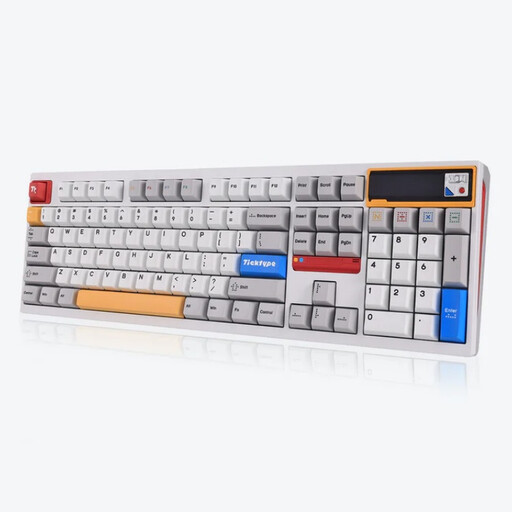
Why It Stands Out: The Ticktype DP104 is built for those who appreciate premium construction and a refined typing experience. Its full aluminium body gives it a substantial, high-end feel, while the leaf spring mounting structure provides a cushioned and flexible typing sensation. The inclusion of quiet tactile switches makes it suitable for office environments, and its tri-mode connectivity ensures it can adapt to any workflow. The customisable pixel screen is a unique touch for displaying system info or personalised animations.
Pros:
Who is it for?: Professionals, developers and enthusiasts who want a full-featured, high-end keyboard for both work and play, with a focus on a quiet, premium typing feel.
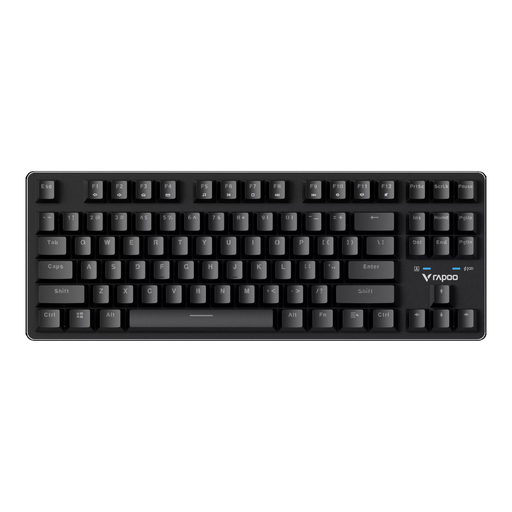
Why It Stands Out: The RAPOO V500 Pro strikes an excellent balance between gaming performance and a clean, wireless setup. The compact TKL keyboard layout is perfect for gamers needing more mouse room, while the dual-mode connectivity offers the choice between a stable 2.4GHz wireless connection or a zero-latency wired mode. The durable double-shot PBT keycaps are designed to resist shine and wear, ensuring the keyboard looks and feels great over time.
Pros:
Who is it for?: Gamers and typists looking for a reliable, compact wireless mechanical keyboard that prioritises performance without the clutter of a full-size layout.
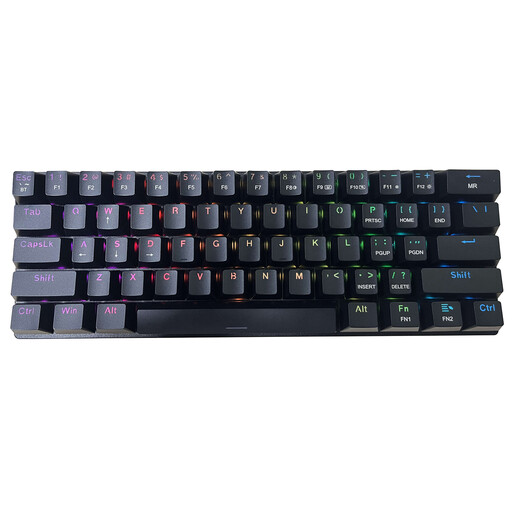
Why It Stands Out: This 60 percent keyboard is all about portability and versatility. Its ultra-compact form factor makes it an excellent travel companion or a great choice for minimalist desk setups. Despite its small size, it's packed with features, including full tri-mode connectivity that allows it to connect to a PC, laptop or tablet with ease. The classic clicky blue switches provide satisfying, audible feedback for typists who enjoy a more pronounced feel.
Pros:
Who is it for?: Students, remote workers and anyone needing a highly portable and versatile compact keyboard for Mac or PC that can easily be thrown in a bag.
While these three models represent great choices across different categories, the world of wireless keyboards is vast. If you're looking for a different layout, switch type or feature set, there are many other options to explore.
? Discover more in our full range of wireless gaming keyboards
Q: Are wireless mechanical keyboards good for gaming? A: Yes, particularly models that feature a 2.4GHz wireless connection. This technology offers a very low-latency signal that is virtually indistinguishable from a wired connection for most players. For competitive gaming, you can always plug in the USB-C cable for a guaranteed zero-latency link.
Q: How long does the battery on a rechargeable keyboard last? A: Battery life varies widely depending on the model and usage. A rechargeable keyboard can last anywhere from a dozen hours to several months on a single charge. The biggest factor is the RGB gaming keyboard backlighting; turning it off or lowering the brightness will significantly extend battery life. Most models offer weeks of use under typical conditions.
Q: Can I use a wireless mechanical keyboard with a Mac? A: Absolutely. Most wireless keyboards are compatible with both Windows and macOS. Many, especially a compact keyboard for Mac, come with keycaps for both operating systems or have functions to switch between layouts. Always check the product specifications for compatibility, but Bluetooth and USB connections are generally universal.