
24/7 Customer Support

Free returns

Same-day & Next-day Delivery

Quality Guaranteed

Unlock Your Welcome Offers: FREE Delivery | Up to 80% OFF | Free 30-day JoyPlus trial
Download the APP
Clear, crisp audio can make the difference between content that looks amateur and content that feels professional. Whether you're a vlogger, podcaster or streamer, upgrading from your device's built-in microphone is one of the most significant improvements you can make. However, the market for the wireless microphone is filled with technical jargon and ambitious marketing claims. This guide will help you navigate the common pitfalls and identify the key features that truly matter for your needs.
As a Joybuy Product Recommendation Officer, my role is to cut through the clutter and provide practical advice, helping you find a reliable tool without overspending on features you don't need.
Many buyers end up with a product that doesn't meet their expectations. Here are three frequent traps to be aware of:
clip on mic for iphone might require a separate, unreliable dongle to connect to a laptop, or a usb c microphone for android may not support real-time audio monitoring. This leads to frustration and unexpected extra costs.noise cancelling microphone function. However, basic digital noise reduction can often process the audio too aggressively, resulting in a thin, "watery" vocal sound that is just as distracting as the background noise it was meant to remove. Effective noise cancellation relies on more advanced hardware and processing, not just a simple on/off software filter.To avoid these issues, focus on a few non-negotiable parameters that determine a microphone's performance and suitability for your specific setup.
This is the most critical factor. A microphone is useless if it doesn't connect reliably to your camera, phone or computer.
microphone for vlogging on the go.podcast microphone kit or a serious streaming microphone setup, consider a model with XLR connectivity. An xlr microphone for pc connects to an audio interface or mixer, offering superior audio quality, control and the ability to integrate into a more complex production workflow. Many modern desktop mics offer both USB and XLR for maximum flexibility.The physical form of the microphone should match your recording style.
gaming microphone or podcasting mic is typically placed on a desk stand or boom arm, designed to capture rich, detailed vocals from a close distance.Beyond the basics, look for features that enhance audio quality and reliability.
Based on these practical criteria, here are some recommendations matched to different types of creators.
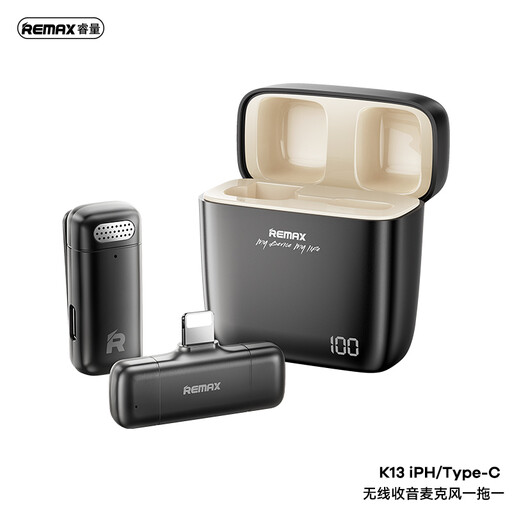
Why This Fits Their Persona: This is an ideal starting point for iPhone creators. It's a simple, no-fuss system designed for vlogging, social media content and online meetings directly on an iPhone, offering a significant audio upgrade with minimal setup.
It avoids the "universal compatibility" trap by featuring a dedicated Lightning receiver. This ensures a stable, plug-and-play connection without needing any adapters, providing reliable performance for iPhone users.
Includes a furry wind muff for clear outdoor recording and a 3.5mm headphone jack on the receiver for essential real-time audio monitoring.
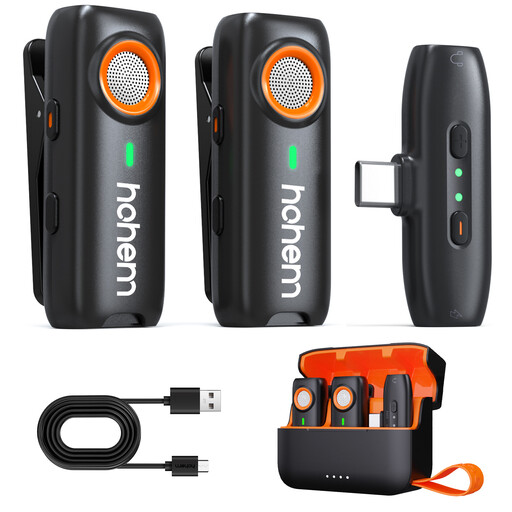
Why This Fits Their Persona: For creators who need a flexible system for smartphones, cameras and laptops. It's well-suited for interviews, online teaching and vlogging, with features that support longer, more demanding recording sessions.
It counters the "overstated noise cancellation" trap with a 3-level DSP chip, giving you granular control to match the environment. It also avoids the "battery life" pitfall by providing a charging case for a total of up to 20 hours of use.
Supports TF card local backup recording, providing a safety net against wireless dropouts. Also features a remote shutter function for controlling your smartphone's camera.

Why This Fits Their Persona: This desktop microphone is built for home studio use. It's an excellent choice for gamers, streamers and podcasters who want high-quality vocal recording and the flexibility to grow their setup over time.
It provides a clear upgrade path, avoiding the trap of a dead-end purchase. You can start with the simple plug-and-play USB connection and later connect via XLR to a professional mixer or audio interface for more advanced control.
Features both USB-C and XLR outputs. When used via USB, it offers on-board controls like a tap-to-mute button, gain knob and a headphone jack for zero-latency monitoring.
We have compiled a complete, real-time list of products that fully satisfy these strict selection criteria and UK safety regulations.
For most modern laptops, the easiest method is to use a wireless system with a USB-C receiver. Simply plug the receiver into a spare USB-C port, and your computer should automatically recognise it as an external microphone. If your system uses a 3.5mm receiver, you will need to plug it into your laptop's microphone/headphone combo jack. You may need to select the microphone as your input device in your video conferencing software's audio settings.
Most dedicated wireless microphone systems use the 2.4GHz frequency band. This provides a stable, low-latency connection that is crucial for keeping your audio and video in sync. Bluetooth microphones, while convenient for calls, often have higher latency (a noticeable delay), which can be problematic for video recording. For content creation, a 2.4GHz system is generally the more reliable choice.
The lifespan of a wireless lavalier microphone depends on its build quality and how it's cared for. A well-made system can last for many years. The most common point of failure is the internal battery. Look for models with a good battery capacity and a charging case, which helps manage battery health. Avoid exposing the components to moisture or extreme temperatures and handle the connectors with care to ensure longevity.