
24/7 Customer Support

Free returns

Same-day & Next-day Delivery

Quality Guaranteed

Unlock Your Welcome Offers: FREE Delivery | Up to 80% OFF | Free 30-day JoyPlus trial
Download the APP
A wireless microphone can make a vlog, livestream, interview, meeting or karaoke session easier to manage. However, product listings often use similar phrases for very different designs. A compact clip-on microphone may suit a mobile creator, while a conference microphone or portable karaoke speaker serves an entirely different purpose.
Before buying, focus on connection type, microphone quantity, battery arrangements and the conditions in which you plan to use it. These details are more useful than vague claims about “professional” sound or “advanced” noise reduction.
A microphone described as an iOS microphone or Type-C microphone may connect to a phone through a dedicated receiver or interface. That does not necessarily mean it will work with every phone, tablet, camera or laptop.
Check the exact connector before ordering:
For mobile recording, confirm whether the product supports your phone model and whether the receiver blocks a charging port.
A noise-cancelling microphone may reduce some background sounds, but performance depends on microphone placement, wind, room acoustics and the software or device receiving the signal. Traffic, strong wind and nearby conversations can still affect a recording.
A clip-on microphone or lapel microphone should sit close to the speaker’s upper chest, away from rubbing fabric. For outdoor filming, a wind cover is useful. Do not assume that a product labelled “noise-cancelling microphone” will remove every unwanted sound.
Many small wireless lavalier microphone systems list around 3–6 hours of battery life, which may be adequate for short videos but less convenient for a full-day event. A charging case can simplify recharging, although the case itself also needs power.
For meetings, performances and live streaming, compare the quoted operating time with your actual session length. If you regularly record for several hours, a dual microphone with a charging case or a mains-powered conference microphone may be more practical.
The most important specification is the interface. A Type-C microphone is not automatically suitable for an iPhone, and an iOS microphone may not connect to an Android phone without additional equipment.
Also check whether the listing includes:
If you plan to switch between a phone and laptop, a USB conference microphone or webcam with an integrated microphone array may reduce connection problems.
A single microphone is suitable for one presenter, solo livestreams and straightforward voice recordings. A dual microphone can record two speakers, making it more useful for interviews, couple videos, teaching content and panel-style conversations.
However, two microphones may require more battery management and a compatible receiver. Check whether both transmitters are included, rather than assuming “dual” refers to two pickup capsules in one unit.
Look for the stated battery capacity, charging method and operating time. Magnetic charging cases are convenient for compact lavalier systems, while USB-C charging is common on larger audio products.
For regular UK use, also review the product warnings. Keep microphones away from rain, condensation and high humidity unless the product has a clearly stated water-resistance rating. For children’s products, check the recommended age, small-parts warnings and battery safety instructions.
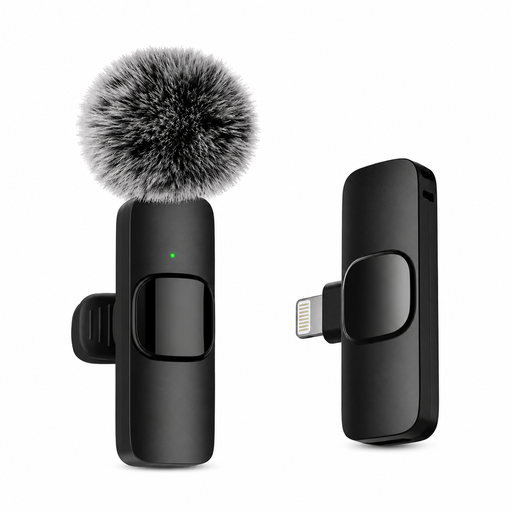
Why This Fits Their Persona: A compact option for a solo vlogger, livestreamer or interviewer using an iOS device. Its listed 3–6-hour battery range suits shorter recording sessions.
The listing identifies it as a single microphone with an iOS interface, helping buyers avoid paying for dual-speaker features they may not need.
Single-mic design; listed noise-reduction and windproof features; 78g product weight.

Why This Fits Their Persona: Designed for remote workers and business professionals who need video and room audio in one USB device for online meetings.
It combines a webcam, four-microphone array and speakers, reducing the need to buy separate conference equipment.
4K video at 3840×2160@30FPS; 98° adjustable field of view; compatible with Windows, macOS, Android TV and Linux.
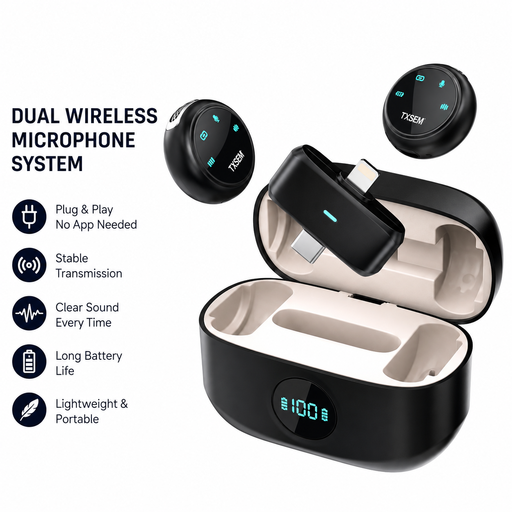
Why This Fits Their Persona: A dual-microphone setup for interviews, two-person livestreams and paired presentations where both speakers need individual clip-on microphones.
The listing clearly specifies two microphones and a magnetic charging case, rather than leaving the microphone quantity unclear.
Dual microphone configuration; magnetic charging case; listed 3–6-hour battery life and 155g weight.
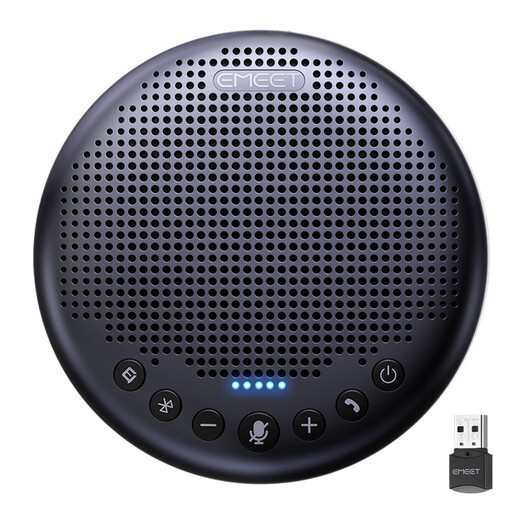
Why This Fits Their Persona: Suitable for shared offices, meeting rooms and hybrid calls where several people need to speak without wearing lapel microphones.
Its 360° pickup and eight-microphone array are specified for group use, making the intended room-based application clear.
Up to 10 hours of talk time is listed; USB-C and Bluetooth 5.3 connections; dual-device expansion support.
We have compiled a complete, real-time list of products that fully satisfy these strict selection criteria and UK safety regulations.
Insert the supplied receiver into the phone’s compatible iOS or USB Type-C port, then select the microphone as the recording input if the app provides that option. Test audio before recording, as some phones may need an adaptor or permission setting.
Battery duration varies by model and usage. Compact lavalier products in this range list approximately 3–6 hours, while the EMEET conference speaker lists up to 10 hours of talk time. Battery capacity can reduce over time, particularly if the device is stored empty or exposed to heat.
It can be, provided the microphone’s connector or Bluetooth connection is supported by your computer. A dedicated conference microphone may be more convenient for several participants, while a lapel microphone is usually more suitable for one presenter. Always check compatibility with your operating system and meeting software before purchase.