
24/7 Customer Support

Free returns

Same-day & Next-day Delivery

Quality Guaranteed

Unlock Your Welcome Offers: FREE Delivery | Up to 80% OFF | Free 30-day JoyPlus trial
Download the APP
A wireless microphone can make spoken audio clearer and recording more convenient, but choosing one based only on phrases such as “noise cancelling” or “studio sound” can lead to avoidable problems. The right model depends on your device, recording environment and how much control you need over the audio.
For UK content creators, vloggers, interviewers and home users, three common buying traps deserve attention before placing an order.
A receiver with a USB-C plug is not automatically suitable for every phone, tablet or camera. Check whether your device has a USB-C, Lightning, 3.5 mm or compatible camera input. Some smartphones may also restrict access to external microphones depending on the recording app and system settings.
An iPhone microphone with a Lightning receiver may not suit a newer USB-C device. Similarly, a USB-C wireless microphone may connect physically to an Android phone but still require the correct recording permissions or adapter for a particular camera.
Noise cancellation can help reduce some background sound, but it cannot remove every unwanted noise. Traffic, strong wind, nearby conversations and room echo can still affect a recording. A furry wind muff, sensible microphone placement and recording in a quieter location remain important.
Look for a stated noise-cancelling mode or wind protection, but avoid assuming it guarantees studio-style audio in all conditions.
A listed operating time may refer to the transmitter under particular conditions. If you are recording interviews with two speakers, both transmitters need sufficient charge. A charging case can make a greater practical difference than a slightly larger individual battery.
Check whether the kit includes one or two transmitters, a receiver and a charging case. Also confirm whether the microphone uses a replaceable or built-in rechargeable battery, and whether the charging cable is included.
Choose the connection around your main device:
If you regularly switch between a smartphone, computer and camera, a USB/XLR microphone may be more suitable for a desk setup, although it is not wireless and normally requires a cable.
A wireless lavalier microphone clips near the speaker’s mouth and is useful for vlogging, interviews, presentations and mobile video. Its small format supports hands-free recording, but clothing friction and wind can affect sound.
A desktop dynamic microphone is more appropriate for podcasts, gaming and streaming. Cardioid or unidirectional pickup focuses more towards the speaker and can reduce some sound from the sides and rear. This does not replace room treatment, but careful positioning can help.
For live content or interviews, useful features include:
Check the product contents carefully. For example, some USB/XLR podcast kits include a boom arm but not an XLR cable. A microphone with an XLR output also needs a compatible mixer, audio interface or sound card for computer recording.
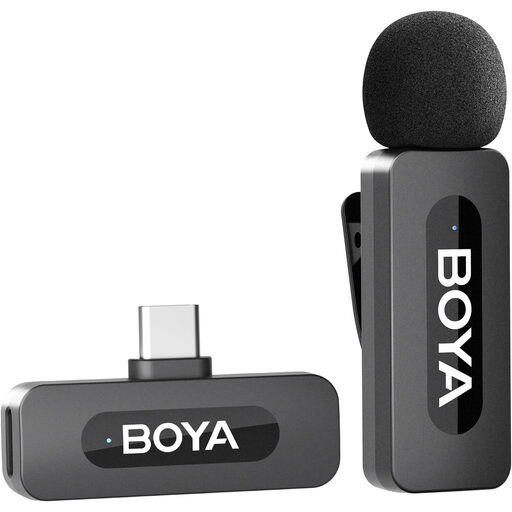
Why This Fits Their Persona: A one-transmitter, one-receiver format keeps the setup straightforward for a first smartphone microphone, particularly for Android users and compatible USB-C devices.
The USB-C receiver makes the connection type clear, while one-click noise cancellation is listed as a built-in function rather than an unspecified marketing phrase.
USB-C plug-in format, one transmitter and a stated 9-hour battery life.
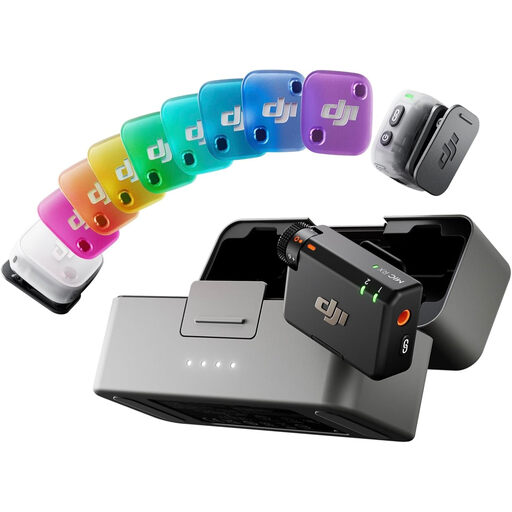
Why This Fits Their Persona: Two transmitters suit interviews, dual-presenter videos and content creators who want a compact kit with multiple voice settings.
The charging case addresses multi-transmitter storage and charging, while the two-level noise-cancelling modes offer more control than a single unspecified setting.
11 g transmitter weight, three voice tone presets and up to 48 hours with the case.

Why This Fits Their Persona: Podcasters, gamers and home-recording users who work mainly at a desk can use USB with a computer or XLR with a mixer and audio interface.
The connection options are specified clearly, and the listing notes that an XLR cable is not included, helping buyers budget for the required accessories.
USB-C and XLR connectivity, boom arm, headphone jack, gain control and mute function when using USB.
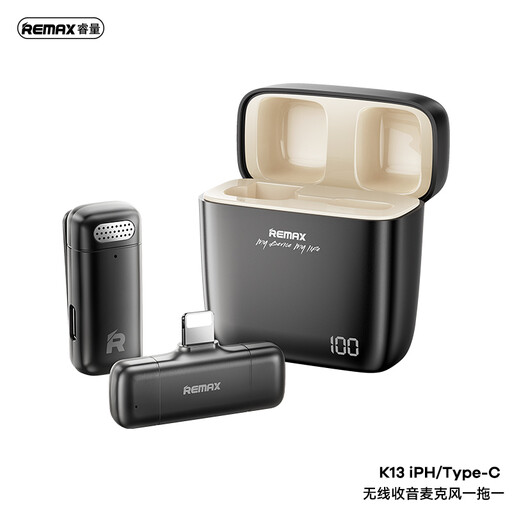
Why This Fits Their Persona: A direct Lightning receiver is practical for compatible iPhone users recording interviews, meetings, livestreams or mobile videos.
The product is specifically identified as a Lightning model, reducing the risk of buying a USB-C receiver for an incompatible phone.
Direct Lightning plug-and-play connection, 2.4G wireless transmission and an included furry wind muff.
We have compiled a complete, real-time list of products that fully satisfy these strict selection criteria and UK safety regulations.
Before recording, connect the receiver, open the camera or audio app and make a short test recording. Speak at your normal volume while checking for clothing rustle, clipping and excessive background sound. Keep the lavalier microphone a consistent distance from your mouth and use a wind muff outdoors.
Keep rechargeable components dry, away from extreme heat and protected from impact. Do not disassemble the device. Store transmitters and receivers in their case when not in use, and follow the supplied charging instructions. For desktop microphones, use a stable surface or boom arm and avoid placing the stand where desk vibrations can reach it.
It can provide more consistent voice placement, particularly when the speaker is moving away from the phone. The improvement depends on connection quality, microphone position, wind protection and the recording environment.
Battery life varies by model and usage. Some compact systems list around 9 hours for the microphone, while charging-case systems may state a combined figure of up to 48 hours. Treat these as product specifications rather than a guarantee for every recording situation, and charge before important work.
Yes, a wireless lavalier microphone can suit mobile interviews and two-person recordings. For a fixed podcast or streaming desk, a USB or USB/XLR microphone may offer more direct monitoring and control. Check whether your computer, mixer or audio interface supports the selected connection.