
24/7 Customer Support

Free returns

Same-day & Next-day Delivery

Quality Guaranteed

Unlock Your Welcome Offers: FREE Delivery | Up to 80% OFF | Free 30-day JoyPlus trial
Download the APP
Poor audio can make otherwise useful video, interviews, podcasts and livestreams difficult to follow. Yet choosing among wireless microphones, USB-C models, Lightning receivers and USB/XLR desktop microphones is not always straightforward.
Marketing often focuses on phrases such as “studio quality” or “noise cancelling” without explaining what the product includes, which devices it supports or how it behaves in everyday use. Before buying, check these common pitfalls and match the microphone to your recording environment.
A receiver designed for USB-C may not connect directly to an older iPhone with a Lightning port. Conversely, a Lightning wireless microphone is not automatically suitable for Android phones, laptops or cameras.
Check the exact connector on your recording device before ordering. Also confirm whether the product includes a receiver, transmitter, adaptor or charging case. A system listed as “wireless” may still need a receiver connected to the phone or computer.
One-click noise cancellation can reduce some unwanted background sound, but it cannot remove every distraction. Traffic, conversations, fans and room echo may still affect recordings. The microphone’s position, wind protection and distance from the speaker remain important.
For outdoor interviews and vlogging, a wireless lavalier microphone worn close to the speaker can provide more consistent voice levels than a phone’s built-in microphone. A furry wind muff is also useful in breezy conditions, although it does not make a microphone waterproof.
A low headline price may exclude useful accessories. Desktop users should check whether a boom arm, shock mount, USB cable or XLR cable is supplied. For wireless kits, review the number of transmitters, receiver type, battery arrangement and charging method.
If you need two people to speak at once, a kit with 2 TX + 1 RX is more suitable than a one-transmitter set. For a home studio, a microphone with boom arm may offer better positioning than a small clip-on system.
A USB-C wireless microphone is designed for compatible phones, tablets, computers or cameras with USB-C inputs. Many newer smartphones use this connector, but compatibility can still depend on the device, operating system and recording application.
An iPhone microphone may require either a USB-C or Lightning receiver, depending on the phone model. Older iPhones may need a Lightning wireless microphone, while newer models commonly use USB-C. Do not rely only on a product title: compare the receiver connector with the port on your device.
For computers and mixers, a USB/XLR microphone offers more flexibility. USB is generally convenient for direct connection to a laptop, while XLR is intended for a compatible mixer, audio interface or sound card. Controls such as mute, gain and headphone monitoring may work only through USB on some models.
Wireless systems commonly use a transmitter worn or held by the speaker and a receiver connected to the recording device. Look for practical features including:
A claimed transmission distance is not a guarantee of performance in every UK home, street or event venue. Walls, other wireless equipment and crowded radio environments can affect operation.
A lavalier microphone is compact and convenient for speech, interviews and mobile video. A desktop dynamic microphone is often more suitable for podcasts, gaming and streaming from a fixed position. Dynamic microphones with cardioid or unidirectional pickup are designed to focus more towards the speaker than the rear or sides, but they still work best when positioned correctly.
Battery life matters for wireless systems. Compare the stated operating time with the length of your filming sessions and remember that charging cases, additional transmitters and frequent use may affect your routine. For corded USB/XLR models, there is no microphone battery to recharge, but the setup is less portable.
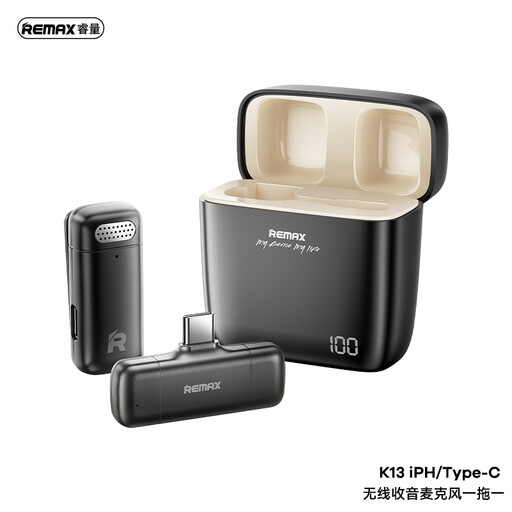
Why This Fits Their Persona: A compact option for new vloggers, interviewers and mobile creators using USB-C phones, tablets or cameras.
The USB-C receiver makes the connection requirement clear, while the included furry wind muff addresses a common outdoor recording problem.
Plug-and-play USB-C receiver, 2.4G wireless transmission, headphone monitoring and built-in rechargeable batteries.
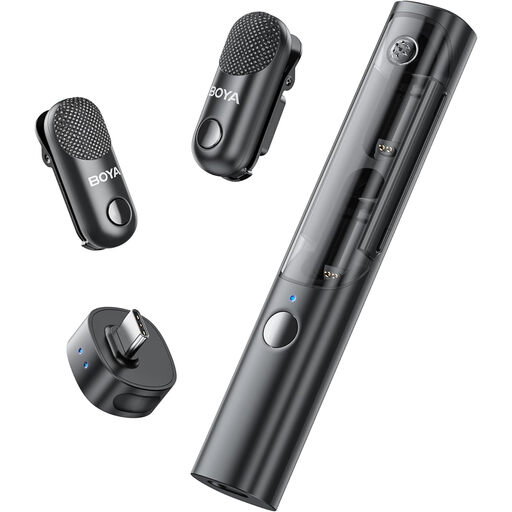
Why This Fits Their Persona: Suits creators who want a two-speaker kit for interviews, paired presentations or collaborative videos using USB-C devices.
The supplied 2 TX + 1 RX arrangement avoids needing to buy a second transmitter for two-person recordings.
USB-C compatibility is listed for cameras, iPhone 16/17 and Android devices; a charging case is included.

Why This Fits Their Persona: Designed for regular podcasting, gaming, voice-over work and streaming from a home desk.
The kit includes a boom arm, shock mount and windscreen; however, the XLR cable is not included and must be purchased separately for XLR use.
USB-C and XLR connectivity, cardioid pickup, 130dB maximum SPL, gain control, mute button and headphone monitoring through USB.
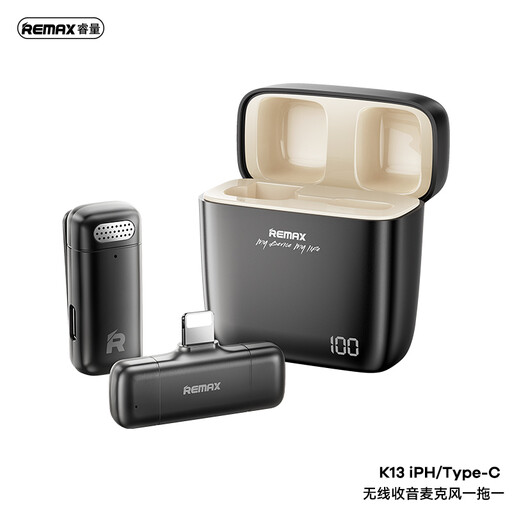
Why This Fits Their Persona: A portable choice for iPhone vloggers, journalists, online meetings and interviews using a Lightning connection.
Its dedicated Lightning receiver avoids depending on Bluetooth pairing or an additional audio adaptor.
Plug-and-play operation, 2.4G wireless communication, a furry wind muff and a 3.5mm headphone monitoring jack.
We have compiled a complete, real-time list of products that fully satisfy these strict selection criteria and UK safety regulations.
For fixed-position gaming or streaming, the FIFINE AM8W XLR/USB Gaming Microphone combines USB-C and XLR connections with a gain knob, mute button, headphone jack and RGB lighting through USB. The microphone and desktop stand are supplied, but a boom arm and XLR cable are not included.
For a single USB-C transmitter and stated nine-hour battery life, the BOYA BY-V10 V2.0 USB-C Wireless Microphone includes one transmitter and one receiver, with one-click noise cancellation. A two-transmitter alternative is the BOYA BY-V20 V2.0, which is more appropriate for two-person content. Check the product listing for the precise device compatibility and included accessories before purchase.
Yes, provided the receiver or microphone is compatible with the computer or phone being used. A plug-and-play microphone can reduce setup steps, but select it as the input device in the meeting software and make a short recording to confirm the signal before joining an important call.
Most wireless lavalier systems use rechargeable transmitters and receivers, so they need regular charging. A charging case can simplify storage and top-ups. USB/XLR desktop microphones are normally powered through a USB connection or audio equipment and do not require a separate internal battery.
They suit different environments. A wireless lavalier microphone is convenient for movement, interviews and smartphone video. A dynamic podcast microphone with boom arm is more suitable for a desk-based setup where the speaker can maintain a consistent position. Consider portability, room noise, connection type and the number of people recording before choosing.