A tidy desk can lead to a tidy mind, and one of the simplest steps towards a clutter-free workspace is cutting the cord on your mouse. A wireless mouse offers freedom of movement, a cleaner setup and enhanced portability. But with so many options available, choosing the right one can feel overwhelming. Whether you're a professional needing an ergonomic mouse for all-day comfort, a student seeking a quiet wireless mouse for the library or a frequent traveller requiring a portable mouse for laptop use, this guide is here to help.
We've analysed the features that matter most to UK users—from connectivity to comfort—to provide practical advice and highlight a few standout models that suit different needs and budgets.
How to Choose the Right Wireless Mouse for Your Needs
Before diving into specific products, let's cover the key factors to consider. Understanding these will help you narrow down your options and find a mouse that truly enhances your workflow.
1. Connectivity: Bluetooth vs. 2.4GHz USB Receiver
How your mouse connects to your device is a crucial first decision.
- 2.4GHz USB Receiver: This is the classic plug-and-play option. You plug a small USB dongle into your computer, and the mouse connects almost instantly. It provides a stable, reliable connection and is ideal for desktops or laptops with available USB-A ports.
- Bluetooth Mouse: A Bluetooth mouse connects directly to your device's built-in Bluetooth, freeing up a valuable USB port. This is particularly useful for modern ultrabooks and tablets that have limited ports. Many models are also a multi-device mouse, allowing you to switch seamlessly between your laptop, tablet and even your phone.
Some mice offer dual-mode connectivity, giving you the flexibility of both options.
2. Ergonomics and Design
If you spend hours at your computer, comfort is non-negotiable. An ergonomic mouse is designed to fit the natural contour of your hand, reducing strain on your wrist and arm. Look for features like sculpted shapes, thumb rests and soft-touch materials. For those on the move, a compact and lightweight design is more practical, making it an ideal portable mouse for laptop bags.
3. Essential Features: Clicks, Power and Precision
Beyond the basics, certain features can significantly improve your daily experience.
- Silent Clicks: A silent mouse uses technology to drastically reduce the sound of clicking. This is a considerate choice for open-plan offices, quiet study areas or late-night work at home.
- Battery Life: Power sources vary. Some models use replaceable AA or AAA batteries and can last for over a year, while a rechargeable mouse offers the convenience of a built-in battery, typically charged via USB-C.
- Sensor Precision (DPI): Dots Per Inch (DPI) measures how sensitive a mouse is. A higher DPI means the cursor moves further with less physical movement. While standard users are fine with 1200-1600 DPI, designers and gamers may prefer higher, adjustable DPI for greater precision.
Top Wireless Mouse Recommendations
Based on these criteria, we've selected a few models that stand out for their performance, features and value.
Logitech M330 Silent Plus Wireless Mouse
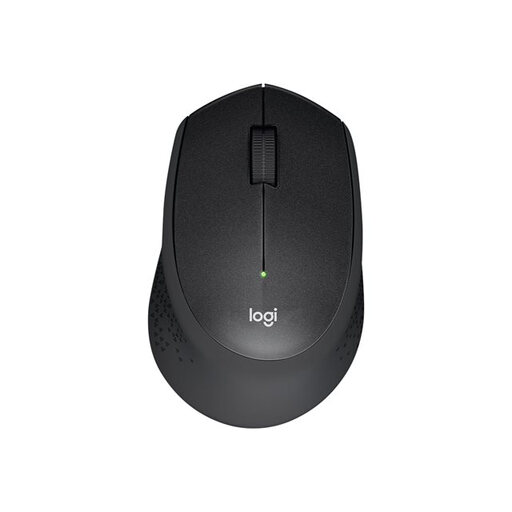
- Why It Stands Out: The M330 focuses on one thing and does it exceptionally well: silence. According to Logitech, its SilentTouch technology reduces click noise by over 90%. This makes it a fantastic companion for shared or quiet environments without compromising on the familiar feel of a click.
- Pros:
- Extremely Quiet Clicks: Ideal for offices, libraries and late-night use.
- Long Battery Life: A single AA battery can last up to 24 months, thanks to an energy-saving auto-sleep mode.
- Comfortable Design: The contoured shape and soft rubber grips provide solid comfort for everyday use.
- Simple Setup: The plug-and-play 2.4GHz USB receiver offers a reliable connection up to 10 metres.
- Who is it for? Professionals in open-plan offices, students and anyone who finds constant clicking a distraction. It’s a straightforward, reliable and quiet wireless mouse.
HP Z3700 Dual Silver Mouse
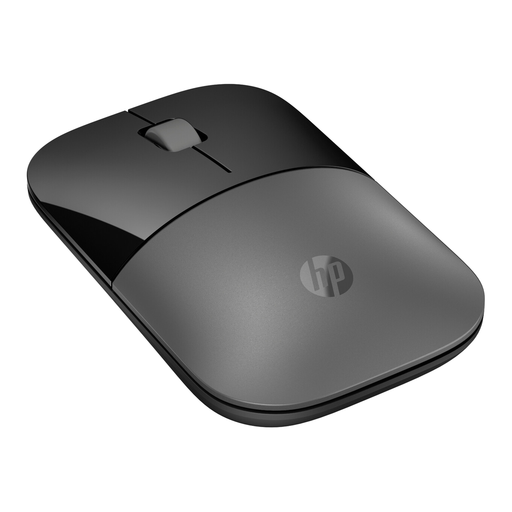
- Why It Stands Out: The HP Z3700 is all about flexibility. Its dual-mode connectivity allows you to connect via Bluetooth or a traditional USB receiver, making it compatible with a wide range of devices. Its slim, lightweight profile makes it an excellent travel companion.
- Pros:
- Dual-Mode Connectivity: Switch between Bluetooth 5.0+ and 2.4GHz wireless to suit your needs.
- Highly Portable: With a slim design and weighing only 50g, it’s a perfect portable mouse for laptop users.
- Good Battery Life: Provides up to 16 months of use from a single AA battery.
- Multi-Surface Tracking: The 1600 DPI optical sensor works smoothly on various surfaces.
- Who is it for? Mobile workers, students and users who need a versatile mouse that can easily connect to different devices, including those without spare USB-A ports.
Logitech MX Master 3S Ergonomic Mouse
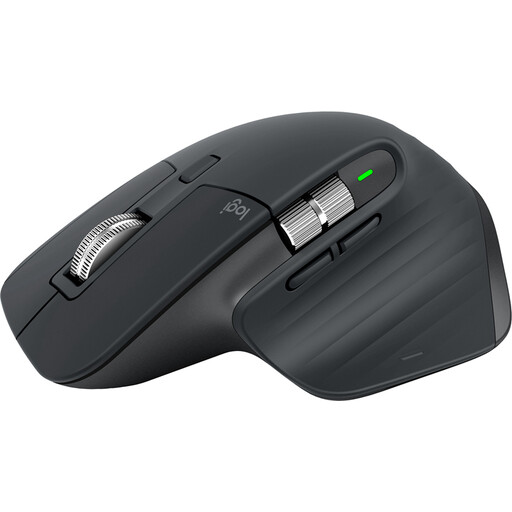
- Why It Stands Out: The MX Master 3S is engineered for peak productivity and comfort. It’s a high-performance tool packed with advanced features, from its ultra-precise sensor to its electromagnetic scroll wheel. This is a true ergonomic mouse built for power users.
- Pros:
- Superior Precision: The 8K DPI optical sensor tracks flawlessly on almost any surface, including glass.
- Advanced Scrolling: The MagSpeed scroll wheel is fast, precise and nearly silent, capable of scrolling 1,000 lines in a second.
- Exceptional Ergonomics: The sculpted shape is designed for all-day comfort, supporting your hand and wrist.
- Power User Features: It’s a rechargeable mouse with USB-C, offers multi-device control with Flow technology and has 7 customisable buttons.
- Who is it for? Designers, developers, content creators and any professional who spends the majority of their day at a computer and requires the highest levels of precision, customisation and comfort.
Looking for More Quiet Options?
If maintaining a peaceful workspace is your top priority, the models above are just the beginning. Many brands now offer peripherals designed to minimise noise without sacrificing performance. To see a wider variety of options tailored for quiet operation, why not explore more?
Discover our full range of silent computer mouse models to find the perfect fit for your workspace.
Frequently Asked Questions
1. Is a Bluetooth mouse better than a wireless one with a USB receiver? Neither is inherently "better"; it depends on your needs. A Bluetooth mouse is excellent for conserving USB ports and connecting to multiple devices. A mouse with a USB receiver offers a simple, highly stable plug-and-play experience that is often preferred for desktop setups.
2. How long does a wireless mouse battery last? Battery life varies significantly. Models using replaceable AA batteries, like the Logitech M330, can last up to two years. A high-performance rechargeable mouse like the Logitech MX Master 3S may last up to 70 days on a full charge, depending on usage. Most models include power-saving features to extend battery life.
3. Can I use a Logitech mouse with an HP laptop? Yes, absolutely. Most wireless mice, including those from brands like Logitech and HP, are designed to be universally compatible. As long as your laptop or computer has the correct connectivity option (an available USB-A port for a receiver or built-in Bluetooth), the mouse will work with operating systems like Windows, macOS and ChromeOS regardless of the computer's brand.


