
24/7 Customer Support

Free returns

Same-day & Next-day Delivery

Quality Guaranteed

Unlock Your Welcome Offers: FREE Delivery | Up to 80% OFF | Free 30-day JoyPlus trial
Download the APP
A wireless mouse can make a laptop, gaming PC or home-office setup easier to use, but the wrong model may create unnecessary costs. Some products advertise impressive DPI figures that are irrelevant for everyday work, while others use “multi-device” language without clearly explaining whether they support Bluetooth, a USB receiver or both.
Before buying, UK shoppers should look beyond appearance and headline specifications. The connection method, battery arrangement, shape and software support usually have a greater effect on daily use than a high maximum DPI number.
A Bluetooth mouse connects directly to a compatible laptop, tablet or computer, leaving the USB ports available for other accessories. However, some desktop PCs and older laptops may not include Bluetooth.
A 2.4GHz wireless mouse uses a USB receiver. It generally offers straightforward plug-and-play setup, but the receiver can be misplaced and some laptops require a USB-A adapter. A dual-mode mouse supports both methods, giving you more flexibility when moving between devices.
A tri-mode mouse typically combines Bluetooth, 2.4GHz wireless and wired USB-C operation. This can be useful for gaming and work, but check how the modes are selected and whether advanced features work in every mode.
A mouse with 26,000 DPI or an 8K polling rate mouse may appeal to competitive players, but these specifications are not automatically valuable for office work. DPI controls cursor sensitivity, while polling rate describes how frequently the mouse reports its position to the computer.
Higher polling rates can increase system workload and may require suitable software, a compatible USB connection and a capable computer. For documents, browsing and study, a reliable sensor and comfortable shape often matter more than extreme figures. Gamers should also check whether the advertised polling rate works wirelessly or only in wired mode.
A rechargeable wireless mouse avoids regular AA battery purchases, but it must be charged. A model using one AA battery may be more convenient for travel if you carry spares. Always check whether the battery is included, how charging works and whether the mouse can be used while connected by cable.
For lithium-battery products, do not disassemble, puncture or expose the device to high heat. Use a suitable certified cable and follow the manufacturer’s charging instructions. At the end of its life, dispose of electronic equipment and batteries through appropriate UK recycling or WEEE channels rather than household waste.
Check the operating systems listed by the manufacturer, particularly if you use Windows, macOS, ChromeOS, Android or iPadOS. Some mice offer basic cursor control across platforms but reserve button remapping or lighting controls for Windows software.
For hybrid working, a Bluetooth mouse or dual-mode mouse can pair neatly with a laptop, while a USB receiver may be more practical for a desktop. Confirm that the receiver is included and that your computer has a compatible port.
An ambidextrous mouse has a symmetrical or near-symmetrical shape and may suit left- and right-handed users. A right-handed contour can provide more dedicated support but may not work comfortably for everyone.
Weight is particularly relevant to gaming. A lightweight gaming mouse of around 49–68g may feel easier to move during fast, repeated swipes. Heavier designs can feel more planted and may include extra buttons or a larger palm support. For office use, dimensions and grip style should take priority over a low weight figure.
A vertical ergonomic mouse holds the hand in a more upright position. This may feel natural to some users, although it usually requires an adjustment period and can be less suitable where a small footprint is important or for rapid gaming movements.
An adjustable DPI mouse allows you to alter cursor sensitivity for different tasks. Lower settings can provide more controlled movement, while higher settings reduce the physical distance needed to move the pointer. The useful range depends on your screen size, operating system settings and personal preference.
For gaming, also consider tracking speed, acceleration figures and the availability of a suitable driver. For office work, consistent tracking on your desk surface and a dependable scroll wheel are usually more important.
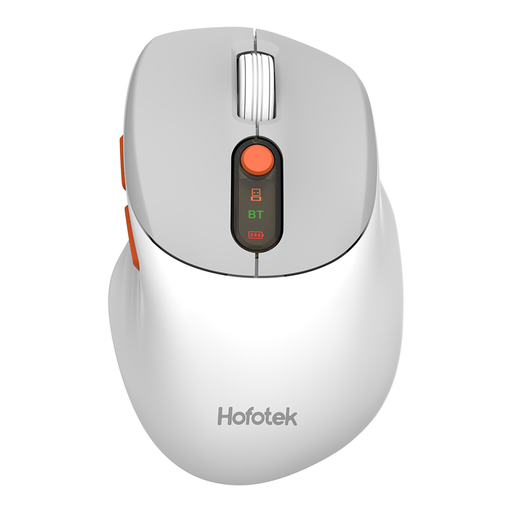
Why This Fits Their Persona: A practical option for students, shared offices and everyday browsing, with Bluetooth 5.1 and 2.4GHz connectivity plus support for Windows, macOS and Android.
The connection modes and DPI steps are clearly specified, rather than relying only on a vague “wireless” label. It uses one included AA battery.
62g body, quiet-touch clicks and DPI settings from 800 to 4,000.
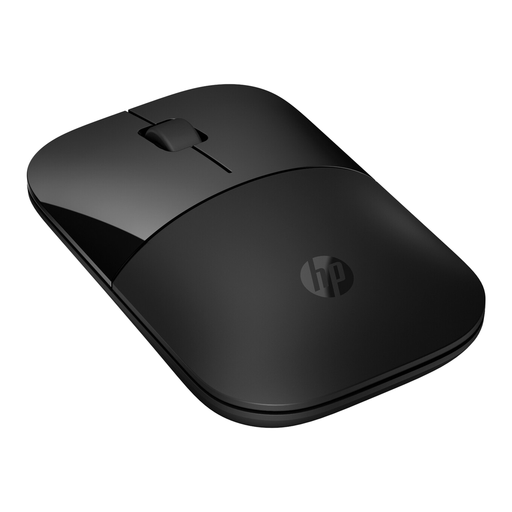
Why This Fits Their Persona: Its slim 50g design suits commuting, library work and laptop bags, while Bluetooth 5.0 and a USB receiver support flexible setups.
It does not require a rechargeable battery or proprietary charging dock; the listed power source is one AA battery.
1600 DPI optical tracking, quiet clicks and stated battery life of up to 16 months.
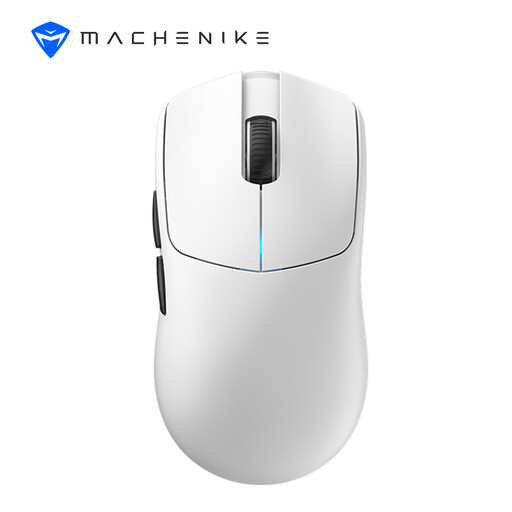
Why This Fits Their Persona: FPS players and users who want one mouse for gaming and general work may value its wired, 2.4GHz and Bluetooth tri-mode setup.
The 8,000Hz polling rate is specified for wired and 2.4GHz modes, so buyers can distinguish it from Bluetooth operation.
49g symmetrical design, PAW3395 sensor, up to 26,000 DPI and stated runtime of over 100 hours.
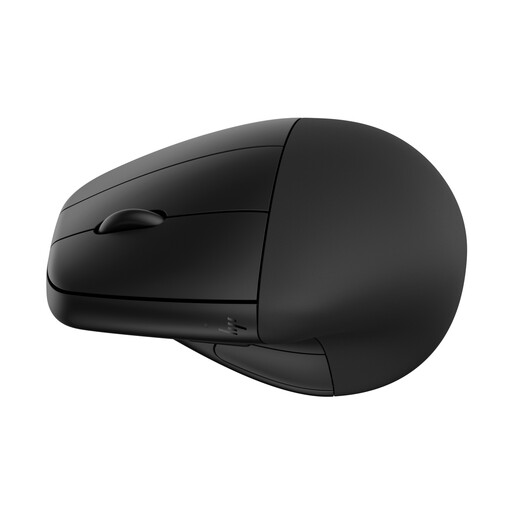
Why This Fits Their Persona: Remote workers and office professionals who prefer a vertical ergonomic mouse may appreciate the detachable wrist rest and larger 167g form.
The upright design and connection choices are stated clearly, without presenting comfort as a guaranteed medical outcome.
Bluetooth 5.3 and 2.4GHz connectivity, six buttons, adjustable tracking up to 4,000 DPI and rechargeable power.
We have compiled a complete, real-time list of products that fully satisfy these strict selection criteria and UK safety regulations.
Yes, provided the laptop supports the connection method. Bluetooth models pair without a receiver, while 2.4GHz models need a compatible USB port or adapter. A dual-mode mouse offers a practical fallback when switching between newer and older devices.
Battery life varies with polling rate, lighting, connection mode and usage. Product specifications may state figures such as over 100 hours or several months, but these are usage estimates rather than guarantees. Check whether the battery is replaceable, how it charges and whether the mouse can operate while connected by USB.
Usually, it is not essential. Office users will generally benefit more from quiet clicks, reliable Bluetooth or receiver connectivity, comfortable dimensions and an adjustable DPI setting. An 8K polling rate is more relevant to users with compatible gaming hardware who specifically want frequent position updates and are prepared to configure the required software.