
24/7 Customer Support

Free returns

Same-day & Next-day Delivery

Quality Guaranteed

Unlock Your Welcome Offers: FREE Delivery | Up to 80% OFF | Free 30-day JoyPlus trial
Download the APP
By Joybuy Product Recommendation Officer
A wireless mouse can make laptop and desktop use more comfortable, but choosing one based only on appearance or a low price can create avoidable problems. A mouse may have impressive-looking specifications yet lack the connection type, shape or battery arrangement that suits your daily routine.
Before buying, watch for three common pitfalls:
The right choice depends on where you work, how long you use it and which devices you need to connect.
A Bluetooth mouse pairs directly with compatible laptops, tablets and computers, leaving the USB ports free for other accessories. It can be convenient for commuters and home workers who move between devices.
A 2.4GHz wireless mouse normally uses a small USB receiver. This is often straightforward to set up because the receiver plugs into the computer and the mouse connects without Bluetooth pairing. Check whether your device has a USB-A port, or whether you need an adapter.
Some mice support both Bluetooth and 2.4GHz wireless. This dual-mode arrangement can be useful when switching between a laptop, desktop and tablet. Always check the listed operating-system compatibility, especially when using macOS, ChromeOS, iPadOS or Android.
A compact laptop mouse is easier to carry in a sleeve or backpack, but a low-profile design may feel less supportive during long sessions. A larger ergonomic mouse can provide more palm contact, although it may take up more desk space and add weight to a travel bag.
An ambidextrous mouse has a symmetrical shape for left- and right-handed use. This is practical for shared workstations or households where several people use the same computer. Right-handed ergonomic shapes may offer dedicated thumb support, but they are less flexible for shared use.
Look at the dimensions and weight rather than relying only on terms such as “comfortable”. A mouse should allow your hand to rest naturally, with your wrist reasonably straight and your fingers able to reach the buttons without stretching.
An optical mouse uses a sensor to track movement across a surface. Most modern models work well on a desk, mouse mat or notebook, but reflective, transparent or very glossy surfaces may affect tracking.
DPI describes cursor sensitivity. An adjustable DPI mouse gives you more control over cursor speed, while a fixed setting can be perfectly suitable for browsing, documents and email. For quiet offices, libraries and shared rooms, a silent click mouse can reduce button noise.
Power options include:
Check what is included in the box, whether the receiver has storage in the mouse and whether charging uses USB-C or another connector.
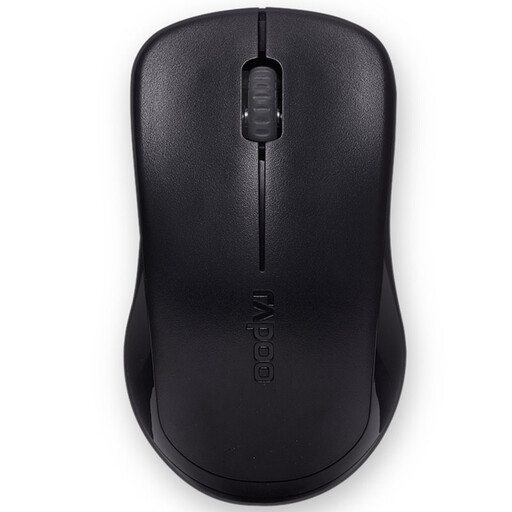
Why This Fits Their Persona: A practical option for students, home users and anyone needing a straightforward USB wireless mouse for everyday browsing, documents and online study.
The 2.4GHz nano receiver provides plug-and-play setup, while the single AA battery and auto-sleep mode make power management uncomplicated.
Fixed 1000 DPI optical tracking, up to 10 metres of wireless range and compatibility with Windows, macOS, ChromeOS and Linux.
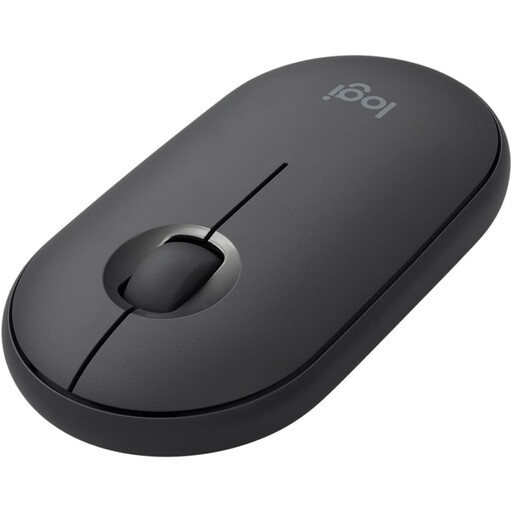
Why This Fits Their Persona: Its slim, low-profile form suits commuters, remote workers and laptop users who want a tidy accessory for cafés, offices and shared spaces.
The near-silent clicking design addresses noise concerns, while the ambidextrous shape avoids limiting use to one hand.
Compact construction, optical tracking and wireless connectivity via Bluetooth or USB receiver, depending on the model.
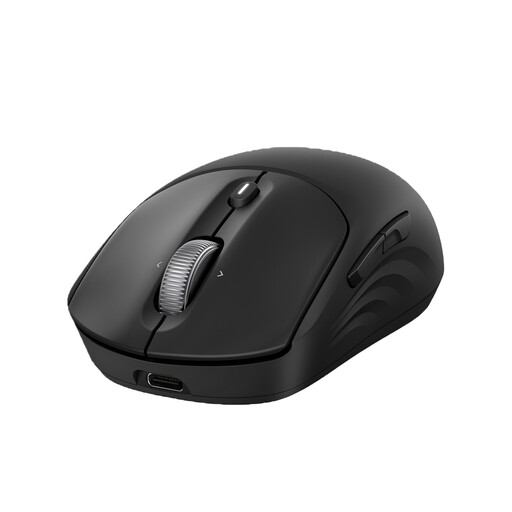
Why This Fits Their Persona: Designed for office professionals and multi-device users who need custom controls, rechargeable power and adjustable tracking for demanding workflows.
The rechargeable supercapacitor removes routine AA battery replacement, while Bluetooth 5.2 and the USB receiver offer two connection routes.
Up to 6,000 DPI, seven programmable buttons plus a Copilot button, 4D scrolling and pairing for up to three devices.
We have compiled a complete, real-time list of products that fully satisfy these strict selection criteria and UK safety regulations.
It can be more convenient when the laptop has Bluetooth but limited USB ports. A USB wireless mouse may be easier to set up on computers with available USB-A ports. Check the device’s operating system and connection support before ordering.
Lifespan depends on switch use, handling, battery care and exposure to dust or moisture. A mouse used for office browsing may remain functional for several years, but battery capacity and button performance can change over time. Keeping it clean and avoiding impacts can help preserve everyday operation.
It can reduce the need to buy replacement disposable batteries, particularly for frequent users. However, it requires regular charging and access to a suitable USB cable. Compare the purchase price, charging arrangement and expected usage rather than judging running cost from battery type alone.