
24/7 Customer Support

Free returns

Same-day & Next-day Delivery

Quality Guaranteed

Unlock Your Welcome Offers: FREE Delivery | Up to 80% OFF | Free 30-day JoyPlus trial
Download the APP
Navigating the world of computer peripherals can feel like a chore. The market is flooded with options, all promising to revolutionise your workflow or gaming experience. But a wireless mouse that looks good on the box can quickly become a source of frustration, leading to wasted money and a cluttered desk drawer. As a Joybuy Product Recommendation Officer, my role is to help you sidestep the marketing clutter and focus on what truly matters for your specific needs.
Before you add any wireless mouse to your basket, let's look at the common pitfalls that many UK buyers fall into.
mouse with a USB receiver offers a simple plug-and-play setup. However, that tiny dongle is easy to lose, especially when commuting. Once it's gone, the mouse is often rendered useless. Relying on a single connection method can limit your device's versatility and lifespan.To make a smart purchase, focus on the core features that align with how you'll actually use the device. Here are the three most important factors to analyse.
How your mouse connects to your devices is crucial. There are three main types:
pc mouse or gaming mouse.bluetooth mouse connects directly to your device's built-in Bluetooth, freeing up a USB port. This is ideal for a mouse for laptop or tablet, offering a clean, dongle-free setup.tri-mode mouse supports 2.4GHz, Bluetooth and a wired USB connection. This allows you to switch seamlessly between multiple devices—like your work laptop and personal desktop—with the press of a button.A mouse's sensor is its eye and DPI is how sensitively it sees movement. Instead of chasing the highest number, consider what you need:
The physical design of a mouse has a direct impact on your comfort.
lightweight mouse.ergonomic mouse holds your hand in a 'handshake' position, which can reduce wrist and forearm strain during long hours of use.Based on these practical criteria, here are a few recommendations tailored to different user profiles.
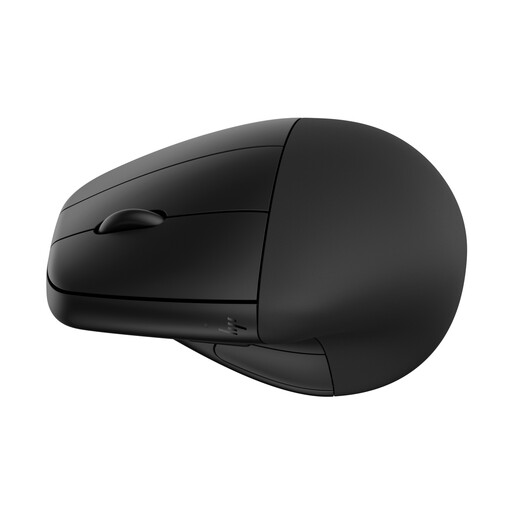
Why This Fits Their Persona: For those spending long hours at a desk, comfort is non-negotiable. This vertical mouse is designed specifically to reduce muscle strain in the wrist and forearm, making it a practical tool for preventing discomfort during the 9-to-5 grind.
It directly counters the "universal comfort" myth by offering a specialised vertical design. It also avoids the connectivity snag with dual-mode Bluetooth and 2.4GHz options.
Its main advantage is the vertical 'handshake' grip, supported by a detachable wrist rest. It's also a rechargeable mouse with up to 4 months of battery life.
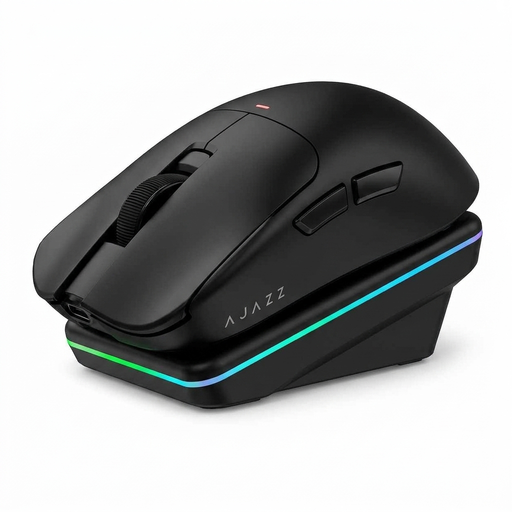
Why This Fits Their Persona: Gamers need speed, precision and reliability. This mouse delivers with a high-performance sensor, a high polling rate for low latency and a lightweight build for fast movements. It's built for competitive titles where every millisecond counts.
While it has a high DPI, it's a functional feature for its target audience, not just a marketing number. Its tri-mode connectivity offers maximum flexibility, avoiding the single-connection snag entirely.
It features a high-performance PAW3311 sensor and a 1000Hz polling rate for responsive input. The included magnetic charging dock adds convenience and keeps the desk tidy.
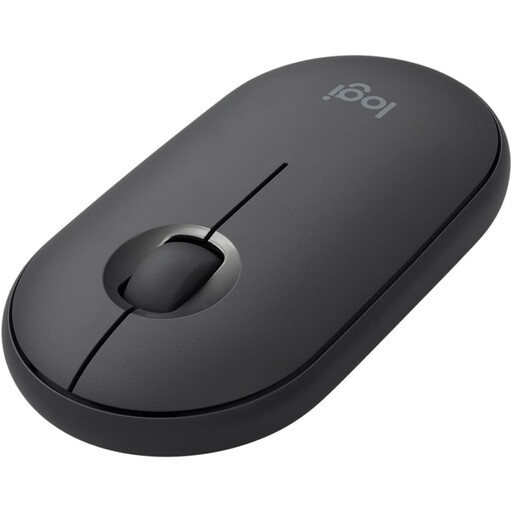
Why This Fits Their Persona: For someone working from coffee shops, trains or co-working spaces in the UK, portability and discretion are key. The Pebble is slim, lightweight and fits easily into any laptop bag. Its quiet clicks won't disturb others around you.
It avoids the DPI trap by focusing on what matters for mobile work: reliable tracking and simplicity. With dual connectivity (Bluetooth/USB receiver), it also sidesteps the single-connection snag.
Its primary advantages are its ultra-slim, portable design and its silent click technology. The long battery life makes it a dependable travel companion.
We have compiled a complete, real-time list of products that fully satisfy these strict selection criteria and UK safety regulations.
The battery life of a rechargeable mouse varies significantly by model and usage, from a few days to several months. A gaming mouse with RGB lighting will consume power faster than a simple office mouse. Look for models that specify battery life in hours or days of typical use. Many modern mice offer fast charging, providing several hours of use from just a few minutes of charging.
Neither is inherently better; they serve different purposes. A 2.4GHz connection via a USB dongle generally provides a slightly lower latency, which can be preferable for competitive gaming. A Bluetooth connection is more convenient for portability as it doesn't require a dongle, making it great for laptops and tablets where USB ports may be limited. For maximum flexibility, a tri-mode mouse that offers both is an excellent choice.
This is a common issue. If your mouse only connects via 2.4GHz, losing the receiver can be a problem. Some brands, like Logitech, offer "Unifying" receivers that can be paired with multiple compatible devices and you can sometimes purchase a replacement. However, for many other brands, a lost receiver cannot be replaced. This is a strong argument for choosing a mouse with Bluetooth or tri-mode connectivity as a backup.