
24/7 Customer Support

Free returns

Same-day & Next-day Delivery

Quality Guaranteed

Unlock Your Welcome Offers: FREE Delivery | Up to 80% OFF | Free 30-day JoyPlus trial
Download the APP
As a Joybuy Product Recommendation Officer, my role is to help you navigate the crowded market of home technology. Choosing a wireless security camera can feel overwhelming, with countless features and technical terms to decipher. You want peace of mind, whether it's keeping an eye on your property while on holiday, checking in on a pet during the day or ensuring family members are safe. This guide is designed to cut through the clutter, offering practical advice and highlighting some noteworthy options to help you find a camera that fits your specific needs.
Making the right choice comes down to understanding a few core features. Here are some key points to consider that will help you narrow down your options.
The first question to answer is where you plan to place your camera. An outdoor cctv camera must be built to withstand the British weather. Look for an IP (Ingress Protection) rating, such as IP65, which indicates the device is protected against dust and rain. These models are typically more robust.
Conversely, an indoor security camera can prioritise different features. You might look for a discreet design that blends with your decor or a 360 ptz camera (pan-tilt-zoom) that can survey an entire room from one spot. Many indoor models also double as a pet camera with two way audio, allowing you to hear and speak to your furry friends remotely.
"Wireless" usually refers to the data connection (WiFi), not necessarily the power. You have two main choices:
For storage, many users prefer a security camera with an sd card slot. This provides free local storage, meaning your video clips are saved directly onto the device. It's a great way to avoid monthly cloud subscription fees while keeping your data private.
Modern cameras offer more than just recording. A smart camera with human detection uses algorithms to distinguish people from passing cars or swaying trees, significantly reducing false alarms. For night-time monitoring, a security camera with colour night vision provides a much clearer and more detailed picture than traditional black-and-white infrared, making it easier to identify details. Finally, for households with busy networks, a 5ghz wifi camera can offer a faster and more stable connection than older 2.4GHz-only models.
Here are a few wireless security cameras that offer a compelling combination of features for different UK households.
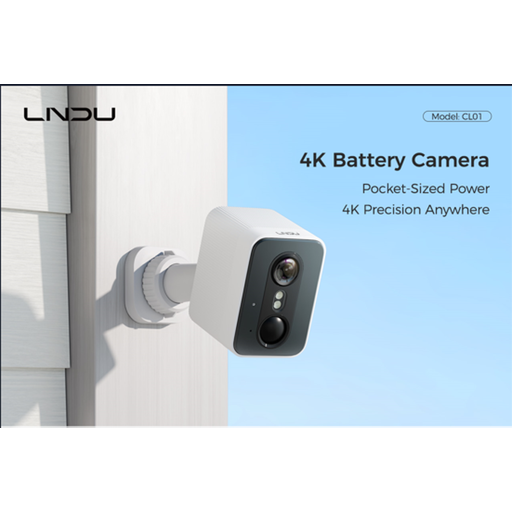
Why It Stands Out: This model is a strong contender for all-around outdoor protection. It combines ultra-high-definition 4K resolution with a completely wire-free, battery-powered design. A standout feature is the included 128GB SD card, providing ample local storage straight out of the box without extra cost. Its dual PIR and radar detection system is designed to minimise false alerts by focusing on human movement.
Pros:
Who is it for? Homeowners seeking a high-performance, easy-to-install outdoor cctv camera that delivers excellent image quality and avoids mandatory subscription fees.
View the LNDU 4K Wireless Outdoor Camera on Joybuy
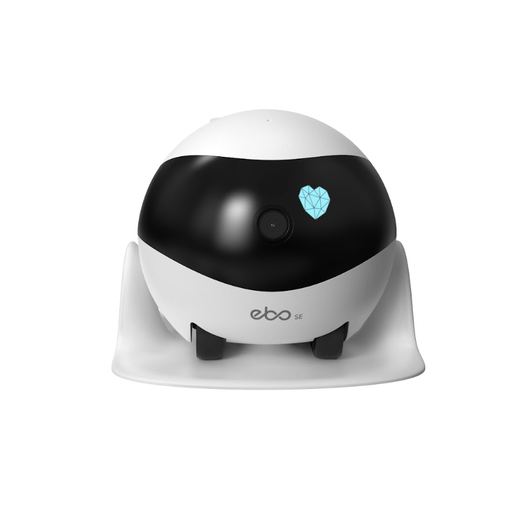
Why It Stands Out: The ENABOT SE is not a typical static camera; it's a mobile monitoring robot. You can drive it remotely around your home using a smartphone app to check on pets, children or just to see what's happening in different rooms. It can also perform automatic patrols and returns to its charging dock on its own.
Pros:
Who is it for? Pet owners who want to interact with their animals or anyone looking for a dynamic and fun way to monitor their entire home without installing multiple cameras.
View the ENABOT SE Home Security Robot on Joybuy

Why It Stands Out: This indoor security camera has a unique feature: a 2.8-inch screen that facilitates two-way video calls. A person at home can press a button on the camera to initiate a video call to your phone, making it great for families with children or elderly relatives. Its 360 ptz camera function provides complete room coverage, and it supports both 2.4GHz and 5ghz wifi camera bands for a stable connection.
Pros:
Who is it for? Those looking for an advanced indoor monitor, especially for keeping in easy visual contact with family members or for comprehensive surveillance of a single large room.
View the JOOAN 5G WiFi Indoor Camera on Joybuy
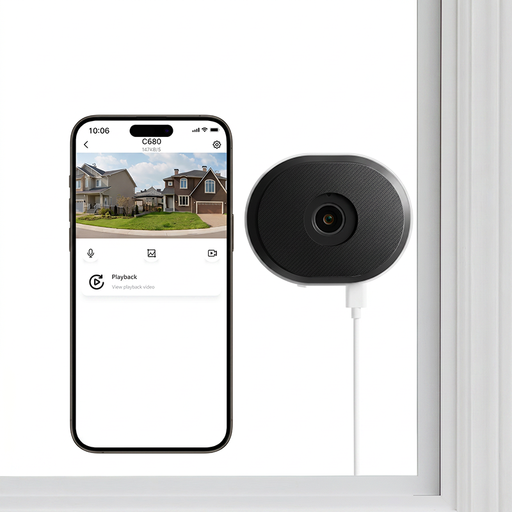
Why It Stands Out: This camera solves a common problem: monitoring the outside from inside a window. Standard cameras often produce unusable footage due to glare and reflections. The ZOSI C680 uses special anti-glare lens technology to capture clear video through glass, day or night. Installation is damage-free, using an adhesive mount that's perfect for renters.
Pros:
Who is it for? Renters, flat dwellers or anyone who wants to monitor their driveway or front garden from indoors without drilling holes or dealing with glare.
View the ZOSI C680 Window Camera on Joybuy
While these cameras address many common needs, your ideal setup might require different specifications. If you're looking for alternative models, different resolutions or integrated systems, we invite you to explore our complete collection.
Explore the full range of CCTV IP camera models on Joybuy.co.uk
1. Do wireless security cameras need to be plugged in? It depends on the model. "Wireless" refers to the WiFi connection for data transfer. Some cameras are completely wire-free and run on rechargeable batteries (like the LNDU model above). Others are also "wireless" but still need to be plugged into a mains socket for power (like the JOOAN and ZOSI models).
2. Can wireless security cameras work without WiFi? For most key features, like remote viewing on your phone and receiving motion alerts, a WiFi connection is necessary. However, a security camera with an sd card slot can continue to record footage locally even if the WiFi network goes down. You would then need to retrieve the SD card to view the recordings.
3. How much data does a wireless security camera use? Data usage varies greatly depending on the video resolution (4K uses more than 1080p), the frequency of recording (continuous vs. motion-activated) and how often you live-stream the feed. If you are concerned about data consumption, choosing a model that records on motion detection and using a lower resolution setting can help manage usage.