Players with few spare sockets
If your PC and other equipment already occupy the available sockets, a replaceable-battery mouse can avoid routine USB charging. You will still need compatible spare cells.


If spare plug sockets are scarce, start with how the mouse gets its power: a replaceable-battery model avoids routine cable charging, while a rechargeable model still needs a charging plan. Then choose a button layout you can comfortably reach for your tactical RPG shortcuts; more controls are useful only if their placement works for your hand and commands.
If your PC and other equipment already occupy the available sockets, a replaceable-battery mouse can avoid routine USB charging. You will still need compatible spare cells.
Extra mouse controls may help you place frequently used abilities, menus or camera commands within reach. Check whether you can distinguish and press those buttons comfortably.
Shape, installed-battery weight and button reach matter alongside power and controls. The Health and Safety Executive advises positioning a mouse in line with your elbow as part of a well-arranged desk setup.
For tactical RPGs with limited plug sockets, settle the power arrangement first, then judge shortcut access and hand fit together.
| Concern | What to check | Who this matters to |
|---|---|---|
| Avoiding routine charging | Confirm whether the exact model takes replaceable AA or AAA cells, and which wireless mode you expect to use. | With sockets occupied, I want to swap a battery rather than find somewhere to charge my mouse; around 40% of consumers put avoiding routine charging first. |
| Access to shortcuts | Check the number and reach of programmable controls, including whether extra commands require a modifier. | If I use abilities and menus often, I want my key commands within thumb reach; around 30% of consumers prioritise shortcut access. |
| Long-session comfort | Assess grip and side-button reach, and whether the mouse can sit in line with your elbow. | During extended play, I need a shape and desk position that feel manageable; roughly 30% of consumers make comfort their primary concern. |
Wireless describes the connection, not the power source. A mouse may take replaceable cells, charge by cable or use a powered charging system.
Check the exact model’s power arrangement before ordering, particularly if a charging dock would compete for limited power access.
A replaceable-battery mouse also means keeping compatible cells available; rechargeable cells may require a charger.
Extra controls help only when you can reach and distinguish the commands you intend to bind.
List your most-used tactical commands, then assess whether a smaller set of accessible buttons would meet your needs.
Manufacturer battery-life claims depend on the stated connection mode and settings. SteelSeries notes that the Rival 3 Wireless uses different Bluetooth defaults and that settings affect runtime.
Read the conditions behind a claim and decide whether you would use the same mode and settings.
UK government guidance says batteries and electrical products should go to appropriate collection points rather than household rubbish.
Plan a suitable battery-collection route for removable cells and an electrical-waste route when the mouse reaches the end of its life.
Razer’s Orochi V2, DeathAdder V2 X HyperSpeed, Basilisk V3 X HyperSpeed and Naga V2 HyperSpeed offer different approaches to size, battery configuration and control layout.
The G305, G502 X LIGHTSPEED and G309 address different priorities, from battery-powered use to more mouse-accessible controls.
The Rival 3 Wireless is a replaceable-battery option with Bluetooth and 2.4 GHz connectivity.
These wireless gaming mice offer different control layouts for tactical RPG play. Consider their charging arrangements separately if avoiding routine charging is your priority.
 No image available
Consider this wireless model if mouse-accessible commands matter more to you than avoiding charging altogether. Check its control placement against the shortcuts you use and plan for its rechargeable power setup.
 No image available
Its stated 10 programmable buttons may suit players who want several commands on the mouse. The title specifies a 53 g weight; check the battery arrangement and the conditions behind its stated runtime before relying on it to reduce charging interruptions.
 No image available
This is an option if you need a smaller set of mapped commands and can accommodate charging. Its title specifies five programmable buttons and a 49 g weight; check the shape for your grip rather than relying on weight alone.
 No image available
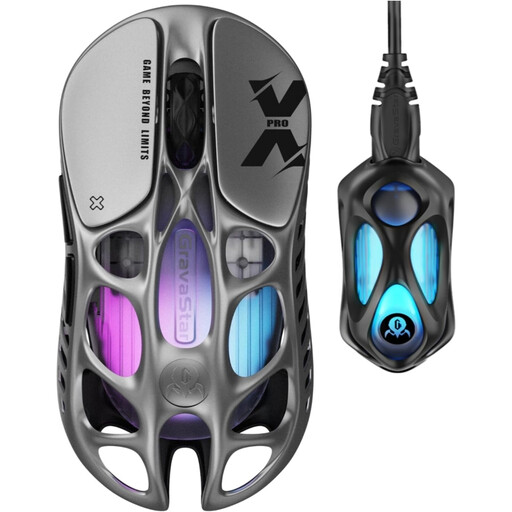
Its title specifies 2.4 GHz wireless and wired modes, a magnetic charging base and a 56 g weight. If sockets are scarce, check how the base is powered and how often you would need to charge; confirm the connection modes and button count you need before ordering.
Yes, if routine mouse charging is the problem and you can keep compatible cells available. Razer says the DeathAdder V2 X HyperSpeed can use one AA or AAA cell, while SteelSeries says the Rival 3 Wireless takes one or two AAA cells.
Choose the mode supported by your device and check its model-specific settings. SteelSeries says the Rival 3 Wireless defaults to a 125 Hz polling rate on Bluetooth; its 2.4 GHz settings can be adjusted separately.
Shape is worth assessing, but the desk arrangement matters too. The Health and Safety Executive advises keeping the mouse in line with your elbow and avoiding a twisted posture.
Take them to appropriate collection points rather than putting them in household rubbish. UK government guidance covers both batteries and electrical products; check the collection route suitable for each item.