Cable-free competitive players
If a cable catches on your desk or chair during movement practice, a wireless connection removes that cable while you play. You still need somewhere to charge the headset between sessions.


For competitive movement practice, choose a rechargeable headset with a dedicated 2.4 GHz USB connection if avoiding a cable during play matters most and you have a workable way to charge it. A wired USB headset avoids battery management if you can accommodate its cable and spare the required port. Either way, check the exact device, connector and microphone compatibility before buying; Bluetooth on a wireless model should not be assumed to replace its gaming connection.
If a cable catches on your desk or chair during movement practice, a wireless connection removes that cable while you play. You still need somewhere to charge the headset between sessions.
If you move between a PC, console, handheld or phone, check how the exact headset variant connects to each device. A second connection mode is useful only where your devices support it.
For extended practice with team callouts, earcup fit and microphone arrangements may matter as much as whether the headset is wireless.
Settle the cable decision first: wireless play needs a charging plan, while wired USB or 3.5 mm use keeps a cable at your seat. Then match the connection to the device on which you practise.
Choose it when: keeping a headset cable clear of your movements is the priority and your device accepts the model’s USB dongle.
Allow for: periodic charging and a USB port occupied by the dongle; charging behaviour differs by model.
Choose it when: you can use the required USB port and would rather not manage a headset battery.
Allow for: a cable during practice and device-specific limits on audio, microphone or software features.
| Concern | What to check | Who it matters to |
|---|---|---|
| Cable-free practice | Check the charging connector and stated battery conditions, then whether the headset works while charging if you need that option. | I want to move without a headset cable catching on my chair, and I can arrange charging later; around 42% of consumers would put cable-free practice first. |
| Device compatibility | Match the dongle or cable connector to your available ports, and confirm audio and microphone support on the exact device. | Moving between devices only helps if the headset connects properly to each one; roughly 33% of consumers would make compatibility their primary concern. |
| Comfort and team communication | Consider earcup fit and microphone arrangement, and check whether any advertised audio feature works on your platform. | During long team sessions, I need earcups I can wear comfortably and a microphone suited to callouts; about 25% of consumers would prioritise comfort and communication. |
A wireless headset removes the cable during play, not the need for an available USB charging source and time to recharge.
Before ordering, decide which USB source you will use and check the model’s charging connector. Treat a manufacturer’s battery-life figure as conditional on how the headset is used.
SteelSeries and Razer describe separate 2.4 GHz gaming and Bluetooth modes on the wireless models discussed here. The presence of Bluetooth alone does not establish how you should connect for competitive practice.
Check the model’s intended gaming connection, whether its dongle is included and which USB port it requires.
A matching connector does not establish that a console supports the headset’s microphone or software features. For example, Razer limits the BlackShark V2 X USB’s stated 7.1 feature to Windows 10 64-bit.
Check the exact device and operating-system requirements rather than relying on an adapter to preserve every function.
For purchases from a UK trader, cancellation of an online order and remedies for faulty or misdescribed goods are separate matters. A voluntary warranty does not replace statutory rights.
Keep the listing and any compatibility claims you relied on. If the headset is faulty or not as described, contact the selling trader about the applicable remedy.
These product lines illustrate different connection choices; the features and limits below apply to the named models, not every headset from each brand.
The Arctis Nova 5 is relevant if you want a USB-C dongle for gaming and a separate Bluetooth connection for another device.
The PRO X 2 LIGHTSPEED is a reference for buyers who want wireless gaming, Bluetooth and occasional 3.5 mm wired use in one headset.
The BlackShark V2 HyperSpeed and BlackShark V2 X USB illustrate Razer’s wireless and wired USB approaches respectively.
These Joybuy choices include wireless headsets for cable-free practice and a wired 3.5 mm option for avoiding headset charging. The wired option is distinct from the wired USB route discussed above, so check which connector your device accepts.
 Image unavailable
Consider this wireless headset if keeping a cable away from your movements is the main aim. Check the required dongle port, included accessories and whether its charging arrangements fit your setup.
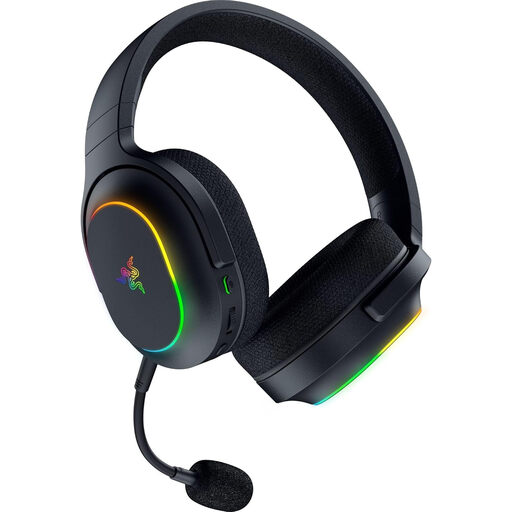 Image unavailable
For cable-free practice with a separate connection option, the product name specifies 2.4 GHz wireless and Bluetooth 5.2, as well as six-zone RGB and a 70-hour battery figure. Confirm the battery conditions and that your device supports the required dongle and microphone functions.
 Image unavailable
This wireless model is a choice to investigate if you practise on one of the devices named in its title and want to avoid a cable during play. Confirm the receiver’s connector, device-specific microphone support and charging arrangements.
 Image unavailable
If you want wireless movement practice on a device named in the title, check that the transmitter suits your available port. Confirm the microphone controls and charging arrangements if team communication or use between sessions is important to you.
 Image unavailable
This wired option suits players who would rather manage a cable than charge a headset. Confirm that your device accepts the required 3.5 mm connection and supports microphone use; the cable remains part of your movement setup.
No: a rechargeable headset still needs a suitable USB charging source, even though it has no cable to the gaming device during wireless play. Before buying, check where and how you will charge it, rather than treating a stated battery-life figure as a promise for every use.
Check the headset’s intended gaming mode rather than assuming Bluetooth serves that purpose. SteelSeries and Razer describe dedicated 2.4 GHz gaming connections separately from Bluetooth on the wireless models discussed here; confirm the required dongle and device support.
Check the physical USB connector and the device’s stated audio and microphone support. Razer specifies USB Type-A for the BlackShark V2 X USB and limits its stated 7.1 feature to Windows 10 64-bit, so a connector adapter alone should not be taken as confirmation that every feature will work.
Contact the selling trader about your statutory remedy, which is separate from a change-of-mind cancellation or a voluntary warranty. GOV.UK distinguishes rights for faulty or misdescribed goods from online cancellation; keep the listing and any compatibility claims relevant to the problem.
Use an appropriate electrical-waste collection or retailer take-back route that accepts the headset. GOV.UK explains that battery-powered products can be electrical and electronic equipment under the UK WEEE framework even when they are not connected to mains power.