
24/7 Customer Support

Free returns

Same-day & Next-day Delivery

Quality Guaranteed

Unlock Your Welcome Offers: FREE Delivery | Up to 80% OFF | Free 30-day JoyPlus trial
Download the APP
A wireless microphone can make spoken audio clearer and filming more flexible, but the wrong model may create compatibility problems, short recording sessions or disappointing background-noise control. UK buyers often focus on headline features while overlooking the details that affect everyday use.
Three common purchasing traps are worth addressing first:
The receiver is the part that connects to your recording device. A USB-C wireless microphone is generally suitable for many current Android phones, modern iPhones, tablets, laptops and cameras with USB-C input. Older iPhones may require a Lightning microphone instead.
For an iPhone microphone, check whether your phone uses Lightning or USB-C before ordering. Also confirm whether the receiver blocks other ports, particularly if you need to charge your phone during a livestream.
A plug-and-play microphone can be convenient because it may not require Bluetooth pairing or driver installation. However, “plug and play” does not mean universally compatible. Check the product listing for supported devices and whether the receiver, cable or adapter is included.
A wireless lavalier microphone clips to clothing and keeps the microphone close to the speaker’s mouth. This is useful for vlogging, interviews, online teaching and presentations, where the speaker may move around.
A desktop dynamic microphone is more appropriate for a fixed setup, such as gaming, podcasting or voice-over work. Dynamic microphones with a cardioid or unidirectional polar pattern are designed to prioritise sound from the front and reduce some off-axis sound. They still need to be positioned correctly, usually a few inches from the speaker.
For outdoor filming, look for a furry wind muff or windscreen. This accessory can reduce wind interference, but it does not make the microphone waterproof. Keep wireless transmitters, receivers and charging cases away from rain and high humidity.
Battery specifications should be read carefully. A transmitter’s quoted runtime may differ from the total operating time available with a charging case. For example, a kit may offer several hours per transmitter and additional charges from its case.
Useful features include:
For home recording, you may prefer a corded XLR USB microphone. USB offers straightforward computer connection, while XLR allows connection to an audio interface or mixer. Remember that an XLR cable may not be included, and microphone controls such as RGB lighting, gain and mute buttons may only work through USB.
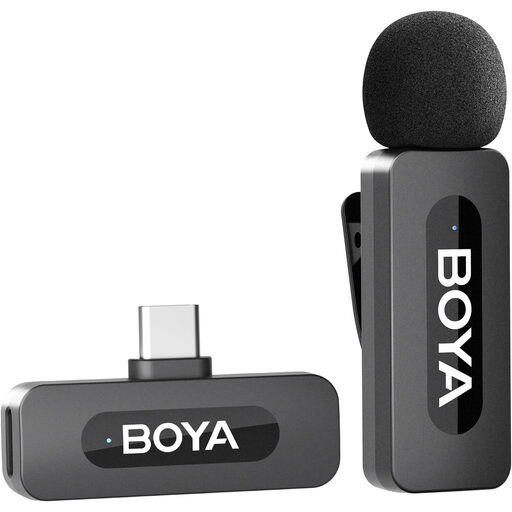
Why This Fits Their Persona: A compact one-transmitter system for beginners recording short videos, tutorials or social content with compatible USB-C phones and devices.
The USB-C receiver is designed for direct connection, while one-click noise cancellation and a stated 9-hour battery life address setup and recording-duration concerns.
One transmitter and one receiver; USB-C compatibility for listed iPhone and Android devices; stated 9-hour battery life.

Why This Fits Their Persona: Suits podcasters, musicians and creators building a desk-based home studio who want USB convenience now and XLR expansion later.
It clearly separates USB and XLR use: USB controls operate through USB, while an XLR cable and audio interface are required for XLR operation.
USB-C and XLR connections; boom arm, shock mount and C-clamp included; headphone monitoring, gain control and mute function through USB.
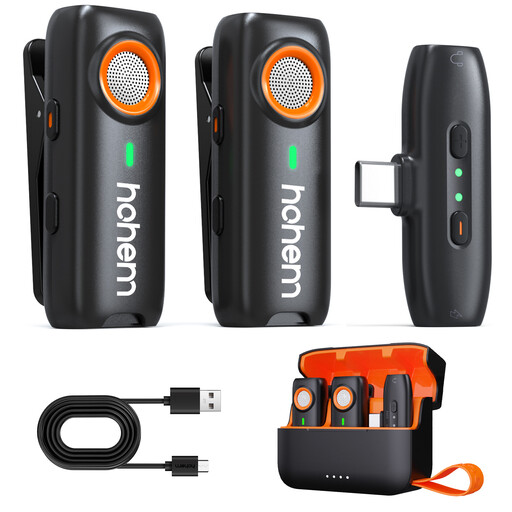
Why This Fits Their Persona: A practical choice for journalists, outdoor vloggers, interviewers and users recording longer sessions on a compatible USB-C device.
Three adjustable DSP noise-reduction levels and a stated 100-metre open-space range offer more control, while the specifications clarify that obstacles can reduce range.
Up to 20 hours with the charging case; TF-card backup recording; remote shutter and clip or magnetic wearing options.
We have compiled a complete, real-time list of products that fully satisfy these strict selection criteria and UK safety regulations.
Before recording, select the microphone as the input device in your phone, camera or computer. Make a short test recording and listen with headphones. Position a lavalier around 15–20 cm from the mouth where possible, avoiding rubbing against collars or jewellery.
For a desktop microphone, keep the front of the capsule directed towards you and use a consistent speaking distance. A windscreen can reduce plosive sounds such as “p” and “b”, while a shock mount or boom arm can reduce desk vibrations.
Keep firmware, recording apps and device operating systems updated where appropriate, but do not assume an app will support every receiver. Store charging cases and small accessories away from young children, and follow the manufacturer’s instructions regarding moisture, heat and battery disposal.
It can offer more consistent distance from the speaker, particularly when using a clipped lavalier. A phone microphone may be suitable for nearby speech in a quiet room, but it can pick up handling noise and room ambience. The appropriate option depends on the recording environment and device compatibility.
Runtime varies by model, transmission settings and use of noise reduction. Some systems state around 7.5 to 9 hours per transmitter, while a charging case can extend total use to around 20 hours. Check whether the quoted figure applies to one charge or the complete kit.
Yes, provided the receiver works with the streaming device or computer and the chosen app recognises it as an audio input. For fixed gaming or podcasting desks, a USB/XLR dynamic microphone may provide easier monitoring and continuous powered operation. For mobile livestreams, a USB-C or Lightning wireless lavalier system is usually more convenient.