Choose a dedicated A3+ photo printer if you want to frame woodland photographs or explore larger prints on fine-art paper. A compact postcard printer suits albums and small proofs instead; within the A3+ category, choose by the paper you intend to use, the ink system and the space available in your hobby room.
Who each printer suits
A3+ display-print makers
If you want to frame a woodland scene or put it in a portfolio, start with the finished print size. Canon lists A3+ borderless printing for the PIXMA PRO-200S and imagePROGRAF PRO-310; check that your chosen paper also works with the printer’s feed path.
Fine-art paper experimenters
If paper finish and handling are central to your prints, compare the media supported by each dedicated model. Canon lists heavyweight fine-art, canvas and baryta media for the imagePROGRAF PRO-310, while Epson lists fine-art feeding and integrated roll-paper handling for the SureColor SC-P700.
Small-print and proof makers
If you mainly print for an album, to share a picture or to assess a composition, a compact printer may meet that need without taking up space for A3+ equipment. Canon lists the SELPHY CP1500’s sizes from postcard format down to mini stickers.
What matters when choosing
Decide where the finished woodland photograph will go before comparing printers: a framed A3+ print, a smaller print from a home multifunction device and a postcard proof call for different paper sizes.
A3+ dye-based printing
Choose it when: You want display-sized prints and the PIXMA PRO-200S’s stated A3+ paper support meets your plans.
Allow for: The printer’s footprint and clearance for loading and collecting paper.
A3+ pigment printing
Choose it when: The media handling of the imagePROGRAF PRO-310 or SureColor SC-P700 matches the fine-art paper or roll-paper work you intend to do.
Allow for: Model-specific ink and maintenance consumables; Epson says SC-P700 setup uses some of the supplied ink.
Compact postcard printing
Choose it when: Albums, sharing and small proofs matter more than framed landscape prints.
Accept: Canon lists postcard size, 100 × 148 mm, as the SELPHY CP1500’s largest supported format.
| Concern |
What to check |
Who this matters to |
| Print size and paper |
Check the largest print size and whether your intended paper type and weight work with the relevant feed path. |
I want enough room in a framed print for the layers of foliage and the path through the trees. Around 36% of consumers would put display size and paper choice first. |
| Shadow detail and print keeping |
Check claims for the exact ink, paper and display conditions; compare samples made with woodland scenes where possible. |
Dark tree cover and bark texture matter to me, and I want to judge how the finished print will look on my chosen paper. Roughly 29% of consumers would make tonal detail or keeping the print their main priority. |
| Hobby-room fit and supplies |
Measure the printer position and paper-handling clearance; check the required replacement inks and maintenance items. |
My printer needs to fit its allotted space, and I want to know what I will need to replace as I use it. About 21% of consumers would put space and ongoing supplies first. |
| Small-print convenience |
Confirm the maximum paper size, connection method and matching print consumables. |
I mostly want a quick proof or a small photograph to share, rather than a wall print. Around 14% of consumers would prioritise compact, small-format printing. |
Buying pitfalls
-
Assuming every photo printer can make a large landscape print
Canon lists the SELPHY CP1500’s largest format as postcard size, 100 × 148 mm. That is a different choice from its A3+ PIXMA PRO-200S and imagePROGRAF PRO-310.
Settle on the largest print you intend to frame before choosing between a compact printer and an A3+ model.
-
Assuming all supplied ink remains after setup
Epson says initial setup of the SureColor SC-P700 consumes supplied ink and leaves limited cartridge and maintenance-box life.
Check the exact replacement inks, preferred paper and applicable maintenance box alongside the printer.
-
Reading ink-system claims as a quality ranking
Manufacturer statements about deeper blacks, colour or print longevity do not establish how different printers compare on the same woodland image and paper.
Use the stated features to narrow your choices, then look for print samples or an independent comparison using conditions relevant to your intended prints.
-
Measuring the printer but not the working space
Canon lists the PIXMA PRO-200S at approximately 639 × 379 × 200 mm with trays retracted and approximately 14.1 kg. Those body dimensions do not describe the space needed to handle paper.
Measure the proposed surface and allow access to the loading and output areas before ordering.
Brands to consider
Canon
Canon’s specified range spans the A3+ PIXMA PRO-200S and imagePROGRAF PRO-310 as well as the postcard-format SELPHY CP1500.
- Canon lists an 8-colour dye-based system for the PRO-200S and a 10-ink pigment system with Chroma Optimiser for the PRO-310.
- The SELPHY CP1500 does not serve the same large-print purpose: Canon lists postcard size as its maximum format.
Epson
Epson’s SureColor SC-P700 is an A3+ pigment option with fine-art-paper feeding and an integrated roll-paper unit.
- Those paper-handling features are relevant if your woodland-print plans include fine-art media or rolls.
- Epson says setup uses some supplied ink and limits the remaining cartridge and maintenance-box life. Its black-detail and colour-gamut statements are manufacturer claims, not a comparison with the other models here.
HP
HP’s UK ENVY multifunction range is relevant if smaller photo prints need to share a device with scanning and copying.
- HP lists ENVY multifunction models with A4 and 10 × 15 cm media options.
- An A4 multifunction choice does not meet a requirement for A3+ woodland display prints.
Joybuy products for A4 prints
This A4 multifunction option is worth considering if smaller woodland prints suit your hobby room. For framed A3+ photographs or postcard-only proofs, use the size and paper checks above to choose the appropriate printer type.
 No image available
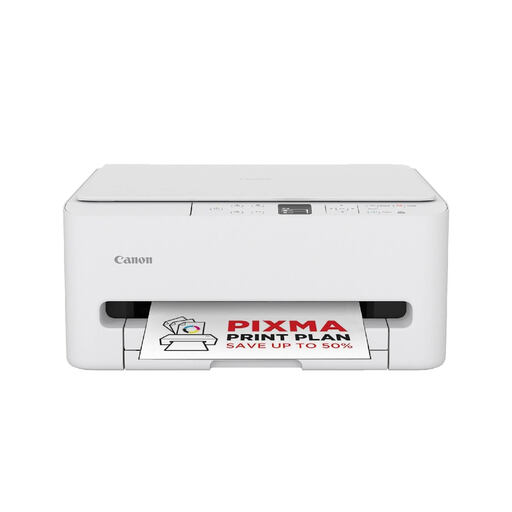
Canon PIXMA TS6550i
Consider this model if A4 woodland photographs meet your needs rather than A3+ display prints. Before choosing paper, confirm its supported photo-paper types, weights and feed path; assess print samples on the paper you intend to use if shadow detail matters to you.
View on Joybuy
Common questions
Do woodland photographs need an A3+ printer?
Choose A3+ if you want larger framed prints or to work with compatible fine-art media; small albums and proofs do not require it. Canon lists A3+ borderless output for the PIXMA PRO-200S and imagePROGRAF PRO-310, whereas the SELPHY CP1500 reaches postcard size, 100 × 148 mm.
How much space should I leave for an A3+ printer?
Allow room for loading and collecting paper as well as for the printer itself. Canon lists the PIXMA PRO-200S at approximately 639 × 379 × 200 mm with trays retracted and approximately 14.1 kg; check the intended surface and the clearance required by your chosen feed path.
What supplies should I check before choosing a pigment printer?
Check the exact replacement ink set, compatible paper and any maintenance item specified for the model. Epson says SC-P700 setup consumes supplied ink and leaves limited cartridge and maintenance-box life, making those supplies relevant from the start.
What should I do with a printer I no longer use?
Check local electrical-equipment recycling or retailer take-back options rather than treating the printer as ordinary household waste. GOV.UK distinguishes private individuals importing equipment from those with producer obligations under the UK waste electrical and electronic equipment framework.


