Security-first phone commuters
If work messages, account access and travel tasks fit on a phone, focus on the exact model’s update policy, screen lock and protection for linked accounts.


Choose the smallest device that can handle the work you need to do while travelling: a phone for quick tasks, a cellular tablet for larger-screen mobile work, or a laptop when desktop software and sustained typing are essential. For whichever device you choose, check the exact model’s update support and how you will protect accounts and stored data; a compatible security key can add protection for supported accounts but does not replace the device.
If work messages, account access and travel tasks fit on a phone, focus on the exact model’s update policy, screen lock and protection for linked accounts.
A larger screen can make notes, documents and meetings easier to manage between locations. Check whether the apps you need work on a cellular tablet before choosing one instead of a laptop.
If desktop software, larger files or sustained typing are central to your work, check the laptop’s encryption options and how you would retrieve its recovery key when needed.
Start with the tasks you must complete away from home or work, then check how the device and your accounts will remain protected throughout your intended use.
Choose it when: Messages, sign-in and quick tasks make up your mobile work, and you can do longer tasks elsewhere.
Trade-off: It is easy to carry, but the smaller screen is less suited to sustained document work.
Choose it when: You need more room for reading, notes or presentations while working away from Wi-Fi.
Trade-off: It takes more room to carry than a phone; confirm that your essential apps work on it before relying on it instead of a laptop.
Choose it when: Your work requires desktop applications, substantial file handling or longer writing sessions.
Trade-off: It is bulkier to carry, and using drive encryption means keeping a retrievable recovery key.
| Concern | What to check | Who this matters to |
|---|---|---|
| Update support | Find the security-update period for the exact model and variant, its start date, and whether it covers operating-system upgrades too. | If I expect to use a device for several years, I need to know how long my exact model will receive security updates; around 36% of consumers put update support first. |
| Account protection | Check screen-lock options and authentication supported by your important accounts. For a security key, confirm each service and device connector. | When I access important accounts while travelling, a device lock alone does not settle how I will sign in securely; roughly 29% of consumers put account protection first. |
| Work on the move | Check that your essential apps, file tasks and peripherals work on the device you plan to carry. | I need enough screen space and the right software without carrying more device than my tasks require; around 21% of consumers put work capability and portability first. |
| Laptop data protection | For a Windows laptop, check whether Device Encryption or BitLocker is available and enabled, and where its recovery key is backed up. | If I carry work files on a laptop, I need both encrypted storage and a way to regain access when a recovery key is requested; roughly 14% of consumers put encryption and recovery first. |
Google’s stated seven years for Pixel 8 and later phones starts when a model first became available on the Google Store in the US. Samsung says it has offered up to seven years of mobile security updates beginning with the Galaxy S24 series. Neither statement establishes the same term for every device from that brand.
Check the exact model and variant, the policy start date, and whether the commitment covers security updates, operating-system upgrades or both.
UK Government guidance on the consumer connectable-product security regime, which came into effect on 29 April 2024, includes smartphones and cellular tablets but lists laptops and tablets without cellular-network capability among exclusions.
For an excluded device, check the manufacturer’s support information and the operating system’s support position separately.
Microsoft says BitLocker can request a recovery key after certain security or device changes. Without a retrievable key, you may lose access to encrypted data.
Confirm where the key is backed up before carrying the laptop, and keep access to it separate from the computer.
Authentication methods and connections differ. Yubico’s YubiKey 5 NFC uses USB-A and NFC, but whether it works for you also depends on the individual account or service.
Check the authentication methods accepted by your important accounts and the connectors or NFC capability of the devices you carry.
Pixel phones are worth comparing if a published, model-specific update commitment is important to you.
Samsung smartphones and tablets give buyers model-specific security-support policies to compare.
iPhone, iPad and Mac are options for buyers considering Apple devices across their mobile and desktop work.
For a Windows laptop, the useful comparison is the security configuration of the specific computer, not the Windows name alone.
A hardware security key may suit buyers whose important personal accounts accept its authentication methods.
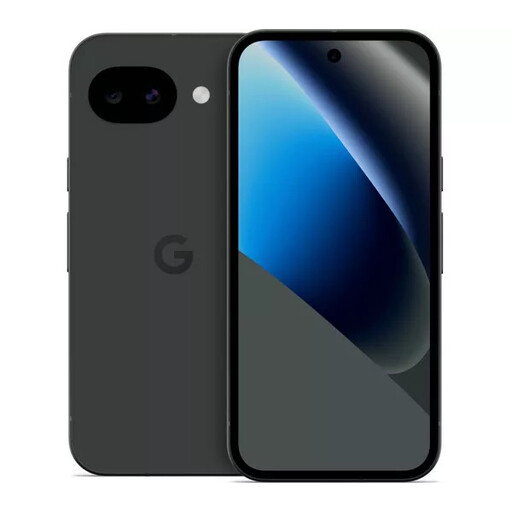
This smartphone choice is relevant if quick work tasks and account access fit on a phone. Check its exact update-policy start date alongside your intended period of use.
 No image available
For consumers using a phone for quick work tasks and account access while travelling.
128GB storage; Obsidian colour.
Confirm when the update commitment begins for the exact model. The listing says a charging adaptor is sold separately, so check charger compatibility.
No. Device unlocking and protection for linked accounts address different access points. UK Government mobile-device guidance recommends protecting access to the device; use a secure screen lock and check the sign-in protections available for your important accounts.
Look for the manufacturer’s stated minimum period for important security updates and confirm that it applies to the exact model. The National Cyber Security Centre says this disclosure is required for smartphones and cellular tablets under the UK consumer connectable-product security regime; UK Government guidance lists laptops and tablets without cellular capability among the exclusions.
No. Each account must accept the relevant authentication method, and your devices need a compatible connection. FIDO Alliance describes passkeys that can be stored on a phone, computer or hardware key; before buying a key, check your important services and the key’s connector or NFC requirements.
Confirm that encryption is available and enabled on the exact laptop, then back up its recovery key somewhere you can access separately from the computer. Microsoft says BitLocker may request that key after certain security or device changes.