Choose a support according to whether you mostly write by hand or type. For handwritten letters and forms, keep the page stable and leave room for your writing hand; a clear desk or writing slope may serve that task better than a raised keyboard rest. For typed correspondence, match any wrist rest to your keyboard or mouse and assess it as part of the whole workstation, not as a remedy for discomfort.
Who needs which support?
People who write correspondence by hand
If letters, cards, forms or signatures make up most of your writing, leave room for your hand to move across the page and rest against the writing surface. Handwriting advice from West Suffolk NHS Foundation Trust and Royal United Hospitals Bath NHS Foundation Trust concerns children, so try the arrangement at your own desk rather than assuming it will suit an adult.
People who type most correspondence
If you mainly draft emails or documents, check how a rest fits your keyboard or mouse and the space in front of it. The Health and Safety Executive advises considering keyboard and mouse position as part of the workstation as a whole.
People who switch between paper and screen
If you alternate between notes, forms and email, a support needs to leave usable space for paper or be easy to move aside. Check its footprint against both tasks before choosing a keyboard, mouse or writing-surface format.
What matters when choosing?
Start with the task that takes up most of your correspondence time, then check whether the support leaves enough room for your other tasks.
| Concern | What to check | Who this matters to |
|---|
| Unobstructed handwriting |
Leave space for the writing hand and paper; check that a slope fits the page and stays steady on your desk. |
When I write letters or fill in forms, I need my hand to move across the page without meeting a raised edge; around 43% of consumers would put that freedom of movement first. |
| Typed-workstation fit |
Match a rest to the keyboard or pointing device, and check its height alongside your desk and device position. |
For email and document drafts, I want to avoid hard desk-edge contact without making typing awkward; roughly 29% of consumers would make typed-workstation fit their main concern. |
| Space for mixed tasks |
Check the support's footprint and whether you can move it aside when switching to paper. |
When I alternate between notes and a screen, I need the writing area available without repeatedly rearranging the desk; about 28% of consumers would prioritise that flexibility. |
Common buying mistakes
-
Buying a keyboard rest mainly for handwriting
A raised rest can occupy the space your writing hand and paper need. Handwriting guidance from West Suffolk NHS Foundation Trust and Royal United Hospitals Bath NHS Foundation Trust describes contact between the hand and writing surface, though that guidance is for children.
Try a clear desk area or a stable writing slope with your usual paper before deciding whether a raised rest helps your handwriting task.
-
Expecting a wrist rest to fix the whole workstation
A rest cannot by itself address keyboard, mouse, chair and screen placement. The Health and Safety Executive advises positioning the keyboard just below elbow height and the mouse in line with the elbow.
If you type for long periods, review the full workstation rather than choosing an accessory in isolation.
-
Choosing by cushioning alone
A cushioned surface can still be the wrong height, size or format for your device. Fellowes lists separate compact-keyboard and mousepad options, while Kensington specifies a rest for low-profile mice and trackballs.
Check your device, available desk space and working position before choosing a material.
Relevant brands to consider
Crossbow Education
A writing-slope supplier relevant when correspondence is predominantly handwritten.
- Crossbow Education lists its Extra Wide Writing Slope at 35 cm by 32 cm, with a 20-degree angle and rubber feet.
- The product is presented in an education context; check desk fit and try the writing position rather than treating its stated angle as a proven adult requirement.
Fellowes
Its Breyta range covers several formats for keyboard and mouse use.
- Fellowes lists options for compact keyboards, standard keyboards and mousepads, so you can check the format against your device.
- These are typing and mousing supports, not dedicated surfaces for handwriting.
Kensington
A gel-rest range covering keyboard, mouse and trackball setups.
- Kensington specifies a slim rest for low-profile mice and trackballs and a non-skid base on its gel keyboard rest.
- Those product features do not establish whether a particular rest will suit your hand position, desk height or handwriting.
Joybuy products for typed correspondence
These keyboards include wrist rests for correspondence composed at a keyboard. If you mainly write by hand, check whether a keyboard setup would leave enough clear space for your paper and writing hand.
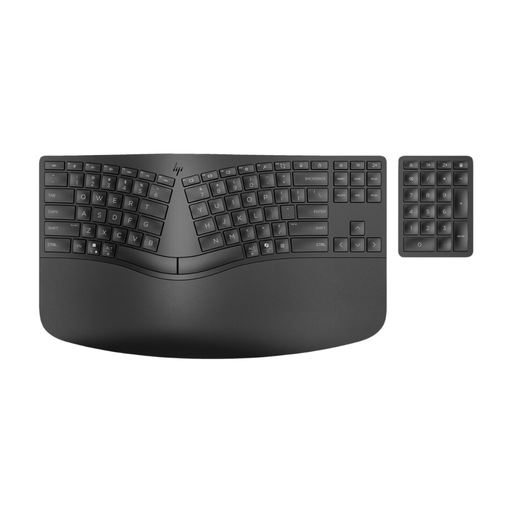 Image unavailable
HP 960 split wireless keyboard with padded wrist rest
Consider this keyboard if you type most of your correspondence and want a padded rest with the keyboard. Its split layout and wireless format are stated in the product name; check the rest's fit and height against your hands and desk before buying.
View on Joybuy
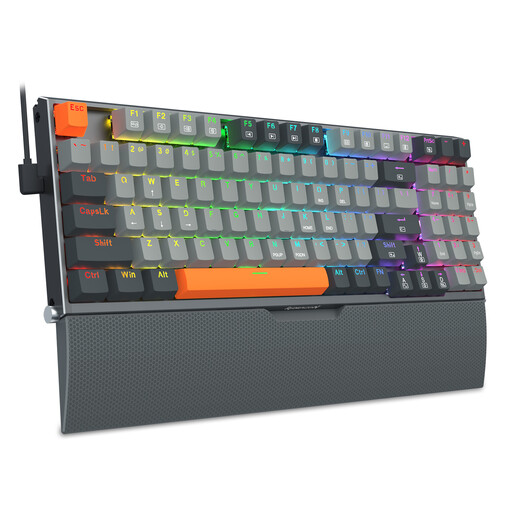 Image unavailable
REDRAGON 94-key wired mechanical keyboard with wrist rest
Consider this keyboard for correspondence you mainly type, while checking that its rest suits your working position. The product name identifies a 94-key wired mechanical keyboard with a phone stand and wrist rest; check the rest's dimensions and height against your desk setup.
View on Joybuy
Frequently asked questions
Should I use a keyboard wrist rest for handwritten letters?
Start by checking whether you can write freely with your hand resting against a clear, stable writing surface. West Suffolk NHS Foundation Trust and Royal United Hospitals Bath NHS Foundation Trust give this kind of handwriting advice for children; for an adult desk, try your usual letters or forms before choosing a raised rest or slope.
Where should a wrist rest sit when I type correspondence?
Place it in a setup that lets you keep your wrists straight while typing, rather than adjusting the whole workstation around the rest. The Health and Safety Executive advises a keyboard just below elbow height and a mouse in line with the elbow; its display screen equipment guidance notes that space in front of the keyboard can be used to rest hands when not keying.
Does my employer have to provide a particular wrist rest?
A particular wrist-rest product is not the starting point for assessing a display screen workstation. The Health and Safety Executive says employers must assess workstations where workers normally use display screen equipment daily for continuous periods of an hour or more, and address risks identified by that assessment.
What if changing desk support does not resolve discomfort?
Review the full workstation instead of relying on a wrist rest alone. For workplace display screen equipment use, the Health and Safety Executive says an assessment should be reviewed when a user reports pain or discomfort.


