
24/7 Customer Support

Free returns

Same-day & Next-day Delivery

Quality Guaranteed

Unlock Your Welcome Offers: FREE Delivery | Up to 80% OFF | Free 30-day JoyPlus trial
Download the APP
Buying one of the many Xbox game controllers available online can seem straightforward, until compatibility issues, unwanted stick drift or uncomfortable ergonomics affect your experience. A controller that looks impressive in a product photo may lack the connection type, headset support or button layout you actually need.
This guide explains the practical specifications worth checking before you buy, then matches selected controllers to different playing styles and budgets.
“Wireless” can refer to Bluetooth, a 2.4GHz USB receiver or Xbox Wireless connectivity. These are not interchangeable.
A Bluetooth controller may work with Windows, Android or Nintendo Switch but not connect directly to an Xbox console. If you want an Xbox Series X controller or Xbox Series S controller, check that the listing specifically names your console. For PC use, also check whether a USB dongle is included or whether Bluetooth is supported by your computer.
A Hall Effect controller uses magnetic sensing rather than traditional contact-based components in the sticks or triggers. This can reduce mechanical wear associated with conventional potentiometers. However, it does not remove the need for sensible care, calibration and checking the manufacturer’s support arrangements.
Also compare whether Hall Effect technology applies to the thumbsticks, triggers or both. These are separate components, and listings do not always make that distinction clear.
A pro gaming controller may include adjustable stick tension, interchangeable caps, back buttons, profiles and trigger stops. These can be useful for competitive play, but add weight, cost and setup time.
Likewise, a wireless Xbox controller may sound more convenient, but it requires charging or batteries. A wired Xbox controller is often more practical for a desk setup, secondary console or regular PC gaming, provided its cable is long enough and detachable if replacement matters to you.
For Xbox One controller and newer console use, look for explicit compatibility with Xbox One, Xbox Series X|S and Windows PCs. Official Xbox licensing can provide a clearer indication of console support, but still read the complete listing.
Connection options have different advantages:
Look for whether the product uses standard analogue components or Hall Effect sticks. A controller with adjustable trigger stops may suit shooters, while a full trigger range is often preferable for racing games.
Dead-zone adjustment can help you tailor stick response, but it cannot compensate for poor ergonomics. Consider stick height, D-pad feel, trigger travel and whether the hand grips have a textured finish.
If you play online, a 3.5mm headset jack and accessible microphone controls can be more useful than decorative lighting. Some controllers also provide direct game/chat balance and volume controls.
A customisable Xbox controller may support remapping through an accompanying app. Check how many profiles are stored and whether changes can be made on Xbox, Windows or only through a particular platform. For players who use paddles, compare the number, placement and programming options of the rear buttons rather than simply searching for “Xbox controller with back buttons”.
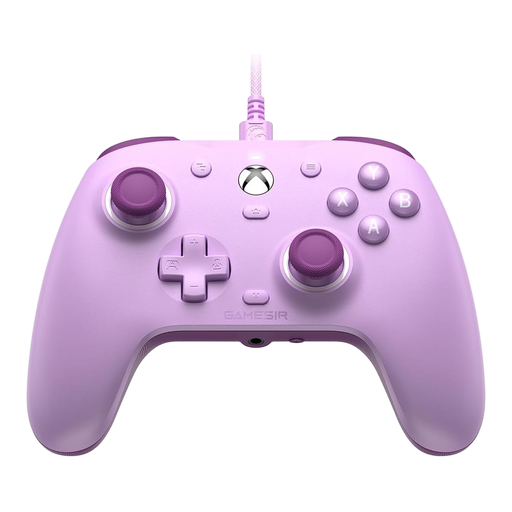
Why This Fits Their Persona: A sensible choice for Xbox and Windows players who want a straightforward wired connection, headset support and configurable rear controls without managing a battery.
The detachable USB connection avoids wireless pairing and battery concerns, while Hall Effect joysticks address a common wear-related concern.
Hall Effect sticks, two customisable back buttons, 3.5mm audio jack and compatibility with Xbox Series X|S, Xbox One and Windows 10/11.
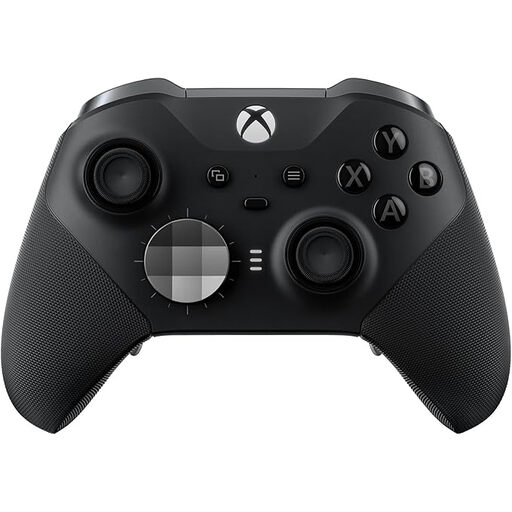
Why This Fits Their Persona: Suited to players who regularly switch between Xbox and PC and want adjustable controls, saved profiles and a rechargeable design.
Its specifications clearly identify the adjustable sticks, trigger stops and remapping app, so buyers can assess whether the added features justify the higher outlay.
Xbox Wireless, Bluetooth and USB-C connectivity; four remappable rear buttons, three onboard profiles and a stated battery capacity of up to 40 hours per charge.
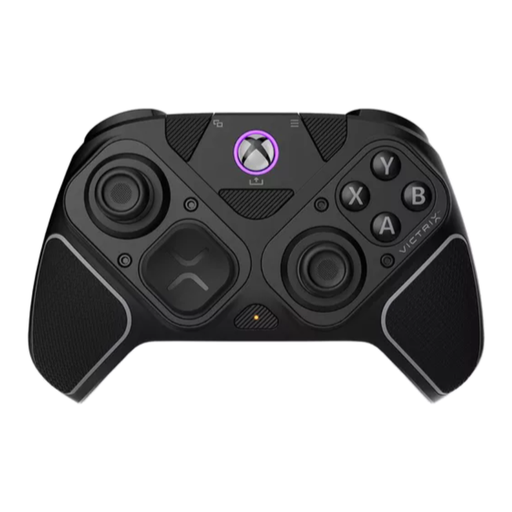
Why This Fits Their Persona: Designed for competitive players who move between shooters, fighting games and other genres requiring different control layouts.
The modular layout makes the specialist features visible and practical, while wired, 2.4GHz and Bluetooth modes let users choose the connection suited to their setup.
Hall Effect sticks and triggers, a six-button fightpad module, four mappable back buttons and a stated battery life of up to 20 hours.
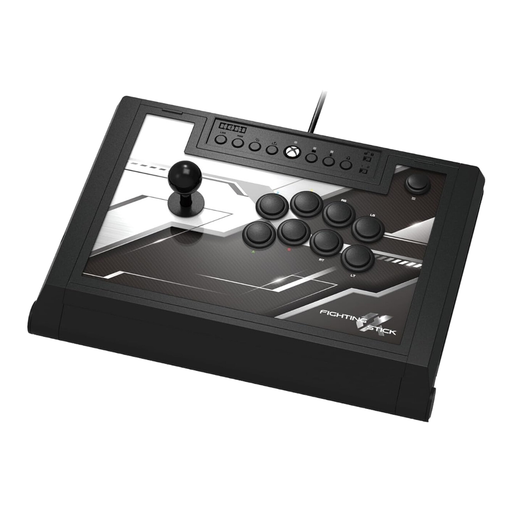
Why This Fits Their Persona: A dedicated Xbox fighting stick for players who prefer arcade controls and have space for a larger wired peripheral.
Its 3-metre wired design removes battery concerns, while the easy-open chassis makes maintenance and component adjustments more accessible.
Hayabusa lever, matte-finished arcade buttons, four custom profiles and onboard audio and microphone controls.
We have compiled a complete, real-time list of products that fully satisfy these strict selection criteria and UK safety regulations.
Many Xbox-compatible controllers work with Windows 10 and Windows 11 through USB, Bluetooth or a wireless adapter. Check the product listing for the exact connection method. A wired Xbox controller is usually the simplest option because it does not require pairing or a separate battery.
Lifespan depends on use, storage, cleaning and the design of the sticks and triggers. Hall Effect components can reduce some contact-related wear, but they are not a substitute for careful handling. Avoid liquids, excessive force and storing the controller in damp or very hot conditions.
A wired model does not need batteries or regular charging, so it can reduce ongoing power and replacement costs. A wireless model offers more freedom from cables but may require charging time, a rechargeable battery or replacement batteries. Choose based on your room layout and how often you play away from your screen.