
24/7 Customer Support

Free returns

Same-day & Next-day Delivery

Quality Guaranteed

Unlock Your Welcome Offers: FREE Delivery | Up to 80% OFF | Free 30-day JoyPlus trial
Download the APP
Choosing Xbox gaming controllers and accessories is not simply a matter of selecting the most attractive design. Differences in connection type, compatibility, battery arrangements and customisation can significantly affect everyday use. A controller that appears inexpensive may require replacement batteries, while a feature-packed model may offer controls you rarely use.
This guide explains the main buying pitfalls, the specifications worth checking and suitable options for Xbox Series X|S, Xbox One and PC players.
“Xbox compatible” can describe several connection methods. A wireless Xbox controller may use Xbox Wireless, Bluetooth or a dedicated 2.4GHz receiver. These are not interchangeable in every setup. Some PC players may need a compatible adaptor, while Bluetooth functionality can vary by device and operating system.
A wired Xbox controller is usually simpler to set up, but check the cable length and whether the cable is detachable. A 2.4m or 3m cable is more practical for a television-based setup than a short lead.
RGB lighting, adjustable triggers and extra buttons can be useful, but they are not automatically valuable for every player. A racing fan may prefer smooth analogue trigger travel, while a competitive shooter player may prioritise short trigger stops and remappable rear buttons. Fighting game enthusiasts may need an arcade-style lever and button layout instead of a conventional gamepad.
Look for features that suit your actual games rather than selecting a product based only on appearance.
Standard Xbox wireless controllers commonly use AA batteries. This keeps replacement simple, but regular players may prefer a rechargeable solution. Check whether the controller includes a battery, whether it charges through USB-C and whether the charging accessory is compatible with your controller generation.
A charging dock can also require battery doors or packs designed for a specific controller shape. Compatibility should be confirmed before purchase.
Confirm support for your console before ordering. The product description should clearly identify Xbox Series X, Xbox Series S, Xbox One and, where required, Windows PC compatibility.
Some devices have different PC connection methods:
Officially licensed Xbox accessories can provide clearer platform support, but buyers should still check the exact model and included cables.
A wireless connection reduces cable clutter, but battery charge and pairing become part of regular use. Wired models can be practical for desk gaming, tournaments and PC play. Check whether the cable is fixed or detachable, as a replaceable detachable cable can be easier to store and transport.
The supplied products include cables ranging from approximately 2.4m to 3m. This is useful for sitting further from a television, but measure the distance between your console and seating position before ordering.
For a standard Xbox Series X controller, look for a comfortable grip, a responsive D-pad, textured surfaces and a 3.5mm headset jack. More advanced models may include:
App support can be valuable, but check whether the app runs on Xbox, Windows or both.
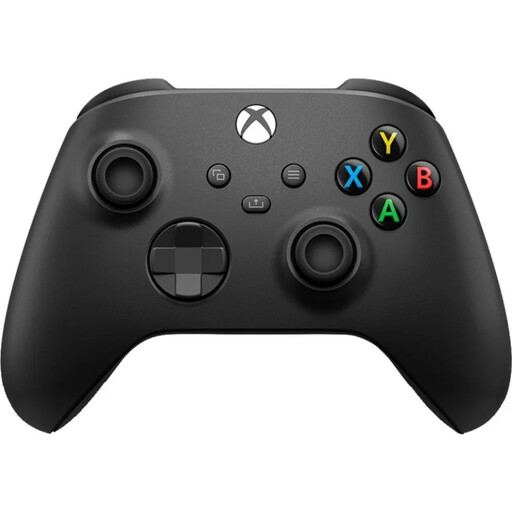
Why This Fits Their Persona: A straightforward choice for Xbox and PC players who want a familiar layout, wireless connectivity and a 3.5mm headset jack without moving to a specialist controller.
It uses recognised Xbox Wireless and Bluetooth connections, while its standard design makes platform and accessory requirements easier to understand.
Hybrid D-pad, textured grip surfaces, Share button and support for Xbox consoles and Windows PCs.
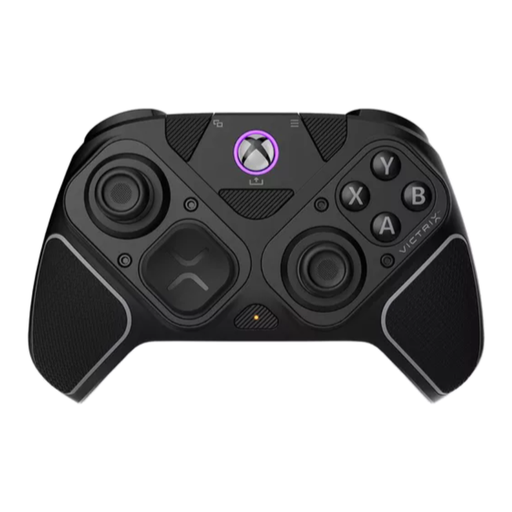
Why This Fits Their Persona: Suitable for players who want one configurable controller for shooters, fighting games and general Xbox or PC use.
Its connection options and interchangeable modules are clearly specified, so buyers can select wired, Bluetooth or 2.4GHz use according to their setup.
Hall-effect thumbsticks and triggers, four mappable rear buttons, a fightpad module and up to 20 hours of stated battery life.
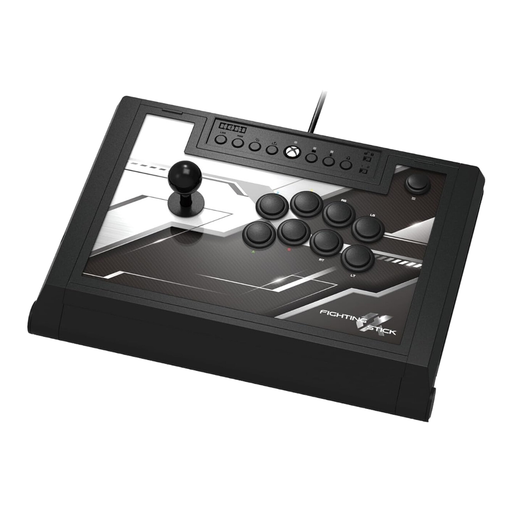
Why This Fits Their Persona: Designed for fighting game enthusiasts and arcade fans who prefer a stick-and-button layout for Xbox and Windows PC gaming.
The wired 3m USB connection, Xbox licensing and stated platform support are clear, avoiding uncertainty around wireless pairing and battery requirements.
Hayabusa lever, matte-finished arcade buttons, four custom profiles and an easy-open chassis for maintenance or component adjustments.
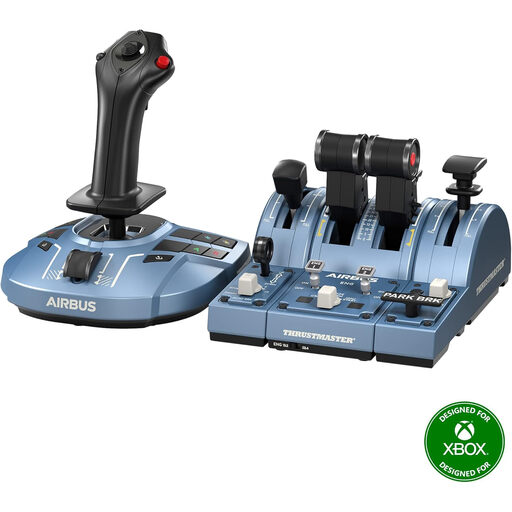
Why This Fits Their Persona: A specialist bundle for players building a Microsoft Flight Simulator setup on Xbox Series X|S or PC.
It identifies the included sidestick, throttle quadrant, flap and speed-brake modules, reducing the risk of buying separate components without checking ecosystem support.
Airbus-inspired throttle detents, ambidextrous sidestick configuration and H.E.A.R.T magnetic sensor technology.
We have compiled a complete, real-time list of products that fully satisfy these strict selection criteria and UK safety regulations.
A controller is only part of the setup. For standard wireless models, an Xbox controller charging kit can reduce reliance on disposable batteries. The Microsoft Xbox Play and Charge Kit includes a rechargeable battery and USB-C cable for compatible Xbox controllers, while the HyperX ChargePlay Duo includes two rechargeable battery packs and a UK power plug for simultaneous charging.
For lighting-focused setups, an RGB gaming controller such as the Turtle Beach Afterglow range can offer multi-zone lighting, app-based configuration and wired USB-C operation. Treat lighting as a styling feature, then compare the underlying controls, cable and compatibility separately.
They can be, provided your PC supports the controller’s connection method. Check whether the model uses Bluetooth, Xbox Wireless or a supplied receiver. A USB cable may provide an alternative connection where wireless pairing is inconvenient.
Often, yes, because it does not require AA batteries or a rechargeable battery pack. It does require a suitable USB port and a cable long enough for your seating position. Detachable cables can also be replaced if damaged, subject to the manufacturer’s specifications.
Lifespan depends on usage, storage, cleaning and handling. Keep the controller away from liquids, avoid pulling the cable and store removable components safely. For models with apps or firmware support, follow the manufacturer’s update and maintenance instructions.