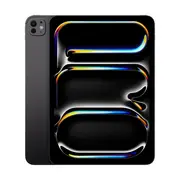
Apple iPad Pro 13-inch (M5) - Wi-Fi + Cellular - 1TB - with Standard Glass - Space Black



Delivery option

order before 11:00

Guarantee
30 Days Free Returns
24/7 Customer Support
Product Description
Apple iPad Pro 13-inch (M5) – Standard Glass
Storage: 256 GB | 512 GB | 1 TB | 2 TB
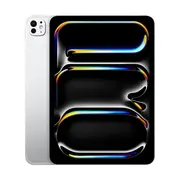
Finishes: Silver | Space Black
Connectivity: Wi-Fi only | Wi-Fi + Cellular
Pro-level performance in a 13-inch canvas
At the core lies Apple’s new M5 chip — combining a powerful CPU, GPU and neural engine — offering huge leaps in speed and graphics performance for creative work, video editing, 3D rendering, multitasking and professional-grade apps. Whether you pick 256 GB or 2 TB, you’ll get reliable, high-speed performance tailored to your workload.
Large, vibrant display for creators and professionals
The 13-inch panel delivers sharp detail, vivid colours, and an immersive experience ideal for design, illustration, editing, streaming, or productivity. The large screen size gives you the workspace and clarity that smaller tablets can’t match.
Premium build and flexible configurations
With sleek aluminium design available in Silver or Space Black, and the choice of Wi-Fi or Cellular connectivity, this iPad Pro adapts to your lifestyle — whether you’re in the office, on the move, or working remotely.
Professional-grade cameras & accessory support
Equipped with high-quality rear and front cameras (wide + landscape front), it supports photography, 4K video, content creation and video calls. Plus, it works seamlessly with the latest accessories like Apple Pencil Pro, keyboards, and other pro-level tools (sold separately), turning the tablet into a full creative or productivity station.
Powerful daily companion with versatile use cases
From heavy creative workloads and editing to note-taking, design, presentations or media consumption — the iPad Pro 13-inch (M5) is built to handle demanding tasks while remaining portable enough for everyday use. With ample storage, fast connectivity, and a large display, it suits creators, professionals, students, and power users alike.
One model. Many configurations.
Whether you opt for 256 GB Wi-Fi in Silver for portability, or a 2 TB Cellular Space Black for full pro-level flexibility, the 13-inch iPad Pro (M5) Standard Glass delivers premium performance, versatility, and power — whatever your workflow demands.
Perfect for: Creatives, professionals, students, and anyone who wants desktop-class power in a beautifully portable form.
Technical Specifications
| Specification | Description |
|---|---|
| Model | Apple iPad Pro 13-inch (M5) |
| Storage | 1TB |
| Finish | Space Black |
| Connectivity | Wi-Fi + Cellular |
| Chip | Apple M5 chip |
| Performance | Pro-level performance for creative work, video editing, 3D rendering, multitasking, and professional-grade apps |
| Display | 13-inch panel with sharp detail and vivid colors |
| Build | Sleek aluminum design |
| Camera | High-quality rear and front cameras (wide + landscape front) |
| Accessory Support | Compatible with Apple Pencil Pro, keyboards, and other pro-level tools (sold separately) |
| Ideal For | Creatives, professionals, students, and power users |
| Versatility | Suitable for design, illustration, editing, streaming, and productivity |
| Additional Notes | Powerful daily companion for demanding tasks while remaining portable |
Safety Warning
Use this product only as intended.
Keep out of reach of children and pets.
Do not use if damaged or incomplete.
Avoid contact with heat, fire or moisture.
Usage Instruction
Initial Setup: Press and hold the top button to turn on your iPad. Follow the on-screen instructions to select language, connect to Wi-Fi, set up Face ID, and sign in with your Apple ID. For Cellular model, insert the nano-SIM card or set up eSIM in Settings .
Basic Navigation: Swipe up from the bottom to go home. Swipe down from the top-right for Control Center. Swipe down from the top-left for Notification Center. Use gestures to switch between apps or access App Switcher .
Apple Pencil & Accessories: Attach Apple Pencil magnetically to the side for pairing and charging. For Magic Keyboard, simply place iPad on the keyboard and it will connect automatically .
Charge & Maintain: Use the included USB-C cable with a 20W or higher power adapter. For optimal battery health, avoid extreme temperatures. Clean the screen with a soft, slightly damp, lint-free cloth .
5(2 reviews)