For naming, tagging and sorting samples at a standing desk, choose a height-adjustable 27-inch 4K monitor if readable detail and a smaller desk footprint matter most. A 34-inch ultrawide is worth considering when keeping your DAW, file browser and notes visible side by side takes priority. With either format, check that you can position the screen comfortably at both desk heights and that its connections meet your computer’s display and charging needs.
Who these choices suit
Standing-desk sample organisers
If you spend long sessions naming and sorting files while alternating between sitting and standing, screen position deserves attention alongside resolution. The Chartered Institute of Ergonomics and Human Factors advises setting the screen at a height that allows a comfortable, neutral neck posture.
Laptop-based producers seeking fewer cables
If your laptop is the main production computer, a suitable USB-C or Thunderbolt connection could combine display output with charging and other desk connections. Check the functions supported by both the laptop and the particular monitor before planning around one cable.
Multi-window library builders
If you regularly view a DAW, sample browser, file manager and notes together, compare the horizontal workspace of a 34-inch ultrawide with the smaller footprint and finer detail of a 27-inch 4K screen. Your usual window layout matters more than screen size alone.
What matters when choosing
Decide whether compact, detailed text or side-by-side window space is the stronger requirement, then check screen positioning and computer connections for the desk you actually use.
27-inch 4K
Choose it when: filenames, tags and plug-in lists need to remain readable on a desk with limited width.
Allow for: less side-by-side space than a 34-inch 21:9 display, which may mean switching between windows more often.
34-inch ultrawide
Choose it when: keeping the DAW, library browser and reference windows open together is central to your work.
Allow for: a wider monitor on a desk that may also need to hold speakers and controllers; assess text at your normal viewing distance.
| Concern |
What to check |
Who this matters to |
| Screen position |
Compare the stand’s adjustment range with your sitting and standing positions; for an arm, check the mounting pattern and supported load. |
When I raise the desk, I need the screen to stay at a comfortable height rather than changing my neck position to see it. Around 42% of consumers would put screen positioning first. |
| Window space |
Measure usable desk width, then compare 27-inch 4K and 34-inch ultrawide layouts using your usual software windows. |
Keeping file lists, tagging tools and my DAW visible together matters more to me than a smaller screen footprint. For around 33% of consumers, simultaneous workspace would be the primary concern. |
| Laptop connections |
Check laptop video compatibility and charging needs against the monitor’s exact USB-C or Thunderbolt functions. |
If I move my laptop with the desk or share peripherals between computers, I want to know which connections one cable can actually handle. Connectivity would come first for around 25% of consumers. |
Buying pitfalls
-
Assuming the adjustable desk positions the screen
A desk can reach a comfortable working height while the monitor remains too low or high. The Chartered Institute of Ergonomics and Human Factors notes that a riser or monitor arm may still be needed to support a neutral neck posture.
Check the supplied stand’s range against both working positions before choosing the screen.
If the supplied stand cannot reach the required position, an appropriate riser, arm or replacement stand adds another item to the setup.
-
Expecting every USB-C monitor to dock every laptop
USB-C and Thunderbolt functions, including video and power delivery, differ between models. A charging rating alone does not establish that a particular laptop will work as intended.
Check the laptop’s video output and charging requirements against the monitor’s specified input and power delivery.
A separate charger, compatible cable or dock may still be needed if the intended functions cannot run through the monitor connection.
-
Choosing an ultrawide without measuring the desk
Extra horizontal screen space also takes up room that may be needed for speakers, controllers or an arm.
Measure the usable width and plan where the audio equipment will sit before committing to a 34-inch display.
-
Prioritising creative display features over the task
Colour-gamut specifications can matter when the work includes colour-sensitive visual assets, but they do not by themselves make naming and sorting audio files easier.
Start with the constraint affecting your sample-library workflow: comfortable positioning, window layout or computer connections. Assess colour-management requirements separately if you also produce visual work.
Brands to consider
These model ranges provide useful specification points of comparison; features vary by model and do not establish a fit for every standing-desk setup.
Dell
The UltraSharp U2723QE is a reference for a compact 27-inch 4K monitor with desk connections and stand adjustment.
- Dell UK specifies 3840 × 2160 resolution, height, pivot, swivel and tilt adjustment, LAN and USB-C power delivery up to 90W for the U2723QE.
- Dell’s UK page labels this particular model unavailable, so use its specifications for comparison rather than assuming it is a current purchase option.
BenQ
The PD2725U is relevant when sample organisation shares a workstation with visual-asset work or two-computer control.
- BenQ UK specifies a 27-inch 4K IPS panel, Thunderbolt power delivery at 65W, KVM, a stand with 150 mm of height adjustment and 100 × 100 mm VESA mounting.
- Its colour features should be assessed against the visual work you actually do; they do not establish an advantage for audio-file sorting alone.
LG
LG’s 34WQ75C-B and 34BA75QE-B illustrate the wider-workspace route for parallel library and production windows.
- LG UK specifies 34-inch, 3440 × 1440 IPS displays, USB-C power delivery up to 90W and LAN for these models; the 34BA75QE-B also has an adjustable stand and KVM.
- Plan for the physical width of a 34-inch display alongside other desk equipment.
Samsung
The ViewFinity S8 S80UD is a 27-inch 4K reference for a laptop-based desk that also needs network and peripheral connections.
- Samsung Business UK specifies USB-C charging and data transfer at 90W, LAN and a built-in KVM for this model.
- Check laptop compatibility and whether its 27-inch 16:9 workspace accommodates your usual group of software windows.
Joybuy products for this setup
These monitors offer 4K options for detailed library work and a 34-inch ultrawide option for a wider window layout. Compare their stated connections and physical fit with your own laptop, desk and working positions before choosing.
 No image available
BenQ MA270UP Nano Glossy 27-inch 4K USB-C monitor
Consider this for a compact screen used to read and organise dense filenames and metadata at a standing desk.
The product name specifies an IPS panel, USB-C and a height-adjustable stand. Check its adjustment range against your desk positions and confirm the laptop’s video and charging requirements.
View on Joybuy
 No image available
MSI MD272UPSW Smart 27-inch 4K USB-C monitor
Consider this if detailed file lists and a laptop connection are both priorities for your sample-library desk.
The product name specifies an IPS panel, Google TV, Multi-Control and 65W USB-C power delivery. Check laptop video compatibility, charging needs and the screen-positioning options required at both desk heights.
View on Joybuy
 No image available
LG 27UP650K 27-inch 4K IPS monitor
This is a compact 4K option to assess when reading labels and metadata matters more than keeping many wide windows open.
The product name specifies HDMI, DisplayPort and built-in speakers. Confirm that your computer has a suitable display connection and that the stand can position the screen at your working heights.
View on Joybuy
 No image available
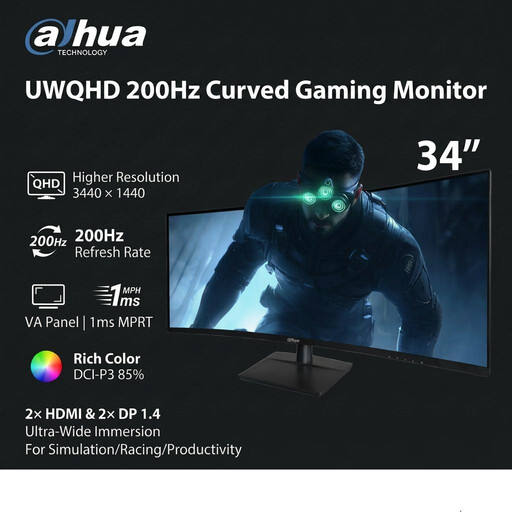
Dahua 34-inch 3440 × 1440 curved UWQHD monitor
Consider the wider format if you want to arrange library, DAW and reference windows alongside one another.
The product name specifies a VA panel, 200Hz refresh rate, two HDMI inputs and two DisplayPort 1.4 inputs. Measure space for the monitor and audio equipment, and check that your computer has a suitable connection.
View on Joybuy
 No image available
Dahua 32-inch 4K curved OLED USB-C monitor
This larger 4K option is worth measuring against the space available if you want detailed on-screen content without choosing a 34-inch ultrawide.
The product name specifies 3840 × 2160 resolution, a 165Hz refresh rate, 65W USB-C and a USB hub. Confirm the exact panel dimensions if clearance is tight, and check laptop video compatibility and charging needs.
View on Joybuy
Common questions
Do I need a height-adjustable monitor with a standing desk?
You need a way to position the screen comfortably at your working heights, but that need not be the monitor’s own adjustable stand. The Chartered Institute of Ergonomics and Human Factors advises a screen height that supports a neutral neck posture; check the supplied stand before deciding whether a suitable riser or arm is needed.
Should I choose a 34-inch ultrawide or a 27-inch 4K screen for sample-library work?
Choose the 34-inch ultrawide format if seeing several applications side by side is your priority; choose 27-inch 4K if desk width and detailed text matter more. LG describes its 3440 × 1440, 21:9 format as accommodating multiple programmes, but your usual window layout and comfortable text size determine whether that extra width helps.
Can one USB-C cable handle my display, laptop charging and peripherals?
It can if the laptop and monitor support the required video, power and data functions through that connection. Check the laptop’s display-output mode and charging needs against the exact monitor specification; a USB-C port or stated charging wattage alone does not establish that every function will work with your laptop.
Does UK display-screen equipment guidance specify which monitor to buy?
The Health and Safety Executive’s display-screen equipment guidance does not identify a particular consumer monitor model to buy. It states that the regulations apply to workers who use display-screen equipment daily for continuous periods of an hour or more; if you are choosing equipment for work, assess the complete workstation and your employer’s arrangements rather than relying on a model name.


