Club web builders with limited desk space
You want a browser preview beside your working window, but still need room to position the keyboard and mouse and sit at a comfortable distance from the screen.


Choose a 29-inch ultrawide if fitting the screen, stand, keyboard and mouse onto your desk is the deciding constraint. If a 34-inch model fits comfortably, its 3440 × 1440 workspace may better suit a site preview beside an editor or CMS; check the exact monitor dimensions and your laptop connections before choosing.
You want a browser preview beside your working window, but still need room to position the keyboard and mouse and sit at a comfortable distance from the screen.
You move between a site preview, code editor or CMS, images and messages. The amount of vertical workspace matters alongside the ability to place windows side by side.
You may want the monitor to connect a laptop to video, charging and peripherals with fewer cables. That choice depends on the laptop’s video output and charging requirements.
Measure the available desk space before deciding how much screen workspace to seek: a display can fit across the desk yet leave too little depth for the stand, keyboard and viewing distance.
Choose when: desk width and depth take priority. LG UK specifies its 29WN600-W at 688.1 mm wide and 209.4 mm deep with the stand.
Trade-off: its 2560 × 1080 resolution gives less vertical pixel space than a 3440 × 1440 model, so a preview and editing panels may need more rearranging. LG UK lists this particular model as discontinued.
Choose when: the desk can take a wider display and you regularly want a site preview alongside an editor, CMS or image assets. The ASUS VA34VCPSN is a documented 3440 × 1440 example.
Trade-off: ASUS UK specifies that model at 80.93 cm wide and 26.49 cm deep with its stand. Its USB-C docking features also require a compatible laptop.
| Concern | What to check | Who this matters to |
|---|---|---|
| Desk fit | Compare the exact model’s width and with-stand depth with your desk; allow room for the keyboard, mouse and viewing distance. | I need the screen to fit without crowding the area where I work. Around 46% of consumers put usable desk space first. |
| Editing workspace | Compare native resolutions, particularly 2560 × 1080 and 3440 × 1440, alongside the displays’ physical widths. | Keeping a live page beside my editor or CMS matters more to me than choosing the narrower screen; roughly 36% of consumers make workspace their primary concern. |
| Laptop setup | Check USB-C video support and charging requirements against the monitor’s connections; consider stand adjustment or VESA mounting. | I want to connect my laptop and position the display without a cumbersome desk setup. For about 18% of consumers, that is the deciding need. |
A monitor’s advertised size does not tell you whether its screen and stand will leave room for the keyboard and mouse. ASUS UK, for example, specifies the 34-inch VA34VCPSN at 80.93 cm wide and 26.49 cm deep with its stand.
Measure the usable width and depth of your desk, then compare them with the exact model’s with-stand dimensions and your intended screen position.
A USB-C connection does not, by its shape alone, establish video output or adequate laptop charging. A monitor’s power-delivery rating must also be considered against the laptop’s needs.
Check the laptop’s USB-C video capability and charging requirement, then confirm the monitor’s video, power-delivery and peripheral connections.
LG UK lists the 29WN600-W as discontinued. A similarly named listing may refer to another variant or a unit in a different condition.
Check the full model number, resolution, ports, stand dimensions, condition and warranty terms on the product-detail page.
More display area does not make up for a screen that sits too close, too high or off to one side. The Health and Safety Executive advises positioning the screen directly in front of you, with its top around eye level and the display about an arm’s length away.
Allow for screen position and glare as well as desk footprint; check whether the stand or a compatible VESA arm lets you place the display appropriately.
LG’s 29WN600-W illustrates the compact, flat ultrawide route rather than the availability of a current replacement.
The VA34VCPSN illustrates a 34-inch UWQHD route for a laptop-based desk where docking connections matter.
Samsung’s ViewFinity S65VC is a 34-inch option to examine if club website work involves two computers or video meetings.
These 34-inch choices are worth examining if your desk can accommodate a wider monitor for a site preview and editing windows. Check each model’s full footprint before choosing it for a small desk.
 No image available
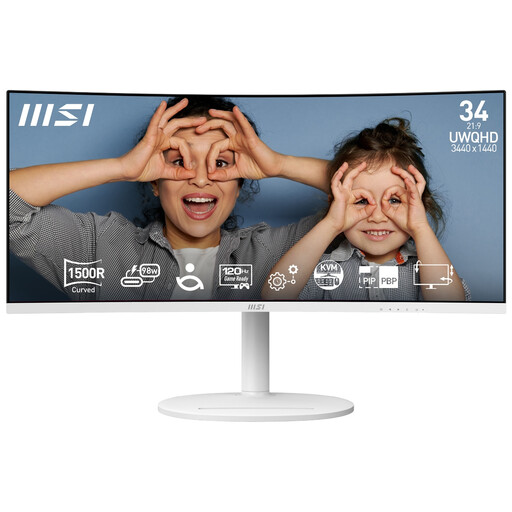
Consider this for placing a club site preview beside editing tools, provided the monitor and its stand fit your desk.
The product title specifies 3440 × 1440 UWQHD resolution, a 120 Hz refresh rate and a 1500R curve. If laptop docking matters, confirm video support and charging compatibility with your laptop.
 No image available
This is a 34-inch option to consider when you want a wide editing area and have measured space for the screen and stand.
The product title specifies WQHD resolution and a 240 Hz refresh rate. If you plan to charge a laptop through the monitor, check its connection details and power output against the laptop’s requirements.
 No image available
Its wide resolution makes it relevant if you need a live website preview alongside another working window; verify the with-stand dimensions against your desk.
The product title specifies 3440 × 1440 resolution, DisplayPort and HDMI connections, and height, swivel and tilt adjustment. Check the exact colour variant if that affects your choice.
 No image available
Consider it if a 34-inch workspace suits your editing layout and you can leave sufficient desk space around the stand.
The product title identifies a UWQHD monitor. Check its exact with-stand dimensions and ports, particularly if you need USB-C laptop video or charging.
 No image available
This wide display may suit a preview-and-editor layout if its full stand footprint leaves enough working room on your desk.
The product title specifies 3440 × 1440 resolution, a 200 Hz refresh rate, and HDMI and DisplayPort connections. Confirm the with-stand dimensions and any laptop-docking connections you require.
Choose by the space the complete monitor setup needs, not diagonal size alone. LG UK specifies the 29-inch 29WN600-W at 688.1 mm wide and 209.4 mm deep with its stand; ASUS UK specifies the 34-inch VA34VCPSN at 809.3 mm wide and 264.9 mm deep. If the larger footprint crowds your keyboard or viewing position, favour a smaller route; if it fits, 3440 × 1440 offers more pixel space than 2560 × 1080 for editing windows.
It can do both only when the laptop supports the required USB-C video output and the monitor supplies sufficient charging power. ASUS UK specifies DisplayPort Alt Mode and up to 65 W power delivery for the VA34VCPSN; compare those connections with your laptop’s manual and charging requirement.
Position the display directly in front of you, with its top around eye level and the screen about an arm’s length away, in line with Health and Safety Executive guidance. Check that your desk, stand or compatible monitor arm also leaves the keyboard and mouse comfortably positioned.
That depends on the working arrangement, not simply on whether the website is for a club. The Health and Safety Executive says display-screen-equipment rules apply to employers whose workers regularly use display screens, and that employers have health and safety duties towards home workers. Do not assume the same employer duties apply to an unpaid volunteer without establishing their working arrangement.