What matters when choosing?
For timeline review, decide how much vertical room the preview and panels need before choosing by diagonal size. Then match colour features, connections and physical fit to your own setup.
| Concern | What to check | Who this matters to |
|---|
| Timeline workspace |
Compare native resolution and screen dimensions; confirm your computer supports the resolution and refresh rate you intend to use. |
If I keep the timeline, preview and tools open together, I need enough height for them without continually rearranging panels. Around 36% of consumers put workspace capacity first. |
| Colour for footage review |
Check modes and documented gamut against your delivery colour space, then consider how you will calibrate and manage colour. |
When review decisions depend on colour, I need a suitable display mode and a way to maintain it, not just a wide-gamut figure. For around 29% of consumers, colour confidence is the primary concern. |
| Laptop connection |
Match USB-C or Thunderbolt video support and stated power delivery to your laptop; check which hub connections you need. |
If I regularly reconnect a laptop, I want the display connection and charging arrangement to work together. A compatible single-cable setup comes first for around 21% of consumers. |
| Desk fit and positioning |
Measure the footprint and usable desk depth; for an arm, check its load rating and the monitor's mounting pattern. |
With limited desk room, I need to know where the screen will sit and whether I can position it comfortably. Around 14% of consumers prioritise fit and setup. |
Ultrawides for timeline review on Joybuy
These models include 34-inch ultrawides and wider 49-inch 32:9 screens. If you are choosing between a 34-inch display and a 40-inch 5K2K workspace, pay particular attention to each model's vertical resolution: a wide 49-inch screen does not necessarily provide the height of a 5K2K panel.
 No image available
CRUA 49-inch Curved Ultrawide DQHD 5120 × 1440 165 Hz
Consider this 32:9 screen if a very wide timeline matters more to you than the additional screen height of a 5K2K display.
The listed resolution is 5120 × 1440, with a 1500R VA panel, two HDMI 2.1 ports, two DisplayPort 1.4 ports and a height-adjustable stand. Check its colour modes for colour-sensitive review and measure your desk or monitor-arm capacity.
View on Joybuy
 No image available
Lenovo R34w-30 34-inch UWQHD Monitor
This 34-inch ultrawide suits a timeline setup where you do not need the larger footprint of a 40-inch screen.
Its listed native resolution is 3440 × 1440, and the stand is described as adjustable. Check its colour modes and calibration information for your review workflow, along with the video connections you need.
View on Joybuy
 No image available
Lepow HC-SJ34MZ5 34-inch Curved Ultrawide 3440 × 1440
Consider this 21:9 model if you want a wider timeline within a 34-inch display.
The title specifies a 165 Hz refresh rate, while the listing identifies DisplayPort and HDMI connections. Check documented colour modes and calibration details before using it for colour-sensitive review, and confirm any laptop connection requirements.
View on Joybuy
 No image available
Acer X Predator X49X 49-inch QD-OLED 240 Hz
This 32:9 model is an option if you favour a panoramic workspace and want to check whether its USB-C connection suits your laptop.
The listing specifies 5120 × 1440 and up to 90 W USB-C power delivery. That screen height is not the same as 5120 × 2160; check the space available for your preview, the colour modes required for delivery and your desk clearance.
View on Joybuy
 No image available
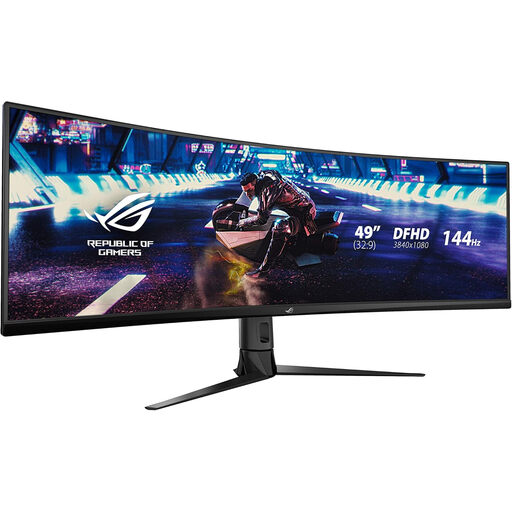
ASUS ROG STRIX XG49VQ DFHD 144 Hz Curved
Consider this 49-inch 32:9 model only if its panoramic layout is more useful to you than extra height for a preview and editing panels.
Its listed resolution is 3840 × 1080, giving it less vertical screen space than the 1440-pixel-high models here. Check the colour modes, stand adjustments and physical fit against your setup.
View on Joybuy
Common questions
Is a 40-inch 5K2K screen worth choosing over a 34-inch ultrawide for timeline review?
Choose a 40-inch 5120 × 2160 screen when you need more vertical room for a preview and panels alongside the timeline; choose 34-inch 3440 × 1440 when timeline width matters but desk space is tighter. LG positions its 5K2K format for displaying multiple creative applications, while BenQ specifies 3440 × 1440 for its 34-inch PD3420Q. Neither size alone establishes colour accuracy.
Do I need a wide-gamut monitor to review footage?
Choose documented support for the colour space you deliver in rather than a wide-gamut figure alone. BenQ lists Rec.709, sRGB and P3 modes for the PD3420Q, while LG lists 98% DCI-P3 coverage, described as typical, for the 40WP95CP-W. Use the appropriate mode and a colour-managed workflow, and check your calibration needs.
Can one cable carry video and charge my laptop?
Yes, if the laptop, monitor and cable support the required video connection and the monitor's power delivery suits the laptop. LG specifies up to 96 W charging for the 40WP95CP-W, Dell up to 90 W for the U4025QW and BenQ 65 W for the PD3420Q; check your particular laptop's requirements before ordering.
What energy information should I check when buying a new monitor?
For an electronic display within the scope of UK energy-labelling guidance, check the energy label shown on the website and the accompanying product information sheet. UK government guidance also requires an accurate printed label for products in scope. The label helps you compare energy information, not colour accuracy or timeline workspace; the cited guidance excludes second-hand products.


