
24/7 Customer Support

Free returns

Same-day & Next-day Delivery

Quality Guaranteed

Unlock Your Welcome Offers: FREE Delivery | Up to 80% OFF | Free 30-day JoyPlus trial
Download the APP
A 49-inch ultrawide gaming monitor can replace a dual-monitor setup for gaming, simulation, editing and office work. However, the large format also creates buying risks. A specification list may look impressive while overlooking practical issues such as desk depth, graphics-card demands, limited port bandwidth or a stand that cannot be adjusted comfortably.
This guide explains which specifications matter, which marketing details require closer attention and which monitors suit different UK user profiles.
A 49-inch panel is physically wide, but size alone does not determine image sharpness or workspace. For a 32:9 gaming monitor, DQHD 5120×1440 resolution is a useful reference point because it provides two side-by-side QHD areas across one display.
Lower resolutions can make text and interface elements appear less detailed, particularly when sitting close to the screen. Always check the native resolution rather than relying on phrases such as “ultra-wide” or “cinematic display”.
A listed 165Hz gaming monitor or 240Hz model can refresh the image frequently, but your computer must be able to supply a suitable frame rate at the monitor’s native resolution. DQHD places a substantially higher workload on the graphics card than standard 1440p.
Also check whether the advertised refresh rate is available through the intended connection. DisplayPort and HDMI versions can have different bandwidth limits and the correct cable may be required for full resolution and refresh-rate support.
A 49-inch curved monitor is wide and heavy. It may not fit comfortably on a shallow desk and the supplied stand can occupy considerable space. Before ordering, measure:
For large displays, move and unbox the panel with two people. A monitor arm must be specifically rated for the screen’s weight and dimensions.
A 32:9 display provides a very broad horizontal workspace. It can be useful for racing simulators, flight games, timelines and multiple application windows. A DQHD panel with 5120×1440 pixels offers more detail than a 3840×1080 alternative, although it requires stronger hardware.
Game compatibility is another consideration. Some titles support 32:9 natively, while others may display black bars or require configuration adjustments. Check the games you play most often before purchasing.
A high-refresh-rate monitor can make cursor movement and supported games appear more fluid. For competitive gaming, look beyond the headline refresh rate and check the response-time measurement method, as MPRT and GtG figures are not directly interchangeable.
AMD FreeSync or another adaptive-sync technology can help coordinate the monitor’s refresh cycle with compatible graphics output, reducing visible tearing and inconsistent motion. Compatibility depends on your GPU, connection and software settings, so confirm the required conditions.
VA panels commonly offer high static contrast and deep-looking dark areas, while IPS panels are often selected for viewing-angle consistency. OLED and QD-OLED displays can provide very high contrast and broad colour coverage, but buyers should read the manufacturer’s guidance regarding care, brightness management and long-term use.
Colour figures such as 120% sRGB or 99% DCI-P3 describe gamut coverage, not automatic colour accuracy. For design and video work, also consider calibration options, colour depth and the software you use.
Similarly, an HDR10 monitor may accept HDR content, but the visible result depends on brightness, contrast, local dimming or OLED characteristics. Treat HDR support as one part of the display specification rather than a guarantee of a particular viewing experience.
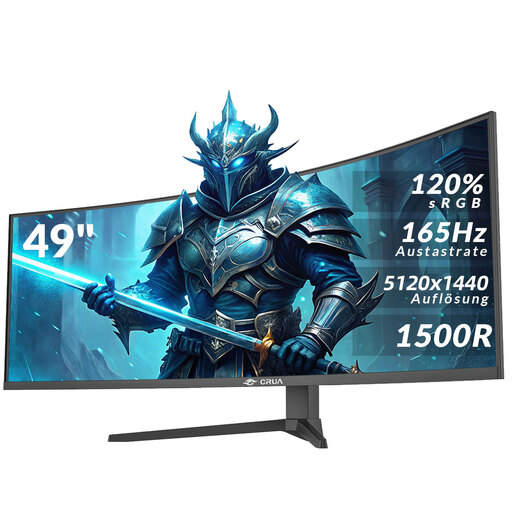
Why This Fits Their Persona: A practical starting point for UK gamers, students and home-office users who want one expansive screen for entertainment and multitasking without moving to a specialist OLED panel.
Its listed native resolution is 5120×1440, while HDMI 2.1 and DisplayPort 1.4 are provided for high-bandwidth connections. Check the included cables and your GPU before expecting 165Hz.
49-inch 32:9 format, 165Hz refresh rate, 1500R curve, 120% sRGB listing, HDR10, AMD FreeSync and 75×75mm VESA support.
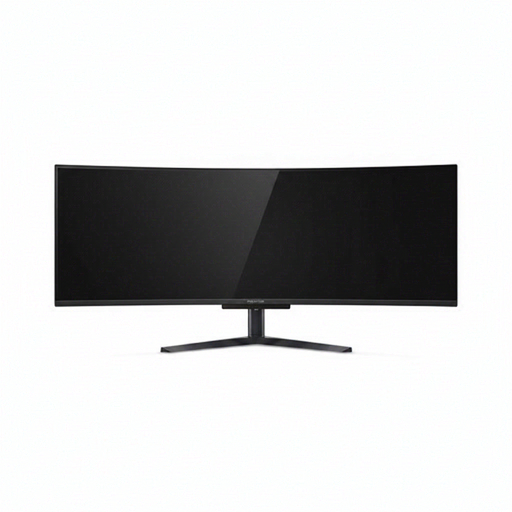
Why This Fits Their Persona: Suits users who place greater emphasis on panel technology, fast gaming performance, HDR-capable content and a flexible connection setup for a premium desk environment.
The specification lists DQHD resolution alongside the connection requirements, helping buyers assess whether their PC can use the panel as intended rather than focusing only on its size.
QD-OLED panel, 5120×1440 resolution, 240Hz refresh rate, 0.03ms listed response time, HDMI 2.1, DisplayPort, USB-C with 90W Power Delivery and integrated KVM.
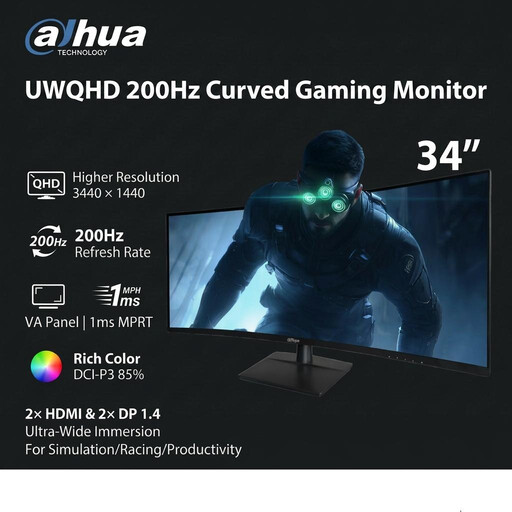
Why This Fits Their Persona: A suitable alternative for racing enthusiasts, simulation users and productivity-focused buyers who want an ultrawide format but do not require the footprint of a 49-inch panel.
Its specifications separate HDMI and DisplayPort performance: HDMI 2.0 is listed up to 100Hz at 3440×1440, while DP 1.4 is listed up to 200Hz.
3440×1440 resolution, 200Hz refresh rate, 1500R VA panel, HDR10, 2×HDMI, 2×DP 1.4, height adjustment and VESA 100×100mm support.
We have compiled a complete, real-time list of products that fully satisfy these strict selection criteria and UK safety regulations.
A 49-inch monitor can consume more electricity than a smaller office display, particularly when operating at high brightness and refresh rate. Check the product’s rated power consumption and use operating-system power settings, sleep timers and sensible brightness levels when the screen is not being used for gaming.
Place the display centrally so your eyes are near the middle of the panel. A sturdy desk, adequate ventilation and a correctly rated VESA mount are more important for a large curved ultrawide monitor than decorative RGB lighting. For content creation, consider a separate calibration device if consistent colour matters.
It can be useful for spreadsheets, timelines, browser windows and video calls because the 32:9 layout provides substantial horizontal space. Check that your desk is deep enough and that your computer supports the native resolution. Some applications may need manual window arrangement.
Usually, yes. DQHD at a high refresh rate requires considerably more graphics processing than 1080p or standard 1440p. Check the recommended output specifications for your graphics card and use DisplayPort or HDMI as required by the monitor.
Lifespan varies with panel technology, operating hours, heat, brightness and usage conditions. Follow the manufacturer’s care instructions, keep ventilation clear, avoid pressing the screen surface and use a stable mounting solution. Before buying, review the stated warranty, returns policy and support arrangements available to UK customers.