What matters when choosing?
Check text at your usual viewing distance and the monitor’s fit on your desk before deciding how much gaming performance you need beyond interactive fiction.
| Concern |
What to check |
Who this matters to |
| Readable text |
Check for native 3840 × 2160 resolution on a 31.5–32-inch display, then assess your preferred font size and scaling at your viewing distance. |
If I mainly read story text and keep notes beside the game, I need type that stays comfortable through a long session. Around 40% of consumers put reading clarity first. |
| Other games and dark scenes |
Match the desired refresh rate and variable refresh rate mode to your games and source device. For OLED, read the model’s screen-care and burn-in-warranty terms. |
When I switch from interactive fiction to faster games, motion handling or dark-scene presentation becomes a primary concern. Roughly 30% of consumers prioritise those additional gaming needs. |
| Desk fit and connections |
Measure desk depth and stand footprint; check adjustment, glare, ports and the connection needed for your intended display mode. |
If I use the screen for extended desk sessions or connect more than one device, I need a position and setup that work day to day. About 30% of consumers place desk fit and connections first. |
Large-screen monitor choices
These Joybuy choices include 32-inch 4K OLED and IPS screens for text-led play, plus a 34-inch ultrawide alternative. The ultrawide has a different resolution, so compare its text presentation separately rather than treating it as another 4K option.
 Image unavailable
Dahua 32-inch curved 4K OLED gaming monitor, 165Hz
A large OLED option if interactive fiction shares the screen with other games. The title specifies 3840 × 2160 resolution, 165Hz, HDR400 and USB-C with 65W power delivery.
For prolonged static-text use, check the manufacturer’s screen-care and warranty terms. Confirm that your source device supports the display mode you intend to use.
View on Joybuy
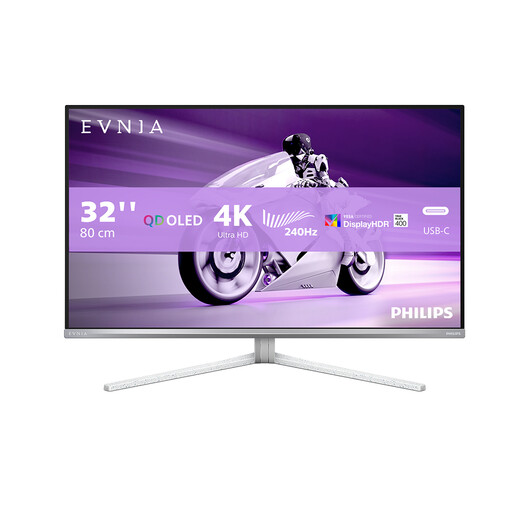 Image unavailable
PHILIPS Evnia 32M2N8900 32-inch UHD OLED monitor
A 32-inch UHD OLED option for reading-focused play alongside other games. Check the exact refresh-rate and response-time specifications for this variant before choosing it for fast-paced play.
For lengthy sessions with static text, review its screen-care instructions and burn-in-warranty conditions.
View on Joybuy
 Image unavailable
ASUS ProArt Display PA32UCG-K 32-inch 4K IPS Mini LED monitor
A large 4K IPS option to consider when reading and desktop use matter alongside gaming. Its title specifies a Mini LED display, 120Hz, Thunderbolt 3 and HDMI 2.1.
If you also want variable refresh rate or a particular console mode, confirm support for that mode with your source device.
View on Joybuy
 Image unavailable
Dahua 34-inch curved UWQHD VA gaming monitor, 200Hz
A wide-screen alternative if a 34-inch layout appeals more than the 32-inch 4K route. The title specifies a 3440 × 1440 VA panel, 200Hz and DisplayPort 1.4 connections; this resolution is not 4K.
Check text at your preferred size and confirm which refresh-rate mode your chosen connection and source device can deliver.
View on Joybuy
Common questions
Is 4K useful for interactive fiction on a large monitor?
Yes, if sharp text and room for a game window alongside notes or references are priorities. RTINGS says 4K pixel density supports sharp text, but check that your preferred font size and scaling remain comfortable at your normal viewing distance.
Should I choose IPS or OLED for text-heavy games?
IPS is a practical starting point when static text dominates; consider OLED if its dark-scene presentation and gaming characteristics are also important to you. For an OLED model, read the maker’s screen-care instructions and burn-in-warranty conditions rather than assuming care features remove the risk.
Do I need HDMI 2.1 for interactive fiction?
Not for the text-led game alone; HDMI 2.1 becomes relevant when a console or PC mode you want requires it. Check the intended resolution and refresh rate against both the monitor’s supported modes and your source device’s output.
Will an adjustable monitor stand solve desk ergonomics?
An adjustable stand can help you position a large screen, but the desk layout and lighting still matter. For employment-related display-screen work, the Health and Safety Executive also advises attention to posture, glare and breaks as part of the wider workstation setup.


