UI designers checking visual detail
If you inspect interface components, page sections and responsive layouts closely, a 4K workspace and model-specific colour specifications matter more than diagonal size alone.


Choose a 27-inch 4K monitor if inspecting type, spacing and colour is the priority; choose a 34-inch 3440 × 1440 ultrawide if you need a design tool and browser preview visible side by side on one continuous desktop. Neither format settles the choice on its own: compare the exact model’s colour claims, laptop connections, stand adjustment and fit on your desk.
Start with the work you need to see at the same time: fine interface details, two wide working views, or a laptop-based desk setup.
If you inspect interface components, page sections and responsive layouts closely, a 4K workspace and model-specific colour specifications matter more than diagonal size alone.
If a design application, browser preview, code editor or asset library regularly needs to stay visible, uninterrupted horizontal space may be the deciding feature.
If you connect and disconnect a laptop each day, check whether the monitor and laptop can handle the video, charging and peripheral connections you intend to use. Screen position still needs to work with your desk.
For two-view landing-page work, decide whether fine-detail inspection or window width is harder to accommodate; then check connections and screen position for the exact setup.
Choose it when: Close inspection of text, icons and spacing matters most on a conventional desk.
Allow for: A 16:9 desktop gives side-by-side applications less horizontal room than a 34-inch 21:9 screen.
Choose it when: The design canvas and browser preview need to remain open together without a centre bezel.
Allow for: A 3440 × 1440 screen has fewer total pixels than 3840 × 2160 and needs more desk width.
| Concern | What to check | Who this matters to |
|---|---|---|
| Colour and UI detail | Check native resolution, the colour space relevant to your work, and any model-specific accuracy or calibration claim. | If I am checking brand colours and fine spacing, I need more than a broad colour-gamut figure to judge the display. Around 40% of consumers put colour and detail first. |
| Side-by-side workspace | Compare 3440 × 1440 with 3840 × 2160, and measure usable desk width and depth. | Keeping an artboard and live preview visible matters more to me than maximising total pixels. For around 40% of consumers, uninterrupted workspace is the primary need. |
| Laptop setup and screen position | Check laptop video support, the monitor’s charging output and the stand’s adjustment range. | I connect a laptop daily and need the display at a workable height and distance without assuming one USB-C cable does everything. Docking and positioning come first for around 20% of consumers. |
A 34-inch 3440 × 1440 ultrawide provides a different workspace from a 27-inch 3840 × 2160 monitor: the former gives more horizontal room, while the latter has more total pixels.
Compare aspect ratio and native resolution, then decide whether window width or close inspection is limiting your work.
Monitor power-delivery ratings differ, and a laptop’s USB-C port may not support the video or hub functions you expect.
Check the laptop’s port capabilities and charging requirement against the exact monitor’s connections and supplied cable.
A stated colour-space percentage does not tell you whether a monitor has the calibration target, accuracy metric or supplied report your work requires. Claims apply to the named model and stated conditions.
Compare those claims for the exact variant and check the applicable return conditions if colour-critical acceptance matters.
A wide display needs room for its panel and stand, while limited adjustment can make a suitable viewing position harder to achieve. The Health and Safety Executive advises placing the screen top at eye level and the screen about an arm’s length away.
Measure the desk, check the stand’s adjustment range and confirm VESA mounting compatibility if you plan to use an arm.
A separate arm or riser may be needed if the supplied stand cannot achieve a suitable position.
These product lines illustrate different specifications to compare; a brand name alone does not establish the features of every model.
A creative-monitor line to consider when 27-inch 4K detail, stated colour specifications and an adjustable stand are priorities.
A designer-monitor line relevant to web and UI work where stated sRGB coverage and calibration documentation are useful checks.
Lines spanning a 27-inch 4K hub monitor and a 34.1-inch ultrawide hub monitor for different desk layouts.
An ultrawide line relevant when a continuous desktop for design, preview and supporting windows is the main requirement.
These choices cover 27-inch 4K detail-focused displays, a larger 4K curved display and a 34-inch ultrawide for side-by-side work. Match the format to your main task, then check the exact connections and colour specifications you need.
 No image available
Consider this for close landing-page inspection at a laptop-based desk, provided your computer supports the connections you need.
The product title identifies an IPS panel, a height-adjustable stand and P3 colour support; check the exact colour-accuracy claim if your work requires one.
 No image available
The 27-inch 4K format is relevant if inspecting text and assets matters more than having an extra-wide desktop.
Check the exact model’s colour-accuracy documentation and laptop-charging requirements before relying on either for your setup.
 No image available
This larger 4K option may suit a desk where screen size is welcome, but check the curved format against your viewing position and available space.
The title states 99% DCI-P3 and a 65 W Type-C connection; confirm the colour claim and your laptop’s video and charging compatibility for the intended workflow.
 No image available
Its 27-inch 4K format fits a detail-first design desk where the display does not need to provide an ultrawide workspace.
The title lists HDMI, DisplayPort and 95% DCI-P3; check your laptop’s connection route and any colour-accuracy requirement separately.
 No image available
Consider the 21:9 format if a design canvas and another application need to stay visible together; measure the desk before choosing the wider panel.
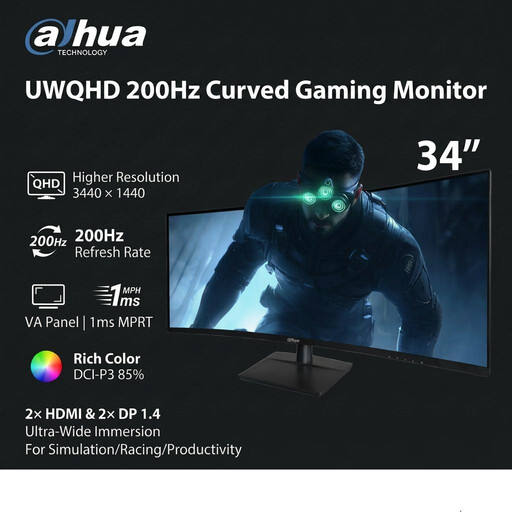
The title lists HDMI and DisplayPort inputs. Check your connection plan and the colour specifications relevant to web design rather than treating its ultrawide shape as an accuracy claim.
A 34-inch 3440 × 1440 ultrawide is the more relevant format when keeping two wide applications visible is your overriding need; LG describes its 21:9 34WQ75C-B as suitable for displaying several programs at once. Choose a 27-inch 4K format instead when close inspection of text and interface details takes priority over horizontal room.
Only if the laptop supports the required video connection and can use the monitor’s available charging output. For the named models, BenQ specifies 65 W on the PD2705U, ASUS specifies 96 W on the PA279CRV, and LG specifies up to 90 W on the 34WQ75C-B; compare the exact model and cable with your laptop’s requirements.
Height adjustment is worth checking if the supplied stand must put the screen in a comfortable position. The Health and Safety Executive advises having the screen top at eye level and the display about an arm’s length away; desk depth and chair position affect whether the stand can achieve that arrangement.
For ordinary SDR web-page design, check resolution, relevant colour space, stated accuracy and connections before using HDR as a deciding feature. If your work requires HDR, check the exact certification: the Video Electronics Standards Association says displays must meet its specifications to carry the DisplayHDR logo.
Check the seller’s current recycling service or your local authority’s options before disposing of the monitor. GOV.UK describes the UK Waste Electrical and Electronic Equipment framework as supporting recovery, reuse and recycling; that does not, by itself, establish a collection arrangement for a particular purchase.