
24/7 Customer Support

Free returns

Same-day & Next-day Delivery

Quality Guaranteed

Unlock Your Welcome Offers: FREE Delivery | Up to 80% OFF | Free 30-day JoyPlus trial
Download the APP
Choosing a new printer for your home office can feel overwhelming. The market is filled with models boasting different features, technologies and running costs, making it difficult to know where to start. Whether you’re a freelancer printing invoices, a parent handling school projects or a small business owner managing documents, the right printer can make a significant difference to your daily productivity and budget.
This guide is designed to cut through the clutter. As the Joybuy Product Recommendation Officer, my role is to provide clear, practical advice to help you identify the features that matter most for your needs. We will explore key considerations and highlight a few standout models that balance performance, cost and functionality for UK homes and small offices.
Before diving into specific models, let's break down the essential factors to consider. Aligning your choice with your printing habits is the key to finding an efficient and economical printer.
One of the most significant decisions is the choice between inkjet (including ink tank) and laser technology.
A modern home office printer should do more than just print. Look for these features to streamline your workflow:
Based on a combination of features, user needs and value, here are some noteworthy options for your home office setup.
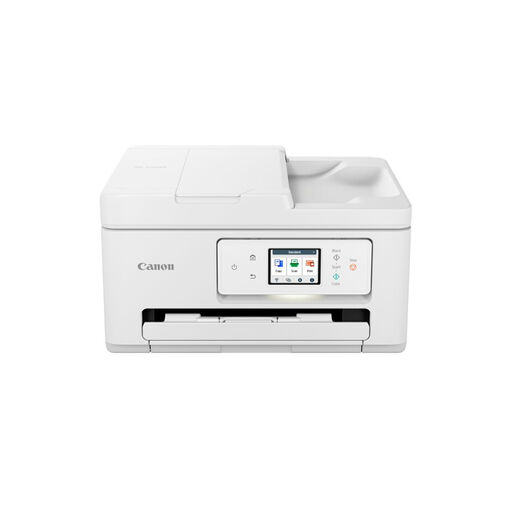
Why It Stands Out: The Canon PIXMA TS7750i is a versatile all-rounder that fits perfectly into a busy household that doubles as a workspace. Its compact design doesn't compromise on functionality, offering print, scan and copy capabilities. What makes it particularly useful for home working is the inclusion of a 35-sheet Automatic Document Feeder (ADF), a feature that simplifies the task of digitising or copying multi-page documents.
Pros:
Who is it for? This printer is well-suited for families, students and remote workers who need a reliable device for a mix of tasks—from printing colourful school projects and photos to scanning work documents.
View the Canon PIXMA TS7750i at Joybuy

Why It Stands Out: For those whose work is primarily text-based, the HP LaserJet M209dw is an efficient workhorse. As a dedicated monochrome laser printer, it delivers sharp, smudge-resistant text at impressive speeds of up to 30 pages per minute. Its focus on speed and efficiency is further enhanced by automatic two-sided printing, helping to reduce paper costs and environmental impact.
Pros:
Who is it for? This is an excellent candidate for the best printer for small business owners, consultants and remote professionals who need to print large quantities of reports, invoices and forms quickly and reliably.
Explore the HP LaserJet M209dw at Joybuy

Why It Stands Out: The Brother DCP-T780DW tackles the biggest concern for many printer owners: the ongoing cost of ink. As a refillable ink tank printer, it offers an exceptionally low cost-per-page. It comes with a remarkable amount of ink in the box—enough to print up to 15,000 black pages and 5,000 colour pages. The mess-free, easy-fill system makes topping up the tanks simple. It combines this economy with features like automatic duplex printing and a 20-sheet ADF, making it a powerful and practical choice.
Pros:
Who is it for? High-volume users who want the versatility of colour printing without the high cost. It's ideal for small businesses, busy families and anyone who prints frequently and wants to minimise long-term expenses.
Discover the Brother DCP-T780DW at Joybuy
These recommendations cover a range of common home office needs, but every workspace is unique. If you're looking for different features, a more compact model or a printer with specialised photo capabilities, there are many other models to consider.
Explore our complete collection of paper printers to find the right fit for your specific requirements and budget.
It depends entirely on your printing habits. If you print hundreds of text documents a month, a laser printer will likely offer a more economical cost-per-page. However, if you print a mix of colour documents, schoolwork and photos, a modern ink tank printer can be exceptionally cost-effective due to the low price of its refill bottles.
A duplex printer automatically prints on both sides of a sheet of paper. An Automatic Document Feeder (ADF) lets you place a stack of pages into the printer for scanning or copying at once. If you frequently handle multi-page documents, a model with both features is a significant productivity booster, saving you time, effort and paper.
Yes, absolutely. Most modern wireless printers support mobile printing technologies like Apple AirPrint, Mopria Print Service or brand-specific apps. This allows you to print documents, photos and web pages directly from your smartphone or tablet, offering great convenience for the whole family.