
24/7 Customer Support

Free returns

Same-day & Next-day Delivery

Quality Guaranteed

Unlock Your Welcome Offers: FREE Delivery | Up to 80% OFF | Free 30-day JoyPlus trial
Download the APP
Running out of space on your laptop is a familiar frustration. Whether it's a warning that your drive is full just as you're saving an important work project, or the need to delete cherished photos to make room for new ones, a lack of digital storage can bring your productivity to a halt. For gamers, it means choosing which titles to uninstall to play the latest release.
A portable external hard drive is a straightforward and effective solution. It provides the extra space you need for files, a secure place for backups and the freedom to carry your data with you. As the Joybuy Product Recommendation Officer, my role is to help you navigate the options. This guide cuts through the technical jargon to offer practical advice, helping you find a reliable drive that fits your specific needs and budget.
Before diving into specific models, let's cover a few key considerations. Thinking about these points will help you identify which features matter most to you.
The most fundamental feature of an external drive is its storage capacity, measured in terabytes (TB). A 4TB external hard drive is a popular choice, offering ample room for thousands of high-resolution photos, hours of HD video and extensive document archives. For those with larger needs—such as professional video editors, digital collectors or serious gamers—a 6TB portable hard drive provides a vast digital library that can store entire project archives or a massive collection of games. Consider your primary use to avoid paying for space you won't use or, conversely, running out of room too quickly.
Most modern portable hard drives use a USB 3.0 hard drive interface (also known as USB 3.2 Gen 1). This standard offers transfer speeds of up to 5 Gbps, which is significantly faster than the older USB 2.0. This speed is crucial when moving large files, as it can reduce transfer times from hours to minutes. All the drives we recommend are bus-powered, meaning they draw power directly from your computer's USB port, so you don't need to carry a separate power adapter. They are also backward-compatible with USB 2.0 ports, ensuring they work with older machines, albeit at slower speeds.
For many, an external drive is more than just extra storage; it's a backup hard drive for irreplaceable files. Some models come with features designed to protect your data. This can include software for scheduling automatic backups, which creates copies of your important files without you having to remember. For sensitive information, look for drives with built-in 256-bit AES hardware encryption. This feature password-protects your entire drive, making your data unreadable to anyone without the password.
Based on features, user needs and overall value, here are our recommendations for a range of common scenarios.
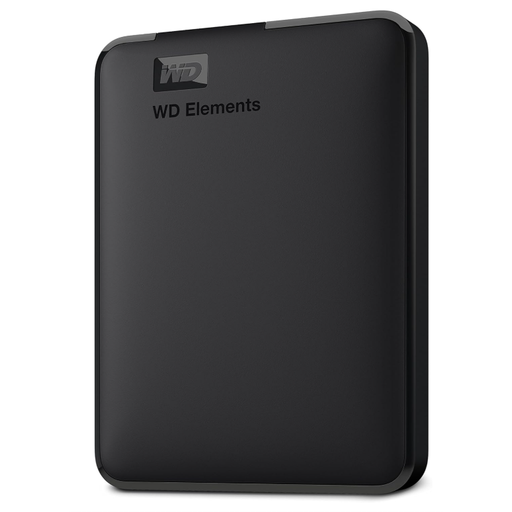
Why It Stands Out: This drive is all about providing maximum storage with minimum fuss. With a colossal 6TB capacity in a lightweight, portable design, it's an excellent choice for straightforward data storage and backup. It works straight out of the box with Windows PCs, requiring no software installation or configuration.
Pros:
Who is it for? This drive is perfect for users who need a simple, high-capacity external storage for PC solution. It's a great fit for students, families archiving photos and videos or anyone who wants a reliable backup hard drive without complex features.
View the Western Digital Elements 6TB on Joybuy

Why It Stands Out: The WD_BLACK P10 is purpose-built for gaming. It combines a high-performance platform capable of speeds up to 130MB/s with a durable, travel-ready design. It’s specifically engineered to handle the demands of loading and running games directly from the drive, giving your console or PC a significant storage boost.
Pros:
Who is it for? This is the clear choice for serious gamers. If you're tired of deleting games to make space on your console or PC, this drive provides the capacity and performance you need to keep your entire library ready to play. It's an ideal external hard drive for laptop gaming setups.
View the WD_BLACK P10 Game Drive on Joybuy

Why It Stands Out: The My Passport strikes an excellent balance between capacity, portability and security. Its standout feature is the built-in 256-bit AES hardware encryption and password protection, which keeps your sensitive files safe from unauthorised access. It also includes software to simplify automatic backups.
Pros:
Who is it for? This drive is designed for professionals, freelancers and anyone who handles confidential data. If you need to transport sensitive work files or simply want peace of mind that your personal information is secure, the My Passport is an outstanding choice.
View the Western Digital My Passport 4TB on Joybuy
While these three drives from the Western Digital external hard drive lineup cover many common needs, your requirements might be different. If you're looking for a different capacity, a solid-state drive (SSD) for even faster performance or other specific features, we have more to offer.
Explore our full collection of storage drives to find the perfect match for your digital life.
HDD stands for Hard Disk Drive. These drives, like the ones featured above, use spinning magnetic platters to store data. They offer very large storage capacities at a cost-effective price point, making them ideal for mass storage and backups. SSD stands for Solid-State Drive. SSDs use flash memory, have no moving parts and are significantly faster and more durable than HDDs. However, they typically come at a higher price per gigabyte.
Yes, most modern consoles like the PlayStation 4, PlayStation 5, Xbox One and Xbox Series X|S support external hard drives. A drive like the WD_BLACK P10 is specifically designed for this purpose. Be aware of console limitations: on PS5 and Xbox Series X|S, you can typically store and play previous-generation games (PS4/Xbox One) from the external drive, but current-generation games (PS5/XSX) can only be stored or "archived" on the external drive and must be moved to the internal SSD to be played.
To prevent data loss or corruption, you should never unplug a portable hard drive while it is in use. Before physically disconnecting the USB cable, always use your computer's "Eject" or "Safely Remove Hardware" function. On Windows, this is usually found in the system tray in the bottom-right corner. On a Mac, you can drag the drive icon to the Bin. Once the system confirms it is safe to do so, you can unplug the drive.