Single-laptop desk users
People with a USB-C-capable work laptop who want a dashboard and report on one screen while reducing reliance on a separate charger or dock. Whether one cable can do both jobs depends on the laptop and monitor connections.


For a dashboard beside a report, start with a 34-inch-class ultrawide at 3440 × 1440: it gives both windows a wide desktop on one display. If saving a plug socket matters, choose a monitor with USB-C video input and enough Power Delivery for your laptop, then check that the laptop and cable support the intended single-cable connection.
People with a USB-C-capable work laptop who want a dashboard and report on one screen while reducing reliance on a separate charger or dock. Whether one cable can do both jobs depends on the laptop and monitor connections.
People who want a dashboard, spreadsheet or report visible beside another window on one display. LG UK describes side-by-side files as a use for its 21:9 WQHD monitor; that is a manufacturer use case, not a measured productivity gain.
People who switch a keyboard and mouse between computers, or need to view two video sources at once. KVM and Picture-by-Picture are relevant to those tasks, rather than to two windows running on a single laptop.
Check the screen space you need first, then decide whether the monitor must also take over laptop charging. A wider panel still needs to fit the desk and the way you work.
| Concern | What to check | Who this matters to |
|---|---|---|
| Side-by-side workspace | Check for a 21:9, 3440 × 1440 panel and confirm your computer can output its intended resolution. | If I keep a dashboard beside a report, I need room to read both without continually changing windows; roughly 34% of consumers put this workspace need first. |
| Fewer occupied sockets | Check USB-C video input and Power Delivery against your laptop’s charging requirement and the cable you plan to use. | With few sockets at my desk, I want the monitor connection to handle display and laptop charging where compatible; around 33% of consumers prioritise reducing charger and cable dependence. |
| Two-computer use | Confirm KVM or Picture-by-Picture on the exact model and check which inputs and USB connections each function uses. | When I work across two computers, I may need to share controls or see both sources without another screen; about 20% of consumers put that workflow first. |
| Desk and workstation fit | Measure desk width and depth, including the stand, and check the available height and position adjustments. | If the wider display crowds my regular workstation, I need a workable position as well as screen space; roughly 13% of consumers make desk fit their primary concern. |
A USB-C socket alone does not establish video or charging compatibility. Dell UK and LG UK specify up to 90 W Power Delivery on the cited P3425WE and 34BA75QE models; BenQ specifies 65 W on the PD3420Q. Those are monitor capabilities, not guarantees of how a particular laptop will charge.
Check the laptop’s USB-C video output and charging support, compare its charger rating with the monitor’s stated Power Delivery, and check the cable before planning a single-cable setup.
You may still need your laptop charger, a compatible cable or an adapter.
A monitor can fit across a desk yet leave too little depth for a comfortable position. UK Health and Safety Executive guidance considers the whole display-screen workstation, including furniture and working conditions, rather than the monitor alone.
Measure the space available for the panel and stand before ordering. If the display is for regular workplace use, review its position as part of the workstation setup.
A monitor arm or changes to the desk setup may be needed if the supplied stand cannot provide a suitable position.
KVM is for sharing controls between computers; Picture-by-Picture is for viewing separate inputs. Neither adds desktop space beyond the panel’s resolution when both work windows run on one laptop.
Prioritise screen dimensions and any needed charging connection for a one-laptop setup. Check KVM or Picture-by-Picture only if you will connect multiple computers or video sources.
Dell UK lists the P3425WE as a 34.1-inch curved WQHD office monitor with USB-C hub features.
LG UK lists the 34BA75QE-B as a curved 34-inch, 3440 × 1440 IPS monitor with office connectivity.
BenQ lists the PD3420Q for work that combines a 3440 × 1440 ultrawide desktop with colour-oriented display settings.
These ultrawides offer space for a dashboard beside a report, from 34-inch displays to a wider 49-inch option. If reducing socket use is essential, check USB-C video and laptop-charging compatibility for the particular monitor rather than relying on screen size alone.
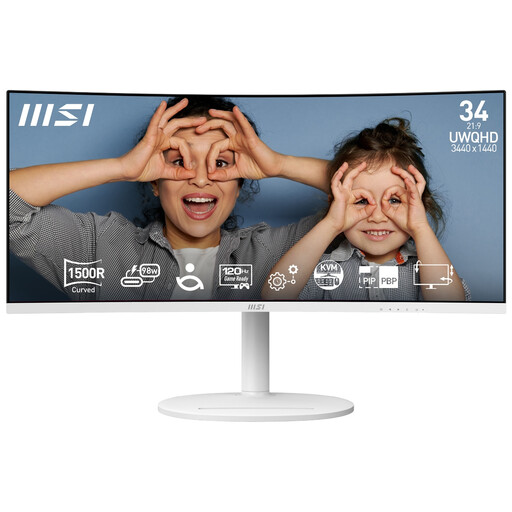 Image unavailable
Its stated 3440 × 1440 display is relevant when a dashboard and report need to share one screen.
The listed variant has a 120 Hz refresh rate and 1500R curve. Check USB-C video and laptop-charging compatibility before counting on it to replace a charger, and measure the desk space needed for the stand.
 Image unavailable
Consider its 32:9 format if you want a wider desktop than the 34-inch options and have room for a 49-inch screen.
The listed variant has Double Quad HD resolution, a 1800R curve and 240 Hz refresh rate. Measure the full desk setup and check laptop video and charging compatibility before planning around one cable.
 Image unavailable
Its 34-inch curved WQHD format is relevant to keeping work windows on one display.
The listed variant has a 175 Hz refresh rate. Check its exact video connections and laptop-charging capability before treating it as a way to free a plug socket.
 Image unavailable
The listed 3440 × 1440 screen provides the wide format sought for a dashboard beside a report.
The title specifies a VA panel, two HDMI inputs and two DisplayPort 1.4 inputs. Confirm how your laptop will connect and charge before expecting the monitor to replace its charger.
 Image unavailable
Its 34-inch UWQHD format fits the aim of placing a dashboard and report on one wide display.
Check its connections and laptop-charging capability if reducing occupied sockets is part of the purchase decision. Measure the desk and stand footprint as well.
It can if the monitor supplies enough USB-C Power Delivery and your laptop supports charging and video over the connection you intend to use. Dell UK and LG UK list up to 90 W on the cited P3425WE and 34BA75QE models, while BenQ lists 65 W on the PD3420Q; compare the relevant rating with your laptop’s requirements and check the cable.
Not when both are open on one computer: choose the screen space and connections you need first. KVM is relevant when sharing a keyboard and mouse across two computers, while Picture-by-Picture is for viewing two inputs together; LG and BenQ list these functions on the cited models.
No. UK Health and Safety Executive guidance addresses risks across the whole display-screen workstation, including equipment, furniture and working conditions. For workers using display-screen equipment daily for continuous periods of an hour or more, the employer’s workstation assessment is relevant to the new monitor setup.
Revisit it when the workstation or its use changes, including when a larger display alters the setup. The UK Health and Safety Executive also identifies a new workstation, a new user and reports of pain or discomfort as reasons to assess the workstation.