Who is this for?
The useful starting point is where your files live now and how you would retrieve them if a device failed or went missing.
Phone-first photo households
If most photos are on an iPhone, iPad or Android device, check which photos and device data the chosen service backs up, and how restoration works on a replacement device. Apple distinguishes synchronised iCloud Photos from data in iCloud Backup; Google notes that some Android apps cannot back up or restore all their data.
Families with several photo libraries
A shared cloud storage plan may cover several people without making their files visible to one another. Check the provider’s membership, storage-quota and file-sharing rules before relying on one plan for the household.
Large local-library and multi-computer users
An external drive can hold a separate copy of files from a computer. A NAS may help organise files from several devices, but it also needs its own backup destination; Synology warns that drive and RAID failures can still cause data loss.
What should you check?
Decide what must be recoverable before choosing a capacity or device. The National Cyber Security Centre describes a backup as a copy kept in a separate safe location.
| Priority |
What to check |
Your needs |
| Recoverable copies |
Identify where the separate copy is kept. Check how to restore a file and whether earlier versions remain available after a change or deletion. |
I want my photos and documents back if the original device is lost, damaged or inaccessible—not just another place to view the current files. |
| Cloud coverage |
Check which photos, folders, apps and device settings are backed up rather than synchronised. Apple separates iCloud Photos from daily iCloud Backup; Google says some Android apps cannot restore all data. |
If my phone needs replacing, I need to know which files and settings will return and which require a separate copy. |
| Storage capacity |
Measure the files you intend to copy across your devices. Compare that total, with room for growth, against the cloud plan or removable drive capacity. |
Our photo and video collections are growing, so I want enough space for the files we actually plan to protect. |
| Device compatibility |
Confirm operating-system support, the physical connector and the file system for both copying and restoring. For a NAS, check the model and software requirements of the intended backup tools. |
I need the backup to work with the phones and computers we use, including the device on which we might restore it. |
| Household access |
Check who can use a shared storage quota and which files each person can see. Google One says family members’ files are not shared with one another without permission. |
We may need shared storage space, but I do not want that to make everyone’s personal files automatically visible. |
| Local storage |
For an external drive, plan when files will be copied and where the drive will be stored afterwards. For a small selected file set, check whether a USB flash drive has sufficient capacity. |
I would rather keep a removable copy that I can put away from the original device; I can maintain a repeatable copying routine. |
| NAS and combined copies |
Check who will manage NAS disks, accounts and backup jobs, then specify a separate destination. A cloud copy plus a periodically updated removable drive is another way to keep copies apart. |
For irreplaceable family files, I want more than one recovery route and can check that each copy can be restored. |
Relevant brand references
These services and product lines illustrate different backup routes; their features do not establish that a particular plan or device suits every household.
Apple
iCloud services are relevant when a household keeps photos and device data on iPhone or iPad and wants access to supported files on other devices.
- Apple offers iCloud+ family sharing.
- Apple says iCloud Photos and iCloud Drive content synchronise separately from daily iCloud Backup. Check which setting covers each type of data you need to recover.
Google
Google Account backup and Google One are relevant to Android device data and household cloud storage.
- Google says family members can share a Google One storage quota without automatically sharing their files.
- Google notes that not all Android apps can back up or restore all settings and data.
Microsoft
OneDrive is relevant to households using supported Windows folders and accessing documents across devices.
- Microsoft supports backing up selected standard Windows folders to OneDrive.
- Microsoft’s full OneDrive restore for Microsoft 365 subscribers covers activity within the previous 30 days; it is not indefinite archival storage.
Synology
Synology NAS products are relevant to households willing to manage shared local storage and scheduled backups.
- Synology documents backup destinations including external devices, another NAS and cloud services.
- A local NAS copy can still be lost to drive or RAID failure. Check backup-package support for the specific NAS model and DSM version.
Seagate
Seagate’s external-drive range is an example of removable storage for computer-based copies of photos and documents.
- Seagate describes Windows and macOS compatibility across its external-drive range.
- Range-level compatibility does not confirm the connector, cable or file system of a particular model. Seagate also specifies a compatible USB-C drive and iPhone 15 or later for direct iPhone use.
Removable storage options on Joybuy
These external drives and USB flash storage options are for making local copies of selected files or a larger library. Choose against your measured archive and device connections, and keep the completed copy apart from its source.
 No image available
Samsung T7 Shield portable SSD, 1 TB, blue
Consider this removable SSD for a separate copy that you can store away from your computer or phone. Its stated capacity is 1 TB and its connection is USB 3.2 Gen 2. Check your device connection, usable capacity and copying routine before relying on it for backups.
View on Joybuy
 No image available
Samsung T7 portable SSD, 2 TB, grey
The stated 2 TB capacity gives you a figure to compare with the photo and document library you intend to copy. This portable SSD lists USB Type-C and USB 3.2 Gen 2. Confirm that your devices and restore workflow work with the drive, then keep the copy separately.
View on Joybuy
 No image available
Western Digital My Passport Ultra portable hard drive, 5TB, blue
This external hard drive lists 5TB for a local copy of a larger library. Measure the files you intend to protect, and check its connection and file-system setup with the computer that will copy and restore them. Store the completed backup away from the original files.
View on Joybuy
 No image available
Lexar ES4 portable SSD with magnetic set, 1TB
This removable 1TB SSD is described for iPhone 15/16, PC and Mac use. Its title lists USB 3.2 Gen 2 and speeds of up to 1050MB/s read and 1000MB/s write; those figures do not establish backup or restore behaviour. Confirm the connection and file system for your device before copying important files.
View on Joybuy
 No image available
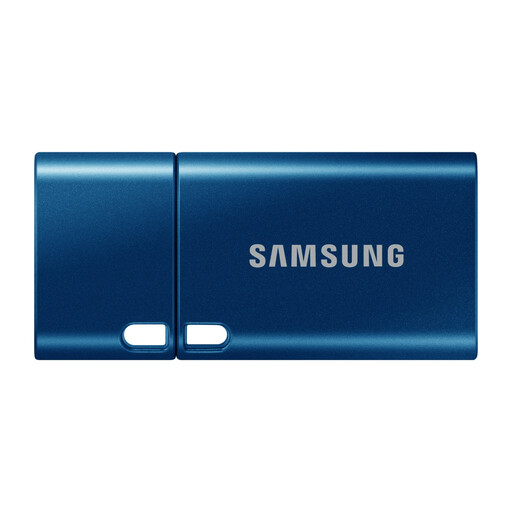
Samsung MUF-512DA USB flash drive, 512 GB, blue
Consider this flash drive for a deliberately selected set of documents or photos rather than assuming it will hold an entire library. It lists 512 GB, a USB Type-C connector and USB 3.2 Gen 1. Check your device and file-system compatibility, and keep the copied files separate from their source.
View on Joybuy
Frequently asked questions
How can I tell whether cloud files are synchronised or backed up?
Check which data the provider includes in a device backup and how you would restore a deleted or earlier file. Apple says iCloud Photos and iCloud Drive content synchronise separately from daily iCloud Backup. Microsoft offers a full OneDrive restore for Microsoft 365 subscribers covering activity within the previous 30 days, so do not assume that synchronisation keeps an unlimited history.
Can a family share cloud storage without sharing every file?
Yes, where the provider’s family plan permits it, but check its membership and quota rules. Google says Google One family members share storage while their files are not accessible to other members without permission.
What matters before buying an external drive for backups?
Measure the files you intend to copy, then check capacity, device connection, file-system compatibility and how you will restore them. Keep the completed copy separately from the original device, as the National Cyber Security Centre advises for important data.
Is a NAS enough on its own for family photos?
No: a NAS can hold a shared local library, but it still needs a separate backup destination. Synology warns that RAID crashes and drive failures can cause data loss, so check the backup and restore options supported by the particular NAS model and software.


