What matters when choosing backup storage?
Start with the files you need to recover and the device you would recover them to. Then choose a route you can repeat and keep separate from the original files.
Cloud storage
Consider it when: You want supported photos or files copied automatically and accessible from signed-in devices.
Keep in mind: Internet access, account access, storage limits and the service’s rules determine what you can recover. Apple Support distinguishes iCloud device backups from photos already synced to iCloud.
External hard drive
Consider it when: You want a local copy of a computer library, particularly if internet access is unreliable.
Keep in mind: You need a routine for connecting the drive, making copies and storing it safely afterwards. The National Cyber Security Centre warns that connected backup drives can be affected by an infected computer.
Portable SSD
Consider it when: You regularly move sizeable files and want a compact local copy.
Keep in mind: Check the host port and cable before relying on a stated speed. Samsung says its T7’s rated maximum requires USB 3.2 Gen 2 and UASP support.
USB flash drive
Consider it when: You need a removable copy of selected documents or files.
Keep in mind: A small drive needs deliberate copying and safe storage; do not assume a selected-file copy includes your whole device.
SD card
Consider it when: Your camera or another device uses the card format and you need a removable copy or transfer medium.
Keep in mind: Check that the device you would use for recovery has a compatible slot or reader, and store the card where it will not be misplaced.
| Concern | What to check | Who this matters to |
|---|
| Recoverable copies |
Check which files are included, when copying runs and how to restore to another device. |
If I lose or replace my phone, I need the important files to be there without relying on a copy I forgot to make. Around 33% of consumers put automatic protection and recovery first. |
| Room to grow |
Measure the files to protect and check the available capacity, including any cloud allowance shared with other services. |
A growing photo and video library needs space for new files, not just today’s collection. For around 25% of consumers, sufficient capacity is the primary concern. |
| Compatibility and restoration |
Check ports, cables or card readers, operating-system support and which data the restore process includes. |
If my files need to move between a phone and computer, I want to know that the replacement device can read the copy. Getting that connection and restore path right comes first for around 25% of consumers. |
| Portable offline copy |
Check the media format at both ends and where the copy can be stored securely when disconnected. |
When I need selected files away from a reliable connection, I want a copy I can carry or keep apart from my everyday device. Around 17% of consumers prioritise that portable or offline copy. |
Joybuy storage options for local copies
These drives and USB storage options can hold local copies of files. Choose between them by the amount you need to copy, the devices you will connect and the routine you will use to make and restore copies.
 No image available
Western Digital My Passport 4TB Portable Hard Drive, Black
Consider this for a local copy of a sizeable computer-file library.
Capacity: 4TB. Check the connection, operating-system setup and backup software for your intended copying and restore routine.
View on Joybuy
 No image available
Samsung Portable SSD T7 2 TB, Blue
Consider this for a portable local copy when you regularly move files between compatible devices.
Capacity: 2 TB; USB 3.2 Gen 2 Type-C. Samsung says the T7’s rated maximum speeds require a supporting host, cable and UASP mode. Check how you will run and restore backups.
View on Joybuy
 No image available
Lexar ES4 Portable SSD with Magnetic Set, 1TB
Consider this for a portable file copy from a device you can connect to the drive.
Capacity: 1TB; USB 3.2 Gen 2. Check phone compatibility and the magnetic attachment requirements separately, then confirm your copying and restore process before relying on it as a backup.
View on Joybuy
 No image available
Western Digital Elements Portable 4TB Hard Drive, Black
Consider this as a local destination for a larger computer-file collection.
Capacity: 4TB; USB 3.0. Check compatibility with each computer you intend to use and whether your preferred software can make recurring backups to it.
View on Joybuy
 No image available
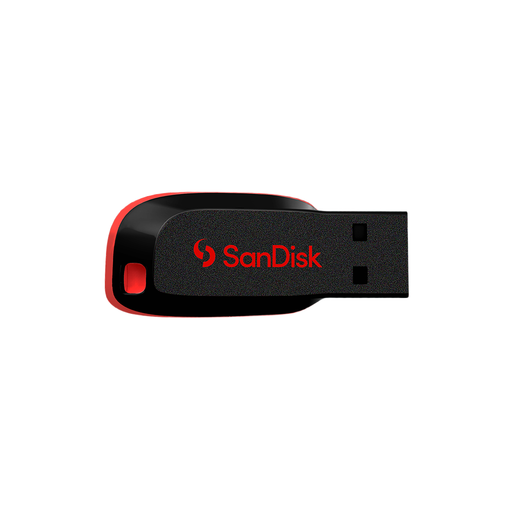
SanDisk Cruzer Blade 64GB USB Flash Drive
Consider this for a removable copy of selected files rather than choosing it without measuring a larger library.
Capacity: 64GB. Check that the files fit, that both devices have a compatible USB connection and that you can open the copied files when needed.
View on Joybuy
Common questions
Is cloud storage a backup or just file syncing?
Cloud storage can form part of a backup plan, but check what the particular service saves and how you would recover it. Apple Support says iCloud device backups exclude data already synced to iCloud, including iCloud Photos; Google describes a separate photo and video backup function. Check inclusion and deletion behaviour before relying on one account as your only recoverable copy.
Can an external drive make regular Windows file backups?
Yes, Microsoft says Windows File History can make regular copies to an external drive or network location and restore earlier file versions. Check which folders you have included and try restoring a file before depending on the setup.
Should I leave an external backup drive plugged in?
Not when you are relying on it as a disconnected local copy. The National Cyber Security Centre warns that connected storage may also be affected by an infected computer, so disconnect and store the drive when you are not using it for a backup or restore.
How can I tell whether my files will restore?
Make a small test restore after your first backup and check that the recovered files open. For a phone or computer backup, also follow the provider’s restore instructions and check whether the photos, documents and other data you need are included.
What should I do before passing on an old backup drive?
Confirm that you have a usable replacement copy, then properly delete personal information before selling or disposing of the drive. The Information Commissioner’s Office warns that personal data can remain on external drives and removable memory.


