Buying priorities
Start by listing the files and settings that matter, then choose a route that covers them and works with both the old and replacement device.
| Priority |
What to check |
Your needs |
| Backup coverage |
Check whether photos are synchronised separately, which folders are copied, and whether settings, app data and contacts can be restored. Android restoration varies by phone and Android version. |
I need to know whether I am making a file copy, synchronising selected files, or preparing a replacement-device restore. |
| Capacity and ongoing access |
Compare the full library size with the included allowance or drive capacity. Review paid-plan renewal and cancellation terms before relying on a cloud service. |
My photos, videos and documents need enough room to complete a backup without leaving part of the library behind. |
| Privacy and account control |
Review account protection, folder-sharing permissions and the provider's privacy information. The ICO notes that cloud files are stored on servers controlled by the provider. |
I want to control who can view or share family documents and photographs held online. |
| Ports and file formats |
Confirm ports, cables, card readers and external-storage support on both devices. Check the drive format before copying; Apple notes that formatting erases existing data. |
I need a transfer medium that connects to both devices and can be read and written by the operating systems I use. |
Joybuy product options
These Joybuy options cover local removable storage for copying photo, video and document libraries between compatible devices. They do not replace platform-specific phone backup for settings, accounts or app data.
 No image available
Samsung MU-PG4T0B 4 TB USB Type-C SSD
A local option for large photo, video and document libraries moving between compatible computers or Android devices.
Stated 4 TB capacity, USB 3.2 Gen 2x2, Windows/macOS/Android compatibility, and USB-C-to-C plus USB-C-to-A cables. Check the drive format and host ports before use; this is not a confirmed full phone-restore solution.
Joybuy
 No image available
Samsung Portable SSD T7 1 TB USB Type-C
A separate local copy option for personal photos and documents, with cables for compatible USB-C and USB-A devices.
Stated 1 TB capacity, USB 3.2 Gen 2 and Windows, Mac and Android recognition. Verify file-system compatibility before use; slower host ports can limit the stated transfer speed.
Joybuy
 No image available
Samsung MU-PG1T0B 1 TB USB Type-C SSD
A portable local-storage choice for copying photos, videos and documents between compatible Windows, macOS and Android devices.
Stated 1 TB capacity, USB 3.2 Gen 2x2, AES-256 hardware encryption and USB-C-to-C plus USB-C-to-A cables. Check the drive format and device ports before copying files.
Joybuy
 No image available
Lexar ES4 Portable SSD with Magnetic Set 1 TB
A local copy and transfer option for compatible iPhone 15 or 16 users who also use computers.
Stated 1 TB capacity, USB 3.2 Gen 2, USB-C-to-C and USB-A-to-C cables, with listed compatibility for iPhone 15/16, Android, PC and Mac. Magnetic mounting is stated for iPhone 15/16 series only.
Joybuy
 No image available
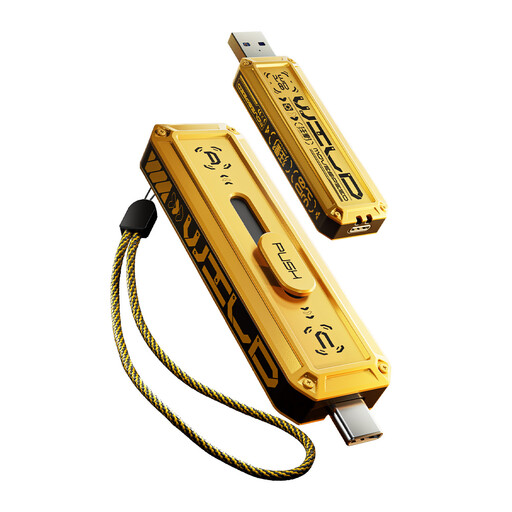
MOVESPEED 1 TB Dual-Interface USB Flash Drive
A compact option for manually moving selected photos and documents between compatible USB-A and USB-C devices.
Stated 1 TB capacity, USB 3.2 Gen 2×1 and dual USB-A and USB-C connectors, with listed Windows, macOS and Android support. Confirm external USB-storage support and file format before purchase.
Joybuy
Frequently asked questions
Will cloud storage move everything to my replacement phone?
Not necessarily. Apple Support says iCloud Backup includes information and settings not already synchronised to iCloud, while iCloud Photos synchronises photos separately. Google Help says Android restoration varies by phone and Android version, and some items such as Downloads, hidden-folder media and non-Play-Store apps can be excluded. Check the backup summary and replacement-device setup screens before erasing or trading in the old phone.
When will I need an adapter or file-system check for removable storage?
Check the physical ports on both devices before buying storage. Google says an Android cable transfer may need an adapter if the cable does not fit both phones. For Mac and Windows use, Apple lists FAT and ExFAT as Windows-compatible formats and specifies ExFAT for Windows volumes over 32 GB; copy files elsewhere before reformatting because formatting erases the drive.
Can I use a USB flash drive or SD card for a Mac Photos library?
Apple advises against storing a Mac Photos library on removable storage such as an SD card or USB flash drive because of possible data loss. For a Photos library on an external drive, Apple specifies APFS or Mac OS Extended (Journaled), and says that drive cannot also be used for Time Machine backups.
What should I check for privacy before uploading family files to cloud storage?
Review who controls the service, its security and availability information, and whether folders are private, shared or public. The ICO says cloud files are held on servers controlled by the provider; use a strong unique account password and check sharing settings before uploading sensitive personal documents.
Do UK consumers have a cancellation period for an online cloud-storage subscription?
For a service contract or digital content not supplied on a tangible medium, Regulation 30 of the Consumer Contracts (Information, Cancellation and Additional Charges) Regulations 2013 states that the normal cancellation period ends 14 days after the contract is entered into, unless an exception applies. Check the provider's current terms for the service and circumstances involved.


