One-off community film-night organisers
If the hall cannot be fully darkened, image visibility matters alongside a straightforward setup. Epson’s UK buying guide identifies room brightness as a factor in projector choice.


Choose a Full HD projector around the hall’s lighting and the distance available between projector and screen, rather than choosing by brightness alone. Epson’s UK guide places 3,500+ lumens in its bright-room category; choose short throw when a close screen position is necessary, then check the exact image size, playback and audio connections, and screening permissions before the event.
If the hall cannot be fully darkened, image visibility matters alongside a straightforward setup. Epson’s UK buying guide identifies room brightness as a factor in projector choice.
A shallow room, central aisle or close seating can make conventional rear placement awkward. A short-throw model is worth considering once the screen position and available distance are measured.
Recurring events make light-source maintenance and responsibility for shared equipment more relevant. Compare operating conditions for any quoted light-source life and plan equipment checks with the hall.
Decide how much light the hall can exclude, then measure the screen position and check the complete playback and sound setup. Standard and short throw address different placement constraints; neither removes the need to check the selected model’s geometry.
Consider when: The hall has a clear projector position away from the screen. BenQ lists a 1.15–1.5 throw ratio for the LH650.
Allow for: The required distance depends on the exact model and planned image width; a clear room length alone does not establish a workable position.
Consider when: The projector needs to sit close to the screen. ViewSonic specifies a 0.5 throw ratio for the LSD400HD-ST and states that it produces a 100-inch image from 1.1 m.
Allow for: Screen height, a stable position and unobstructed sightlines still need checking in the hall.
| Concern | What to check | Who this matters to |
|---|---|---|
| Image visibility | Check lighting control and intended screen size; compare brightness figures using their stated measurement standards. Epson places 3,500+ lumens in its bright-room category, not as a guarantee for every hall. | If I cannot darken the hall, I need the film to remain visible at the planned image size. Around 36% of consumers would put visibility first. |
| Projector placement | Measure lens-to-screen distance and image width against the exact model’s throw ratio; keep aisles and sightlines clear. | A shallow room or busy aisle leaves little room for a rear projector without people crossing the beam. Roughly 29% of consumers would make placement their primary concern. |
| Film playback | Test the actual film and source device through the planned video connection and audio route; check any required HDCP compatibility. | If my screening relies on a particular laptop or licensed source, I need picture and sound to work together before guests arrive. Around 21% of consumers would prioritise playback reliability. |
| Repeat-use upkeep | Compare light-source-life conditions and warranty terms; agree who will check the equipment and leads before use. | For regular screenings, I need a practical maintenance plan for shared equipment. About 14% of consumers would put repeat-use upkeep first. |
Hall lighting and screen size affect how useful a brightness rating is. Epson distinguishes bright-room use in its buying guidance, while BenQ notes that actual brightness can vary with the unit and conditions.
Find out whether the lights can be dimmed and compare the stated measurement standards before relying on a rating for the planned image size.
GOV.UK says public film showings need permission even when tickets are not sold. Permission to use a film and permission connected with the venue are separate questions.
Clear the rights for the particular film and check any venue or local-council requirements before advertising the screening.
Obtaining the appropriate film rights can involve a separate licensing arrangement, depending on the title and how it will be shown.
A short-throw label addresses projection distance, not screen height, stable placement, cable routing or audience movement.
Measure the proposed position and test the image in the hall rather than relying on room length alone.
The Health and Safety Executive says there is no blanket legal requirement for annual portable appliance testing. Equipment still needs to be maintained safely, with checks appropriate to its use and environment.
Inspect the projector, plugs and leads for visible damage, plan cable routes and follow the hall’s equipment procedures.
The UK-listed EH-TW840 is a lamp-projector example to assess where hall lighting is a concern.
The LH650 is a standard-throw laser model to assess for a hall with a suitable projector position and plans for repeat use.
The LSD400HD and LSD400HD-ST provide standard-throw and short-throw models to compare against the hall’s layout.
These Full HD-labelled projector choices are relevant to playing an HD short film. If the hall cannot be darkened, assess visibility at your intended screen size rather than assuming that a projector intended for home viewing will suit the room; also test placement, sound and the actual playback source.
 No image available
Consider for an HD film where the hall can be darkened; test whether the image remains visible at the planned screen size.
The title lists 900 ANSI lumens, Android 14 and HDMI/USB compatibility. Confirm the image size at your available projector distance and test the film’s playback and audio path.
 No image available
Consider for an HD film if you can check image visibility under the hall’s actual lighting conditions.
The title states 1,200 ANSI lumens and 4K support; that does not mean native 4K resolution. Check the required projection distance and test the planned source and sound setup before the screening.
 No image available
The rotating design may be relevant where the planned projector position needs flexibility, provided that position is stable and clear of walkways.
The title lists 500 lumens, HDMI and a 120-inch display claim without establishing the image size at your available distance. Test visibility, placement and the actual playback source in the hall.
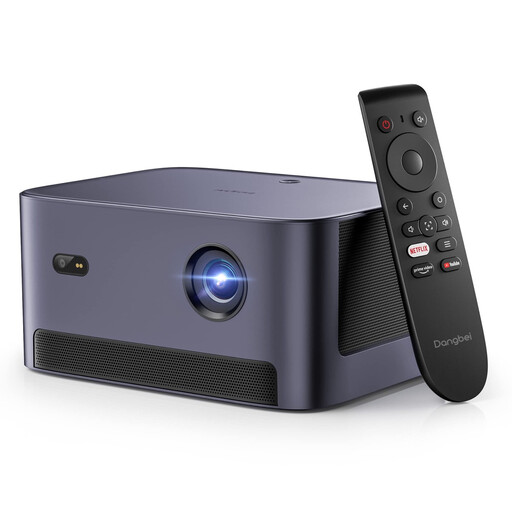 No image available
Consider for an HD film only after checking the intended image size and lighting in the hall.
The title states 540 ISO lumens, Wi-Fi and Bluetooth. ISO and ANSI brightness figures should not be treated as directly interchangeable; also confirm that the planned video source has a suitable input path and test the hall’s audio arrangement.
Start with the hall lighting and planned image size. Epson’s UK guide places 3,500+ lumens in its bright-room category, but that figure does not guarantee a visible image at every screen size or make differently measured ratings directly comparable.
Yes, check that you have the necessary rights for the public showing even if admission is free. GOV.UK says public screenings need permission; if your group made the film, also check rights to any third-party music or footage it contains.
Do not assume a personal subscription allows a public showing. GOV.UK warns that public use may breach a streaming service’s terms, and a TV Licence does not itself grant permission to screen a film publicly; check the rights and permitted playback method for the particular title.
A premises licence may be needed, depending on the hall and event conditions. GOV.UK directs organisers to check with the local council, so confirm the position with the hall manager and relevant council before advertising or selling tickets.
No blanket annual PAT-testing requirement applies. The Health and Safety Executive says electrical equipment must be maintained safely and checks should suit the equipment and environment; inspect visible damage and follow the hall’s equipment procedures.