
24/7 Customer Support

Free returns

Same-day & Next-day Delivery

Quality Guaranteed

Unlock Your Welcome Offers: FREE Delivery | Up to 80% OFF | Free 30-day JoyPlus trial
Download the APP
Navigating the world of computer monitors can feel overwhelming. With a sea of technical specifications and marketing jargon, choosing the right display for your gaming rig or workstation is a genuine challenge. A curved gaming monitor, in particular, promises a more immersive experience, but which one is right for you?
This guide is designed to cut through the clutter. As the Joybuy Product Recommendation Officer, my role is to provide clear, practical advice to help you find a monitor that fits your needs and budget. We will explore the key features to consider and highlight a few standout options, whether you are a competitive gamer, a simulation enthusiast or a professional needing more screen space.
Before diving into specific models, let's break down the essential features. Understanding these will empower you to make an informed decision.
The combination of screen size and resolution determines the clarity and immersiveness of your display.
For a smooth and responsive gaming experience, two numbers are critical.
A monitor is more than just a screen; it is the hub of your setup.
Based on a balance of features, performance and user needs, here are our recommendations.
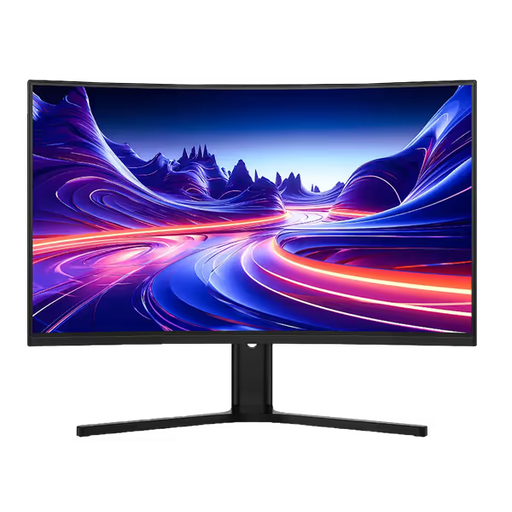
Why It Stands Out This monitor strikes an excellent balance for the modern gamer. The large 32-inch screen combined with a sharp 2560x1440 (QHD) resolution creates a detailed and immersive picture. Its standout feature is the very fast 180Hz refresh rate, which delivers exceptionally smooth gameplay for both competitive shooters and graphically rich AAA titles.
Pros
Who is it for? This is an ideal choice for PC and console gamers who want a large, fast and responsive display that excels in a wide variety of games.
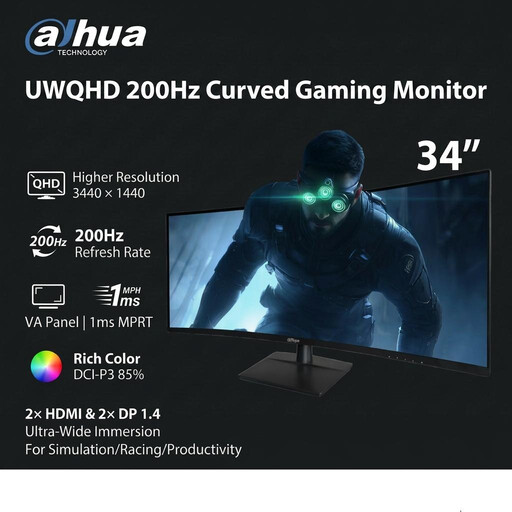
Why It Stands Out For those who crave ultimate immersion, this ultra-wide gaming monitor delivers. The 21:9 aspect ratio expands your peripheral vision, making it perfect for racing, flight simulators and cinematic games. It pushes performance even further with a blistering 200Hz refresh rate, ensuring that even the most frantic on-screen action remains perfectly smooth.
Pros
Who is it for? Primarily aimed at simulation enthusiasts and gamers seeking a competitive edge and maximum immersion. It also serves as a superb productivity monitor for users who need to manage multiple windows.
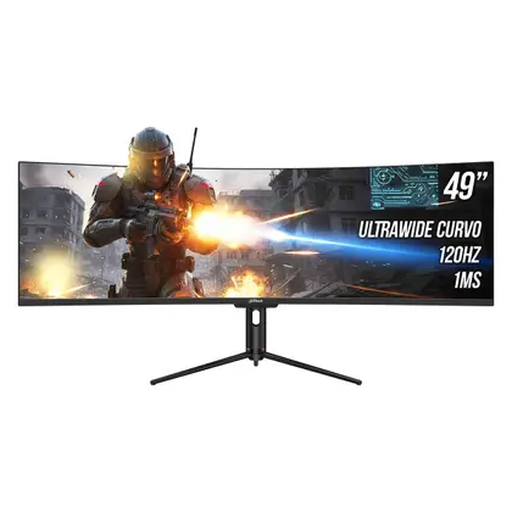
Why It Stands Out This 49-inch "super ultra-wide" is a multitasking titan. Its 5120x1440 resolution is equivalent to two 27-inch QHD monitors placed side-by-side, but without the distracting bezel in the middle. It is packed with productivity-focused features, including a Type-C port with 65W power delivery and a built-in USB hub. While a productivity powerhouse, its 120Hz refresh rate and 1ms MPRT also make it a formidable gaming display.
Pros
Who is it for? Power users, traders, content creators and programmers who demand maximum screen real estate. It is also for gamers who want an unparalleled, all-encompassing field of view.
While these models represent excellent choices for different users, the world of curved monitors is vast. If you are looking for a different size, feature set or price point, there are many other options to consider.
Explore our full range of curved ultrawide monitors to find the perfect fit for your setup.
1. Are curved monitors better for gaming? For many, the answer is yes. The curve helps fill your peripheral vision, which can make the gaming experience feel more immersive and engaging. It can also reduce eye strain during long sessions, as the curved shape more closely matches the natural curvature of the human eye, keeping the entire screen at a more uniform distance.
2. Can I use a curved gaming monitor for work? Absolutely. A curved monitor, especially an ultra-wide model, can be a fantastic productivity monitor. The extra horizontal space is ideal for viewing multiple documents side-by-side, managing large spreadsheets or working with wide video editing timelines. It effectively replaces a dual-monitor setup, providing a more seamless workflow.
3. What is a good refresh rate for a curved gaming monitor? While 60Hz is the baseline, for a smooth gaming experience, you should aim for 120Hz or higher. A high refresh rate monitor (144Hz, 180Hz or more) makes a noticeable difference in fast-paced games, resulting in smoother animations and more responsive controls. For general use and slower-paced games, 120Hz is perfectly adequate, but competitive players will benefit from 144Hz and above.