
24/7 Customer Support

Free returns

Same-day & Next-day Delivery

Quality Guaranteed

Unlock Your Welcome Offers: FREE Delivery | Up to 80% OFF | Free 30-day JoyPlus trial
Download the APP
Edifier wireless desktop speakers can offer a more spacious listening experience than typical laptop or monitor audio, without filling your desk with cables. However, comparing models only by wattage, Bluetooth version or appearance can lead to an unsuitable purchase.
For UK buyers, the main challenge is matching the speaker to the way it will actually be used. A compact speaker for video calls has different priorities from a high-fidelity system for music, while a portable desktop speaker needs battery performance as well as sound quality.
This guide explains the main buying traps, the specifications worth checking and which Edifier models suit different listening habits.
A higher RMS figure can indicate greater available output, but it does not describe tonal balance, cabinet construction, driver arrangement or distortion levels. A speaker with more power may still sound unsuitable in a small-footprint office if the bass is excessive or dialogue lacks clarity.
Look at the driver sizes, amplifier type, acoustic design and frequency range alongside RMS output. For example, the Edifier M60 uses separate 3-inch mid-bass drivers and 1-inch tweeters, while the D32 uses a 2.1 acoustic architecture with a 4-inch mid-low driver.
Bluetooth performance depends on the source device, operating system, codec support and streaming quality. LDAC can support higher-bitrate wireless transmission, but it is particularly relevant to compatible Android devices. An iPhone, laptop or desktop PC may use a different codec.
For a computer setup, check whether the speaker also includes USB-C, AUX or Wi-Fi connectivity. Wired inputs can be useful for reducing latency in gaming and maintaining a stable connection during long work sessions.
Large tabletop wireless speakers need room around them for appropriate stereo separation and airflow. Placing a speaker directly against a wall or underneath a monitor can affect bass response and block controls.
Measure the available area before buying. Also check whether the product is a single speaker designed for wide room coverage or a left-and-right pair. Stereo pairing speakers can create a broader soundstage, but they require two compatible units and suitable placement.
Bluetooth 5.3 and Bluetooth 5.4 can provide current wireless connectivity, but the version alone does not guarantee better sound. More useful questions include:
The Edifier S300 and D32 support AirPlay 2-based multi-room functions, while the ES300 includes Bluetooth, Wi-Fi, USB and AUX connectivity. These features are valuable if you want one system for a home office, lounge and other rooms.
Driver configuration provides more practical information than marketing phrases such as “room-filling” or “immersive”. A separate tweeter and mid-bass driver can help reproduce high and low frequencies independently. A bass-reflex cabinet may provide more low-end presence, although placement will influence the result.
The S300 lists 80W RMS and a frequency response of 48Hz–40kHz. The M60 provides 66W RMS, while the QD25 is rated at 25W RMS in a smaller portable design. These specifications suggest different use cases, rather than a simple ranking.
Battery-powered speakers are convenient for moving between a desk, kitchen or garden, but quoted playtime can vary with volume, lighting and connection type. Consider whether you need a built-in battery at all.
The QD25 lists up to 15 hours of playback, the ES300 up to 12 hours, and the D32 up to 11 hours. A portable desktop speaker should also be easy to carry and have a charging connection that fits your existing USB-C chargers or power banks.
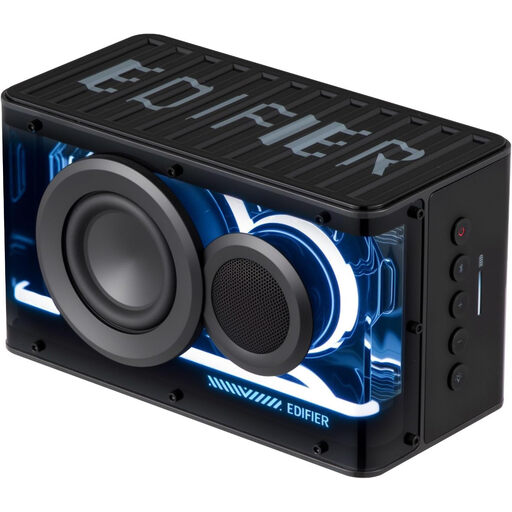
Why This Fits Their Persona: A practical choice for laptop users, students and those with small-footprint UK home-office setups who want one speaker that can move around the house.
Its compact format includes a battery, so you are not paying for a permanently fixed desktop system if portability matters.
25W RMS output, up to 15 hours of listed playtime, USB-C charging, Bluetooth 6.0 and stereo pairing.
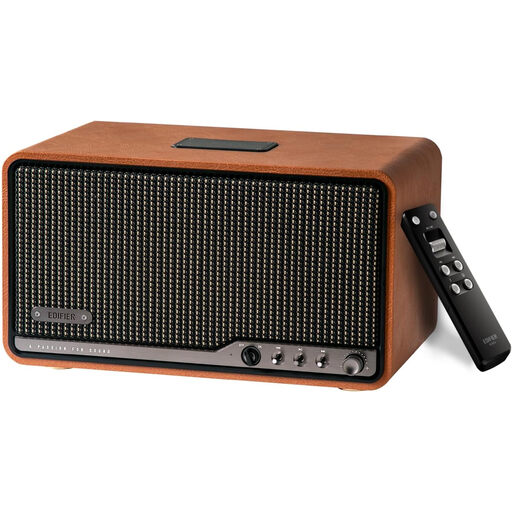
Why This Fits Their Persona: Suits music lovers and design-conscious buyers wanting a substantial tabletop speaker for a study, living room or premium home-office setup.
It combines specified Hi-Res support with USB-C, AUX, Bluetooth 5.4 and AirPlay 2, rather than relying on Bluetooth alone.
80W RMS, LDAC support, 24-bit/96kHz audio support and stereo-pairing or multi-room functionality.
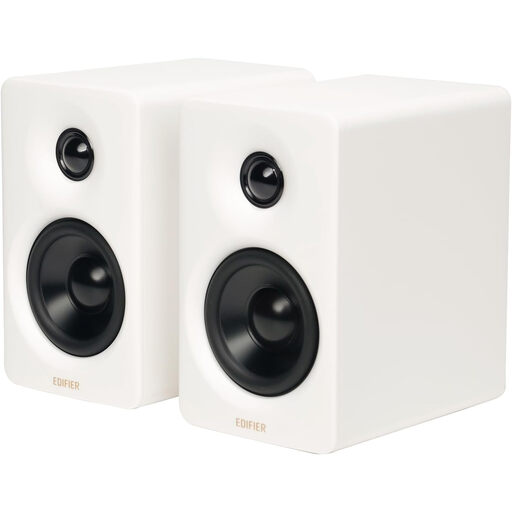
Why This Fits Their Persona: A focused option for PC users, gamers and home-office listeners who want compact stereo speakers positioned directly at ear level.
The included angled aluminium stands help raise the speakers towards ear level, addressing poor desktop placement.
66W RMS, LDAC support, USB-C and AUX inputs, plus separate 3-inch mid-bass drivers and 1-inch tweeters.
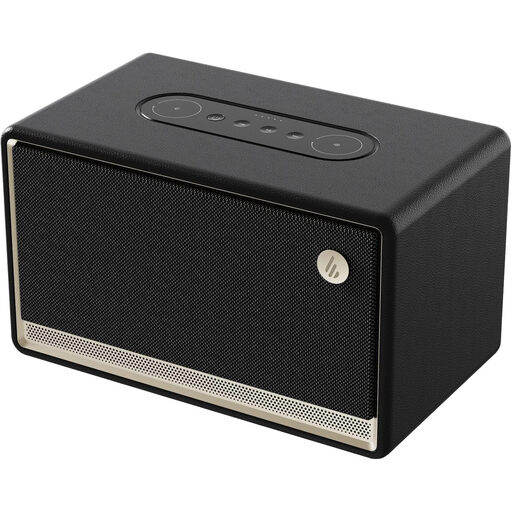
Why This Fits Their Persona: Suitable for listeners moving between a desk, lounge and outdoor area who need broad connectivity and a rechargeable battery.
Its Wi-Fi, Bluetooth, USB and AUX options reduce dependence on one wireless source, while the battery supports movement around the home.
30W+15W×2 RMS configuration, Hi-Res Audio support, AirPlay 2, multi-room synchronisation and up to 12 hours of listed playtime.
Place computer speakers at equal distances from your seating position, with the tweeters roughly aimed towards your ears. Keep wireless speakers away from crowded Wi-Fi equipment where possible, and update firmware through the relevant app if updates are provided.
Before ordering, check the listing for included power accessories, warranty terms, returns information and UK plug compatibility. Product safety instructions should be followed carefully: keep speakers away from water and heat sources, inspect cables and avoid prolonged listening at high volume.
If you need speakers specifically designed to sit beneath or beside a display, browse the wider speakers for monitor category to compare alternative sizes and connection types.
We have compiled a complete, real-time list of products that fully satisfy these strict selection criteria and UK safety regulations.
Yes, provided the computer supports the required connection. Bluetooth is convenient, while USB-C or AUX can be preferable for desktop gaming, video editing and other applications where low latency is important. Check the computer’s operating system and available ports before purchase.
No. LDAC availability depends on the phone, operating system and selected Bluetooth settings. Compatible Android devices may support it, but buyers should confirm their device specifications. The speaker can still connect through standard Bluetooth when LDAC is unavailable.
Power consumption varies according to amplifier design, volume and whether the speaker is charging. Battery models such as the QD25, ES300 and D32 can operate away from a mains socket, but they require periodic charging. For a permanent desk setup, compare standby behaviour and use the supplied charger or a suitable USB-C power source.