Single-screen cockpit drivers
A curved ultrawide appeals if you want more horizontal screen space than a standard 16:9 display without arranging three panels. Measure its position from your usual driving seat before deciding on size or curvature.


Choose the display layout before comparing peak refresh rates. A 34-inch ultrawide suits a more compact single-screen cockpit; a 49-inch super-ultrawide needs substantially more room; and three monitors suit iRacing drivers prepared to mount, measure and configure separate screens. Whichever route you take, check your PC’s output at the intended resolution and set the display geometry from your normal driving position.
A curved ultrawide appeals if you want more horizontal screen space than a standard 16:9 display without arranging three panels. Measure its position from your usual driving seat before deciding on size or curvature.
A 49-inch 32:9 display gives you one continuous, very wide panel without joins between separate screens. It is a route for drivers whose rig or desk has the width and mounting capacity to accommodate it.
Three separately angled displays suit iRacing users willing to measure screen widths, eye distance and angles, then configure the simulator around their normal driving position. iRacing Support documents both the display setup and the measurements it requires.
For endurance-sim practice, settle on a layout that fits your cockpit and simulator, then check whether your PC and connections can drive it as intended.
Choose it when: You want a wider single screen but lack the space or mounting provision for a 49-inch panel or three displays.
Accept: One panel cannot provide the separately angled side screens of a triple-monitor cockpit.
Choose it when: You want a continuous 32:9 display and can make room for its width. Samsung UK describes its Odyssey G91F format as equivalent to two 16:9 screens side by side.
Accept: The larger physical span calls for a careful clearance and mounting check; a wide panel does not become separately angled side displays.
Choose them when: Your simulator supports a triple-display setup and you want side screens positioned at their own angles. iRacing Support documents methods for using three monitors.
Accept: Three panels need more outputs, mounting, cabling and geometry setup than a single display.
| Concern | What to check | Who this matters to |
|---|---|---|
| Cockpit geometry and view | Measure screen width and the shortest distance from your eyes to the panel in your driving position. Check the simulator’s display-geometry options. | If the on-screen cockpit needs to line up with my seating position, screen shape alone will not settle the choice; around 30% of consumers put cockpit geometry first. |
| Triple-screen expansion | Confirm simulator support, GPU outputs and space for three suitably matched displays. iRacing Support documents windowed and full-screen-exclusive setup methods. | I want side screens I can angle around the cockpit and am prepared to configure them; roughly 30% of consumers primarily favour that triple-screen flexibility. |
| Motion at changing frame rates | Check resolution and refresh rate at your chosen input, plus compatible variable refresh rate (VRR) support across the monitor, PC and connection. | When my simulator’s frame rate changes, I care more about compatible refresh behaviour than the largest number on the box; about 20% of consumers prioritise motion under varying frame rates. |
| Fit during long stints | Check panel dimensions, stand or VESA mounting, clearance and adjustment from your seated position. | A screen that forces an awkward position would be difficult to use through a long practice stint; around 20% of consumers put physical fit and positioning first. |
iRacing Support advises measuring from your normal racing position when configuring the display. For general display-screen posture, the Health and Safety Executive advises placing the top of a screen around eye level and the screen about an arm’s length away; assess what positioning works safely and comfortably in your own cockpit.
A 144Hz or 240Hz specification does not tell you what frame rate your PC will achieve at the monitor’s intended resolution. ZOWIE UK explains that VRR synchronises refresh with frame rate when the latter is at or below the display’s native refresh rate, provided the setup is compatible.
Check GPU output, port, cable, monitor settings and in-game performance together. Treat a published response-time figure as a specification for that model, not a promise of identical results in your simulator.
A panel that cannot be placed where you drive may be difficult to position for the intended field of view. iRacing Support uses eye distance, screen widths and angles in its monitor setup guidance.
Measure available width, viewing distance and mount clearance before ordering. For triples, plan each panel’s position and angle rather than choosing screens by diagonal size alone.
A wider or three-screen arrangement may also call for additional mounting, cables or suitable display outputs, depending on the existing rig.
Mounting, adjustments and warranty provisions belong to the exact model. ASUS ROG UK lists 100 × 100mm VESA mounting, height adjustment and a two-year warranty including panel burn-in for the PG34WCDM; those terms should not be assumed for another ROG display.
Check the complete model code, stand dimensions, VESA pattern, supplied connections and written warranty terms for the product you intend to order.
These manufacturer examples illustrate different display formats and model-specific features; a brand name alone does not establish how another model will fit your rig.
LG UK lists the 34GS95QE-B as a 34-inch, 3440 × 1440, 21:9 curved OLED monitor with 800R curvature and a 240Hz refresh rate.
Samsung UK specifies the Odyssey G91F as a 49-inch, 32:9, 1000R curved Dual QHD display with a 144Hz refresh rate.
ASUS ROG UK lists the PG34WCDM as a 34-inch, 3440 × 1440, 800R curved OLED model with 240Hz refresh and 100 × 100mm VESA mounting.
These choices cover 34-inch single-screen ultrawides and 49-inch super-ultrawides for endurance-sim setups. Compare their stated formats with your available space, then check connection and simulator requirements before choosing; the cards are not a triple-monitor kit.
 No image available
Consider this 34-inch single screen if a curved ultrawide fits your cockpit. Its title specifies WQHD and 240Hz; check the exact resolution and whether your PC, input and cable can deliver the refresh rate you intend to use. Consider OLED screen care if your setup also displays static content for extended periods.
 No image available
This is a single-panel option for a cockpit with room for a 49-inch screen. The listed variant is 32:9, 5120 × 1440, 1500R curved and 165Hz, with AMD FreeSync and 75 × 75mm VESA mounting. Check desk or mount capacity and the refresh rate available through your chosen input at that resolution.
 No image available
Consider the R34w-30 for a curved, single-screen ultrawide arrangement. Its title specifies UWQHD; before ordering, confirm the resolution and refresh rate available with your PC and chosen input, then measure where the screen will sit relative to your driving position.
 No image available
This 34-inch option suits a single-screen cockpit where the intended connection matters to the choice. Its title lists 3440 × 1440, 200Hz and DisplayPort 1.4; check the refresh rate available at that resolution through the input you will use. If changing frame rates are a priority, confirm compatible VRR support before ordering.
 No image available
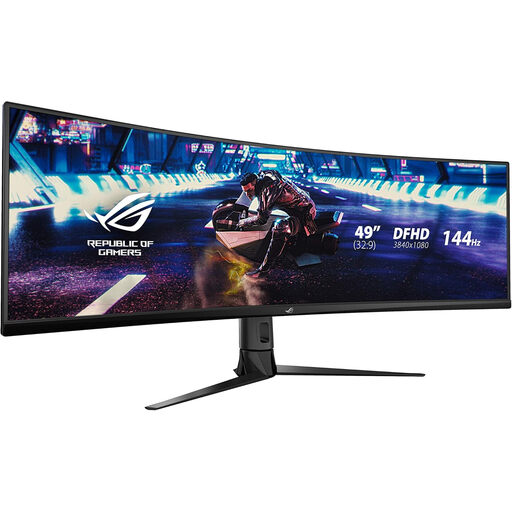
The XG49VQ is a wide single-panel route for a cockpit with suitable clearance. Its title specifies DFHD and 144Hz; check the full dimensions, mounting arrangements and input-specific refresh rate against your rig and PC before choosing it.
Measure from your normal driving position rather than guessing. iRacing Support instructs users to enter eye-to-screen distance and display width in its monitor settings; a triple-screen setup also calls for screen widths and angles before using its Compute function.
No: the PC, game settings and connection must deliver the resolution and refresh rate you select. ZOWIE UK explains that compatible VRR synchronises monitor refresh with game frame rate when that rate is at or below native refresh, which can matter when frame rates change.
Yes. iRacing Support documents a windowed method spanning three screens as well as a full-screen-exclusive method using a combined virtual display through NVIDIA Surround or AMD Eyefinity. Check which method fits your PC before buying additional panels and mounts.
Check the retailer’s take-back arrangements or your local authority’s electrical-waste collection route. GOV.UK explains that the UK waste electrical and electronic equipment framework aims to reduce electrical equipment sent to landfill or incineration through recovery, reuse and recycling.