Single-cable laptop users
If you want one connection for video, charging and possibly peripherals, check your exact laptop’s display output and charging needs before choosing a USB-C monitor.


Start with your laptop: confirm how it outputs video and whether you want the monitor to charge it. A USB-C monitor can simplify a compatible desk setup, while HDMI or DisplayPort works when monitor-based charging is unnecessary. Choose a wider screen only if its workspace suits your tasks and its stand fits your desk; screen positioning and reflections matter too.
If you want one connection for video, charging and possibly peripherals, check your exact laptop’s display output and charging needs before choosing a USB-C monitor.
Documents, browser windows and communication tools may call for more visible workspace. Compare a standard 27-inch display with a 34-inch ultrawide, allowing for the width of your desk.
Stand movement, laptop placement and room lighting matter when the screen position changes. The Health and Safety Executive advises arranging screens and lighting to avoid reflections and glare.
Confirm the laptop’s video connection first, then choose the screen format and position that fit your work and desk.
| Concern | What to check | Who this matters to |
|---|---|---|
| Connection and charging | Check the laptop’s external-display support and charging requirement against the monitor’s connection, power output and cable. | I want fewer cables at my desk, but video and charging both need to work with my laptop; around 36% of consumers put connection and charging first. |
| Workspace and desk fit | Compare the screen format with your tasks, then measure desk width and depth with the stand and laptop in place. | Keeping several windows visible matters more to me than a compact screen, provided it fits my desk. Around 29% of consumers prioritise workspace and desk fit. |
| Screen positioning | Check stand adjustments, room reflections and, if using an arm, monitor and desk-mount compatibility. | My screen needs to sit comfortably alongside my laptop without troublesome reflections; roughly 21% of consumers make positioning their primary concern. |
| Simple video connection | Match the laptop’s output to a monitor input; check adapter compatibility and cable requirements if the ports differ. | I only need an external picture and can keep using my laptop charger. For about 14% of consumers, a straightforward video connection comes first. |
The USB Implementers Forum and VESA describe DisplayPort Alternate Mode as a way to carry display output over USB-C; the connector shape alone does not establish what your laptop supports. Monitor charging outputs also differ by model.
Check the laptop’s video and charging specifications against the monitor and the cable you intend to use.
A compatible adapter, dock or separate laptop charger may be needed for the arrangement you choose.
A 34-inch, 21:9 screen needs more horizontal room than a conventional 27-inch display. For two-computer picture-by-picture use on the LG 34WR55QK-B, LG specifies HDMI and DisplayPort cables and says the DisplayPort cable is not included.
Measure the desk and check the connections required for the way you intend to use the screen.
Stand movement cannot by itself resolve awkward laptop placement or reflections from windows and lamps. The Health and Safety Executive advises considering desk arrangement, screen position and lighting together.
Plan where both screens will sit. If you want an arm, check the monitor’s mounting pattern, the arm’s load range and desk-clamp clearance.
A manufacturer’s warranty is separate from statutory rights. GOV.UK distinguishes cancellation of an online purchase from remedies when goods are faulty or misdescribed.
Read the seller’s return terms and the exact warranty conditions, and keep the listing details while checking the monitor after delivery.
Dell’s UltraSharp U2724DE is a reference point for a desk setup needing Thunderbolt and peripheral connections.
BenQ’s GW2790QT and GW2786TC are home-office USB-C models with stated 65W laptop power delivery and adjustable stands.
LG’s 34WR55QK-B is an example to consider when a wider desktop matters more than a compact footprint.
These choices include standard-format and ultrawide desk monitors. Check each model’s connections against your laptop and allow room for its screen and stand.
 No image available
Consider this standard-format desk display if you want a QHD screen rather than an ultrawide workspace.
Check the exact video connections and stand arrangement for your laptop and desk. If single-cable charging matters, confirm this variant’s USB-C capability and power delivery before ordering.
 No image available
This 22-inch screen is an option when a smaller additional display suits the space available beside your laptop.
Check that your laptop has a compatible video route and whether the stand can be positioned as you need.
 No image available
Consider the 21:9 format if you want a wide desktop for multiple windows and have enough desk width.
The product name specifies 3440 × 1440 resolution, a VA panel, two HDMI inputs and two DP1.4 inputs. Check that your laptop supports the display mode you intend to use; measure space for the stand as well as the screen.
 No image available
This larger standard-format screen may suit a desk where you want more display area without choosing an ultrawide shape.
The product name lists built-in speakers. Check its exact resolution, laptop connection and stand adjustment if any of those determine whether it fits your setup.
 No image available
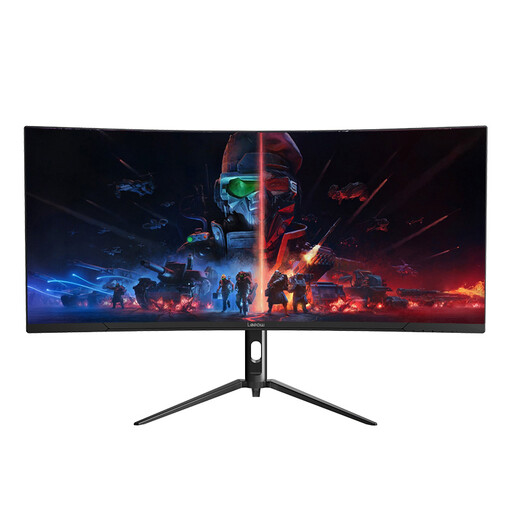
The wide screen is an option for keeping several work windows visible when your desk has sufficient horizontal space.
Its product name specifies 3440 × 1440 resolution and a 165Hz refresh rate. Confirm the supplied stand’s adjustments and the connection needed for your laptop.
No: the port’s shape does not confirm external-display support or suitable charging. Check your exact laptop’s specifications, then compare its display and power requirements with the monitor and cable you plan to use.
You may need one if the laptop’s supported video output does not match the monitor input, or if you need additional connections. Confirm compatibility with your laptop and intended display mode; Apple, for example, lists an HDMI adapter for specified USB-C devices and says an HDMI cable is needed separately.
For online purchases, GOV.UK says you can tell the seller you wish to cancel within 14 days of receiving the item, then have another 14 days to return it; the seller must refund you within 14 days of receiving it back. Faulty or misdescribed goods have separate rights, so check which situation applies rather than relying solely on a change-of-mind policy.
Check the exact listing for the supplied power lead or plug, input-power requirements, warranty duration and who handles a fault. Those product and seller details matter even when the monitor model otherwise suits your laptop and desk.