Small-desk language learner
You want to move lesson, dictation or speaking-practice recordings off your computer without making room for a mains-powered desktop drive.


For routine copying at a small desk, start with a compact portable SSD and check your computer’s USB data capability, the cable and the file system before choosing by advertised speed. A rugged model makes more sense if you regularly carry the recordings; consider a higher-speed model if you frequently move large batches and your connection can use it. Keep another separate copy of important recordings.
You want to move lesson, dictation or speaking-practice recordings off your computer without making room for a mains-powered desktop drive.
You move recordings between USB-C devices and older USB-A computers. Cable connections and a file system that works with your devices matter alongside transfer speed.
You carry recordings away from the desk or keep copies outside your main computer. Physical protection and a separate backup matter; recordings containing personal information may also call for encryption.
Check that the drive will connect to every computer you use, then choose room for your recordings and a separate backup location. Desk footprint and tested physical protection matter more if the drive will travel.
| Concern | What to check | Who this matters to |
|---|---|---|
| Connection and compatibility | Confirm the computer’s USB data capability, the cable connection and the file system needed by each device. | If my recordings move between computers, I need a drive I can connect and use on both rather than a speed figure I cannot reach. Around 42% of consumers put connection and compatibility first. |
| Archive space and backup | Allow for the recordings you plan to keep, and decide where a separate copy will live. | As my lessons accumulate, I want room to retain them without making one SSD the only place they exist. For around 33% of consumers, archive space and a recoverable copy are the primary concern. |
| Desk space and carrying | Check the drive’s dimensions and cable routing; if you carry it, compare stated protection and its test conditions. | With little room beside my computer, I need a drive and cable that fit; if it travels, I also want to understand its physical protection. Keeping the setup compact is the leading need for around 25% of consumers. |
USB-C does not specify one data rate. The USB Implementers Forum says connected USB products operate at their lowest common speed capability; Samsung’s stated maximum speeds also depend on a compatible host, cable and UASP support.
Check the computer’s USB data specification and the cable before deciding whether a faster-rated drive would help.
A different file system may be needed for a particular device setup, but reformatting erases files already on the drive. Crucial gives this warning for its X9 portable SSD.
Check the file system required by each device, and copy existing contents elsewhere before reformatting.
A portable drive can be lost, damaged or affected by malware. The NI Cyber Security Centre recommends copies on separate devices, including one kept offline in another location.
Keep another copy of important recordings, disconnect an external backup drive when it is not in use, and check that you can restore the files.
Samsung’s T7 Shield IP65 and drop claims refer to specified tests. Samsung says liquid, dust and drop damage are not covered by its warranty.
Consider tested protection if the drive travels, but continue to handle it carefully and maintain a separate backup.
The T7 line is relevant to compact desk storage, while the T7 Shield line adds tested physical protection for a drive that travels.
The X9 line offers portable USB-C storage; the X10 line is relevant when a higher stated sequential read speed matters to your setup.
These portable SSDs offer options for compact desk use, carrying recordings and higher-speed transfers. Match the connection and cable to your computer, and keep a separate copy of recordings you cannot afford to lose.
 No image available
Consider this 1TB USB-C SSD if you regularly take recordings away from your desk and want the T7 Shield’s tested physical protection.
Samsung states IP65 protection and a 3-metre drop test for the T7 Shield line, but says liquid, dust and drop damage are not covered by its warranty. Check your computer connection before relying on the line’s maximum transfer-speed claims.
 No image available
This 1TB USB 3.2 Gen 2 portable SSD suits routine recording copies where a compact drive is the priority.
Samsung says the T7 line comes with USB-C-to-C and USB-C-to-A cables. Confirm the connections you need and your computer’s USB data capability before relying on advertised maximum speeds.
 No image available
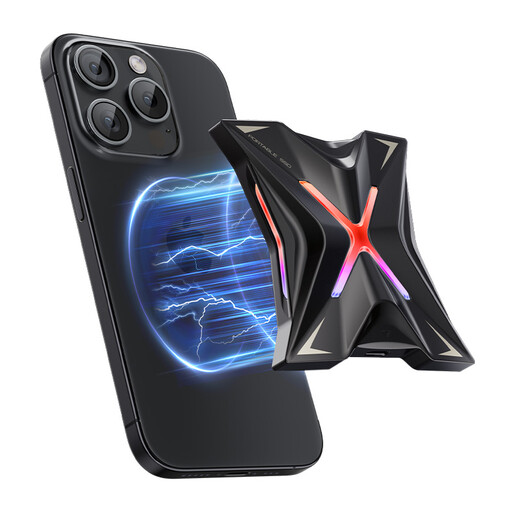
This 1TB USB 3.2 Gen 2 model is an option if you want a portable drive for recording copies and may use the magnetic set with a compatible device.
Joybuy lists transfer figures up to 1,050MB/s read and 1,000MB/s write and names iPhone 15/16, PC and Mac compatibility. Check the drive’s footprint and the file system needed by your devices before buying.
 No image available
Consider this USB-C drive if you often transfer larger batches of recordings and your computer can use a USB 3.2 Gen 2x2 connection.
Joybuy lists transfer speed up to 2,000MB/s for this 1TB model; that figure is not a guaranteed copy rate on every port. Check which cables come with it and whether you need an adapter for a USB-A computer.
 No image available
This USB 3.2 Gen 2x2 portable SSD is worth considering for frequent large recording transfers if your computer has a suitable connection.
Joybuy lists this 1TB model with transfer speed up to 2,060MB/s; actual copying depends on the connected devices. Check the included cables and drive dimensions if the fit beside your computer is important.
Not necessarily: USB-C identifies the connector, not a fixed data rate. The USB Implementers Forum says connected USB products run at their lowest common speed capability, so check the computer port and cable; Samsung also specifies compatible hardware and UASP for its stated T7 and T7 Shield maximum figures.
Only if its current file system does not suit the devices you plan to use. Crucial says the X9 ships as exFAT and warns that reformatting erases data, so move any existing files elsewhere before changing the format.
No: keep separate copies so losing one drive does not mean losing the recordings. The NI Cyber Security Centre recommends at least three copies on two devices, with one offline in a different location, and advises checking that backups can be restored.
Consider how to protect the recordings if the drive is lost or accessed by someone else. The Information Commissioner’s Office advises that encrypting stored personal information can help protect it; organisations handling such recordings should assess their responsibilities and the risks rather than assume a drive’s password feature is sufficient.