What matters when choosing one?
Decide how you will keep a separate recipe copy before comparing transfer speeds. Then check the computers that must read the drive and whether the archive calls for encryption or protection away from the desk.
| Concern |
What to check |
Who this matters to |
| Separate backup |
Allow room for future scans and photos; check your backup workflow and whether you can store the drive separately. |
If my workstation fails, I want a recoverable copy of the recipes elsewhere. Around 40% of consumers would put that separate backup first. |
| Computer compatibility |
Check USB ports and cables, plus the file format if both Windows and Mac computers must write to the drive. |
Recipes need to open on more than one household computer without an unexpected reformat. For around 30% of consumers, cross-device access would be the primary concern. |
| Private files |
Choose an appropriate encryption option and plan how to retain its password or recovery information. |
Family notes stored with the recipes should remain protected if the SSD is lost. Roughly 20% of consumers would prioritise that privacy need. |
| Use away from the desk |
Check the stated drop and ingress-protection conditions if the drive will be carried or exposed to splashes. |
Taking the archive between locations makes physical exposure more important to me than it would be for a desk-based drive. Around 10% of consumers would make portability and protection their main concern. |
Relevant brands to consider
These product lines illustrate different features to check; a feature of one model should not be assumed to apply to the others.
Samsung
Samsung’s T7 line includes a standard portable drive, the security-focused T7 Touch and the more physically protected T7 Shield.
- Samsung UK specifies up to 1,050 MB/s read and 1,000 MB/s write for the standard T7; its maximum performance requires compatible host support.
- Samsung UK lists fingerprint or password unlocking with AES 256-bit encryption for the T7 Touch. Samsung describes IP65 protection and resistance to drops of up to three metres for the distinct T7 Shield.
- Do not assume that the standard T7 has the Touch’s unlocking options or the Shield’s physical-protection rating.
Crucial
Crucial’s X9 is a portable-storage option for document copies, while the X9 Pro has additional physical-protection specifications.
- Crucial UK lists X9 compatibility with Windows File History and Apple Time Machine and a read speed of up to 1,050 MB/s.
- Crucial specifies IP55 resistance and drop protection up to two metres for the X9 Pro.
- Check the exact model and file format before sharing a drive between computers; Crucial warns that reformatting erases its contents.
Seagate
Seagate presents the One Touch SSD as a portable option with backup and synchronisation software features.
- Seagate UK specifies transfers of up to 1,030 MB/s, capacity options up to 2 TB and Windows-and-Mac use without reformatting for the One Touch SSD line.
- Confirm the exact variant and current availability before choosing it for a workstation.
Joybuy products for recipe storage
These portable SSDs cover desk-based recipe copies and options with features for carrying or protecting an archive. Choose by the capacity, connection and features your own setup requires, while retaining another copy of important files.
 Image unavailable
Samsung Portable SSD T7 2 TB Grey
Consider this T7 for a separate recipe archive kept mainly at a home workstation. This variant has 2 TB of storage and a USB 3.2 Gen 2 connection; Samsung UK lists USB-C-to-C and USB-C-to-A cables for the T7. Check the drive’s file format against any computers that need access, and keep another copy of important recipes.
View on Joybuy
 Image unavailable
Samsung T7 Shield Portable SSD 1 TB Blue
Consider the T7 Shield if the recipe archive is regularly carried or used where dust and splashes are a concern. This variant has 1 TB of storage and USB 3.2 Gen 2; Samsung describes IP65 protection and resistance to drops of up to three metres for the Shield. That protection does not make immersion appropriate or replace a separate backup.
View on Joybuy
 Image unavailable
Lexar ES4 Portable SSD with Magnetic Set, 1 TB
Consider this 1 TB portable SSD if its magnetic accessory set is useful beyond the desk-based recipe archive. Its title specifies USB 3.2 Gen 2 and advertised transfers of up to 1,050 MB/s read and 1,000 MB/s write; those figures do not establish the speed of your workstation. Check the file format before transferring recipes and confirm any required encryption setup.
View on Joybuy
 Image unavailable
SANDISK Extreme 2 TB Portable SSD for PlayStation 5 and PC
Consider this 2 TB portable SSD if you also need the PlayStation 5 and PC use identified in its title; that gaming focus is not itself a benefit for storing recipes. Check the file format for your workstation and confirm any access-protection features you require. Keep a separate copy of valued files.
View on Joybuy
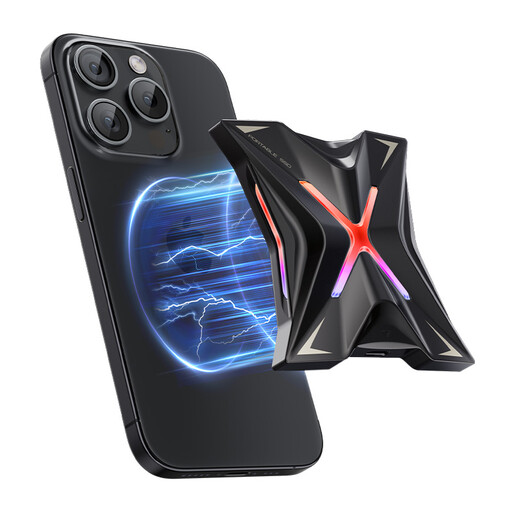 Image unavailable
MOVESPEED YSPSRX20M-1TTG 1 TB Magnetic Portable SSD
Consider this 1 TB portable SSD if you need its magnetic design for another use as well as storing recipes. Its title specifies USB 3.2 Gen 2x2 and an advertised transfer rate of 2,060 MB/s; check whether your workstation has a compatible port if that speed matters. Confirm the required cable and file format before moving the archive.
View on Joybuy
Frequently asked questions
Do recipe documents require a high-speed external SSD?
You do not need to choose an SSD by its highest advertised transfer rate just to keep recipe documents. Samsung UK and Crucial UK list speeds of up to 1,050 MB/s for the T7 and X9 respectively, but achievable speeds depend on the computer and connection; check capacity and your backup routine as well.
Can one recipe SSD work with both Windows and Mac?
Yes, if its connection and file format suit both computers. Crucial UK says the X9 ships in exFAT, which Apple Support identifies as Windows-compatible; check the exact drive’s format before use. Copy existing files elsewhere before reformatting, because Crucial warns that doing so erases drive data.
How do I use an SSD as a backup rather than the only recipe copy?
Keep the working recipe files on the workstation and make a separate copy to the SSD. The National Cyber Security Centre advises storing important backups separately and warns that connected USB backup drives can also be affected in ransomware incidents, so disconnect or separately store a backup when practical.
When is encryption worth considering for a recipe archive?
Consider encryption when the drive contains sensitive personal material or may be lost while being carried. Samsung UK lists fingerprint or password unlocking for the T7 Touch; if you plan to use BitLocker instead, Microsoft says manual BitLocker Drive Encryption is available on Windows Pro, Enterprise and Education. Keep the required recovery information securely.


