Who needs which backup?
The right arrangement depends on what you need to recover and whether someone can keep a separate copy up to date.
Households protecting photos and documents
If a phone or computer is lost, damaged or replaced, a copy stored away from that device gives you another recovery route. Consider both convenient access to family files and a separately managed copy of anything irreplaceable.
People replacing a phone
Check the latest completed backup, the data categories it covers and whether the replacement phone can restore them. Google says Android restoration varies by phone and Android version, and not all apps restore every setting or item of data.
People keeping a removable local copy
A drive can hold a copy apart from a cloud account, but it needs an update routine and a safe place when disconnected. For sensitive files, check encryption, compatible devices and how the household would regain access if a password were lost.
What should you check before choosing?
Start with the files you would need back after losing a device. Then work out where each copy will live and how you would restore it.
| Priority | What to check | Your needs |
|---|
| Recovery |
Confirm which photos, documents, settings and app data are copied. Check the date of the latest completed backup and the restore steps for your intended device. |
If my phone is lost or replaced, I need a copy away from it that I can actually restore. Google says Android restoration varies by phone and version, so I would check the scope before changing devices. |
| Capacity |
Compare your current library and expected growth with the available space. Check whether a cloud allowance is shared with email, other files or household members, and review any continuing subscription terms. |
My photos and device backups need room to keep growing. Apple states that iCloud includes 5 GB of storage; Google says a standard account has up to 15 GB shared across Drive, Gmail and Photos. |
| Access and sharing |
Check access from the phones and computers you use. Review who can see shared files and whether everyone using a household plan draws on the same storage allowance. |
I may need a document on another device, but I do not want every family file visible to everyone. The Information Commissioner’s Office describes cloud file settings that can be private, shared or public. |
| Separate copies |
Decide whether one copy can stay disconnected when not being updated. For removable storage, check encryption and password recovery; for cloud storage, check account access and recovery settings. |
I want an incident affecting my computer to be less likely to reach every copy. The National Cyber Security Centre reports incidents in which connected USB and network backup drives were affected alongside original files. |
Relevant service and storage brands
These examples illustrate features and limits to check within particular services or product lines; they are not a list of products available in the section below.
Apple
iCloud is relevant to households backing up an iPhone or iPad and accessing selected files across Apple devices.
- Apple Support states that iCloud includes 5 GB of storage and provides an iPhone or iPad backup route.
- Check iCloud Photos separately from iCloud Backup: synchronised photo changes are not a substitute for an independently managed copy. Apple says automatic iCloud Backup requires power, Wi-Fi and a locked device.
Google
Google Account storage is relevant to people using Google Photos and Drive, including households restoring selected data to an Android phone.
- Google says a standard account includes up to 15 GB shared across Drive, Gmail and Photos.
- Google says Android restoration varies by phone and Android version; not every app restores all its settings and data. Reaching the shared storage limit can also interrupt uploads and photo backups.
Microsoft
OneDrive is relevant to Windows users who want selected PC folders accessible on other devices.
- Microsoft Support describes backup for selected folders and version history for files stored in OneDrive.
- Microsoft Support states that OneDrive file version history is retained for 30 days; check the recovery you need rather than assuming an older version will remain available indefinitely.
Samsung
Samsung’s Portable SSD T7 line is an example of removable storage for a local copy on compatible devices.
- For the Portable SSD T7 1 TB MU-PC1T0T/WW specifically, Samsung describes USB-C-to-C and USB-C-to-A cables.
- Samsung says that model’s maximum stated transfer speeds require compatible USB 3.2 Gen 2 and UASP support, and that some operating systems may require reformatting. Check the specifications of any other Samsung model separately.
Removable storage options on Joybuy
These SSDs and USB flash drive offer ways to keep a local copy of selected photos and documents. Choose capacity against the size of your files, confirm your devices can use the drive, and plan how often you will update and disconnect it.
 No image available
Samsung Portable SSD T7 2 TB, grey
A removable option for a local copy of photos and documents. The title specifies USB Type-C and USB 3.2 Gen 2; check your device connection and file-system requirements, and keep another copy if you need access independent of this drive.
View on Joybuy
 No image available
Samsung MU-PG4T0B 4 TB, black
Consider this local-copy capacity against the size of your photo and video library. The title specifies USB Type-C and USB 3.2 Gen 2x2; check your host device and how you would regain access if you use password protection.
View on Joybuy
 No image available
Samsung MU-PE1T0S 1 TB, black
This removable drive can be considered for a local file copy if its capacity fits your library. Its title specifies USB Type-C and USB 3.2 Gen 2; check connection and formatting requirements for the devices you intend to use.
View on Joybuy
 No image available
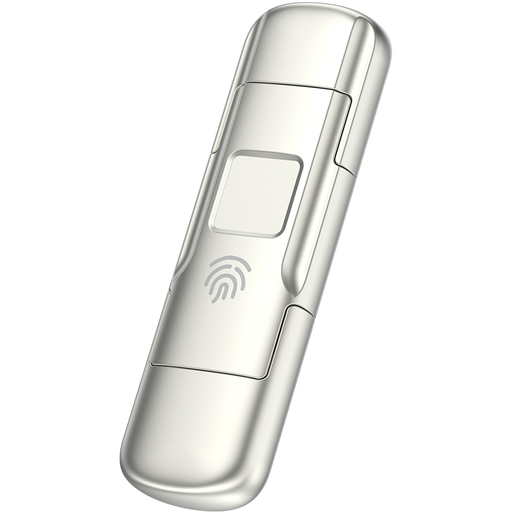
MOVESPEED YSUYC-256GSN 256 GB flash drive, silver
A small removable option for selected files rather than a library whose size you have not measured. The title specifies USB-A and Type-C connections, fingerprint access and encryption; confirm device compatibility and the access-recovery method before depending on it.
View on Joybuy
 No image available
Lexar ES4 1 TB portable SSD with magnetic set
For a local copy from a compatible phone or computer, check that the device can access external storage. The title specifies USB 3.2 Gen 2 and iPhone 15/16 compatibility; magnetic mounting has case or ring conditions, and formatting before use may erase files already on the drive.
View on Joybuy
Backup questions answered
Is cloud sync the same as a separate backup?
Not necessarily: synchronised changes and deletions can appear across enabled devices. For irreplaceable files, keep an independently managed copy as well, and check that you can open it when needed.
What should I check before restoring a replacement phone?
Check when the last backup completed, which data it contains, the available storage and the replacement phone’s restore rules. Apple says automatic iCloud Backup requires power, Wi-Fi and a locked device; Google says Android restoration varies by phone and Android version, and not all apps restore every setting or item of data.
Should an external backup drive stay connected?
If the drive is meant to provide a separate copy during an incident affecting your computer, disconnect it between backup or restore sessions. The National Cyber Security Centre reports ransomware incidents that affected connected USB and network drives holding backups.
Is encryption worth considering for a portable backup?
For sensitive personal files on a drive that could be lost, encryption is worth considering alongside a workable password-recovery plan. The Information Commissioner’s Office describes encryption of USB and backup media as protection against unauthorised access; keep the information needed to regain access separate from the drive.


