Households wanting automatic phone backup
For families whose priority is keeping recent phone photos and videos copied without remembering regular manual transfers. They still need to check that uploads have completed before removing originals.


Choose automatic cloud backup if you want recent phone photos copied with little routine, but check account storage and how you would regain access. Choose a directly connected drive for a separate local copy you can transfer and check yourself, or a NAS if several household devices need a shared destination and you can maintain it. A synchronised photo library is not necessarily an independent backup: deletions may carry across devices.
For families whose priority is keeping recent phone photos and videos copied without remembering regular manual transfers. They still need to check that uploads have completed before removing originals.
For households willing to transfer files to removable storage and check that the copies open, rather than relying only on a synchronised cloud library.
For households with several Android or iOS devices that want a home photo destination and can manage NAS access, storage and a further backup.
Choose it when: You want photos to upload from the phone without a regular copying session.
Accept: Uploads depend on the account, connection and available storage; with iCloud Photos, deletions also synchronise across devices, according to Apple Support.
Choose it when: You want to keep a separate copy on a compatible drive or USB device and can carry out the transfers.
Accept: The copy needs updating and checking; the phone, connector and transfer method must work together.
Choose it when: Several household devices need a shared photo destination that you can administer at home.
Accept: A NAS needs setup, access management and its own separate backup; it is not a complete recovery plan on its own.
| Concern | What to check | Who this matters to |
|---|---|---|
| Recent copies without manual transfers | Confirm that photo and video uploads are enabled for the intended account, and check available account storage. | If I rarely remember to copy files, I want new family photos saved away from the phone with little intervention. For around 36% of consumers, keeping recent copies automatically would be the primary need. |
| An independent, recoverable copy | Check whether deletions synchronise to the destination, then open a copied photo and video to test recovery. | When clearing space on my phone, I want a copy that will remain accessible if I delete the wrong file. Keeping that independent copy would come first for around 29% of consumers. |
| A workable direct transfer | Identify the phone model and port, and test the intended drive or reader with a photo and video. | If I prefer moving selected files to removable storage, I need a transfer route that works with my phone or computer. Around 21% of consumers would make that straightforward physical workflow their priority. |
| A shared home library | Check mobile-app support and user access for the household's devices; arrange another destination for a NAS backup. | With photos spread across several household devices, I want one home destination that family members can use. That shared-library need would lead the choice for around 14% of consumers. |
Apple Support says a deletion in iCloud Photos is reflected on other devices using the same library. Easier access across devices does not, by itself, leave a copy protected from that deletion.
Keep a copy in a separate destination and check that it opens before deleting photos in bulk.
A suitable-looking connector does not establish that the exact phone, accessory and storage device will complete the intended photo and video transfer.
Try copying one photo and a representative video with the intended equipment, then open both files from the destination before moving the full library.
Apple Support says full iCloud storage stops new iCloud Photos uploads. Microsoft Support also notes that large OneDrive uploads on iOS can depend on conditions including Wi-Fi, charging and background behaviour.
Check that recent photos and videos are present at the destination, and that account storage is available, before removing originals.
A NAS may bring files together, but it remains one storage location. The National Cyber Security Centre describes a backup as a copy kept in a separate safe location.
Make another copy beyond the NAS and periodically check that files can be recovered from it.
iCloud Photos and Mac import workflows for iPhone and iPad households.
Google Photos automatic backup for Android, iPhone and iPad.
OneDrive Camera Upload for households using a Microsoft account.
NAS software for a shared, home-held photo library.
Portable and desktop external hard drives for local file copies.
These portable SSDs, USB flash drive and external hard drive are options for making local photo and video copies. Choose around the transfer route you can use with your phone or computer, and check copied files before relying on them.
 No image available
Consider this SSD for a local copy if its connection and file-transfer workflow work with your intended phone or computer. The product name specifies USB 3.2 Gen 2 and names iPhone 15/16, PC and Mac compatibility; check the exact phone workflow before depending on direct transfers. Magnetic mounting also depends on a compatible case or ring.
 No image available
This USB 3.2 Gen 2x2 SSD is a local-storage option for a household able to establish a compatible copying route. Its stated direct external-recording use concerns iPhone 15/16 Pro and Pro Max models; do not assume that this also establishes a routine photo-backup workflow for your phone. Check file transfer and storage requirements before choosing it for family photos.
 No image available
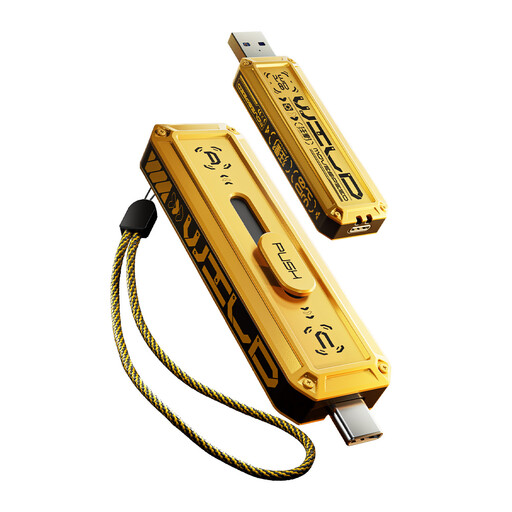
Consider this removable drive for selected-file transfers if your Android phone or computer can use it. Its name specifies USB-A and Type-C interfaces; the stated system support covers Windows, macOS and Android, not an established iPhone workflow. Check recognition and photo and video copying on the intended device.
 No image available
This portable hard drive suits a household prepared to copy phone files through a compatible computer. Its 4TB capacity offers a local destination, but computer-file backup does not establish automatic phone backup or a direct phone connection. Check how you will import the photos to the computer and restore them from the drive.
 No image available
Consider this local SSD if your intended Android device or computer can complete the transfer. The product name specifies 1TB and USB Type-C 3.2 Gen 2; check the exact phone, cable and file-copying workflow before relying on it for photos and videos. Do not treat its stated IP65 resistance as protection against submersion.
Not for protection against an unwanted deletion on its own. Apple Support says deleting a photo or video in iCloud Photos also deletes it from other devices using that library, so keep a separate, checked copy before clearing space by deletion.
Yes, where the phone and USB storage work together. Files by Google Help says its app can access connected USB storage on Android 7.0 and later; test your exact phone, adapter and drive with a photo and video before relying on the route.
Apple Support says iPhone 15 and later models have USB-C and can connect to external storage, subject to the device and accessory workflow. For another iPhone, check its specific connection options rather than assuming the same setup; Apple also documents importing photos to a Mac by USB.
New uploads may stop. Apple Support says full iCloud storage prevents new iCloud Photos uploads and iCloud device backups; check available space and confirm that recent photos and videos reached the destination before removing them from your phone.